RADIUS Change of Authorization: Explained
Key Takeaways
- RADIUS server authentication generally verifies users and devices only before granting access. Once a user has authenticated to your network or VPN, they’re in.
- RADIUS Change of Authorization (CoA) allows for real-time adjustments to a device’s authorization status without needing reauthentication, ensuring continuous compliance with security policies.
- SecureW2 Cloud RADIUS integrates CoA to provide dynamic network security, including the benefits of features like Identity Lookup for real-time verification in your IdP during authentication and RadSec for safely encrypting RADIUS packets over-the-air.
RADIUS server authentication on its own greatly enhances network security by ensuring only legitimate users can access your Wi-Fi and VPN. It continues to see wide use today, and as network security advances in response to evolving cybersecurity threats, so, too, has RADIUS evolved.
New features and improvements are continuously being introduced, including the concept of Change of Authorization (CoA). CoA gives RADIUS a much more active role in your network’s security by giving it the ability to make authorization changes dynamically.
In this article, we’re going to take a closer look at what RADIUS Change of Authorization means, and how RADIUS CoA can impact the security of your Wi-Fi or VPN.
What Is RADIUS Change of Authorization?
Change of Authorization allows RADIUS servers to apply policy changes to devices that have already authenticated and are connected to your network.
The following image illustrates how the SecureW2 Cloud RADIUS enforces network policies.
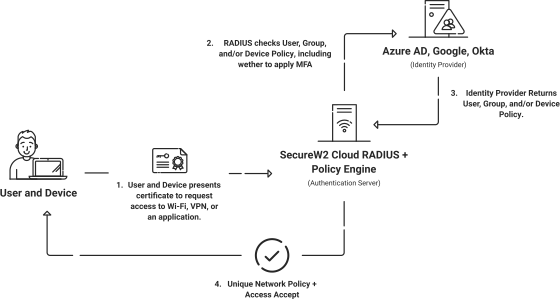
To understand exactly what RADIUS Change of Authorization is and why it’s beneficial, you’ll need to have a grasp on how typical RADIUS authentication works.
Because certificate-based authentication (CBA) is more secure than the alternative of credentials (usernames and passwords), we’ll give you a quick overview of the steps involved in RADIUS authentication when you’re using digital certificates.
At a high level, RADIUS authentication with certificates follows these steps:
- The device attempts to connect to your network and presents a certificate to the RADIUS server.
- The RADIUS checks that the device’s certificate is unexpired.
- If the certificate is unexpired, the RADIUS then checks to see if the certificate is on the Certificate Revocation List (CRL) to confirm whether or not it has been revoked.
- If the RADIUS supports Identity Lookup (such as our Cloud RADIUS), it will check your directory in real-time to confirm if any other policies need to be applied before authentication.
Once all the above steps are completed, and the device is connected to your network, it stays connected to your network until it disconnects and reauthenticates. Unfortunately, a lot can occur while a device is connected to your network. It can become infected with malware, it can fail to meet compliance standards, or the user’s status within the organization can change – just to name a few possibilities.
In all of the above scenarios, administrators would want to either revoke network access entirely or change what the user has access to. Without forcing the device to reauthenticate, though, these necessary changes to authorization cannot be applied – unless your RADIUS is capable of Change of Authorization.
How Does RADIUS Change of Authorization Work?
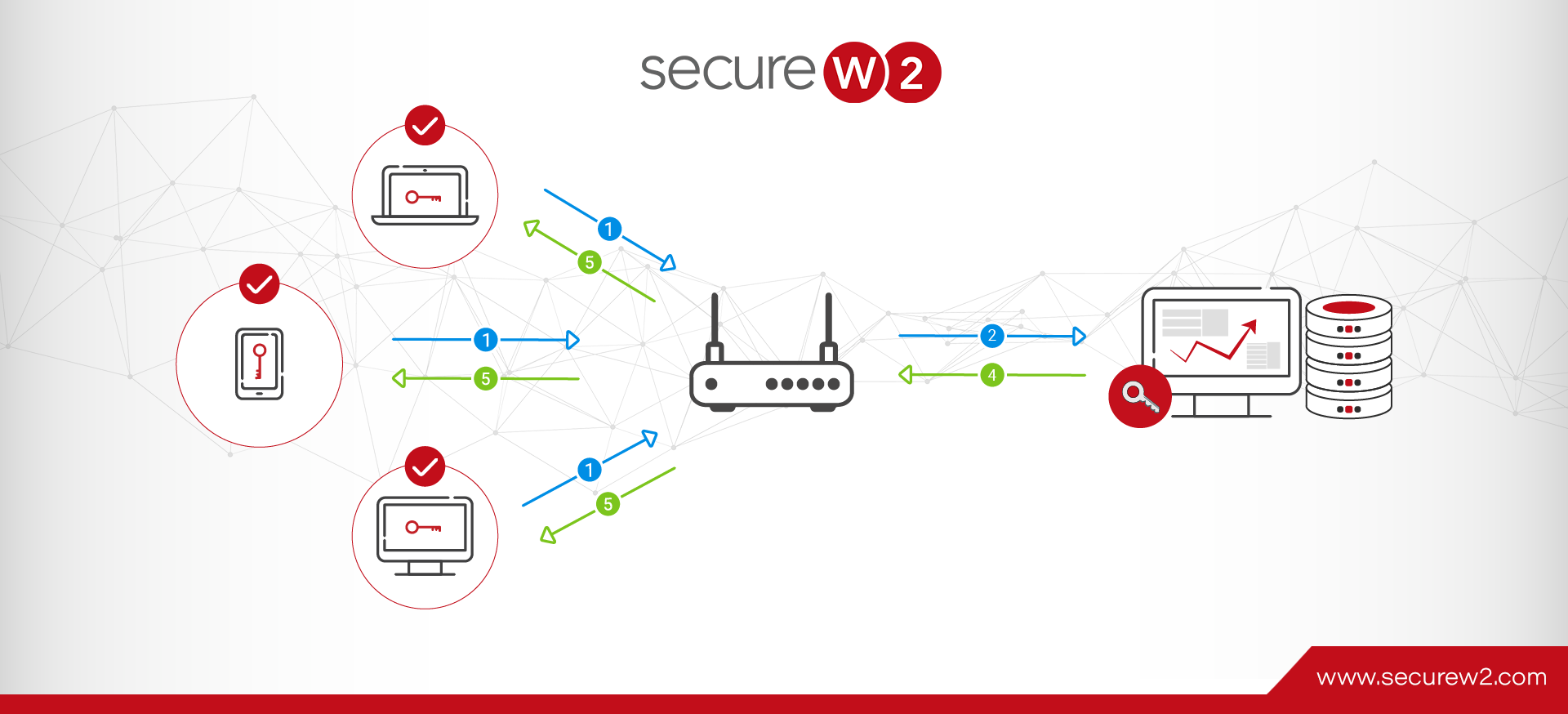
The actual process behind Change of Authorization is surprisingly simple. Once a device is connected to your network, CoA follows these general steps. You can see those steps illustrated in the following flowchart:
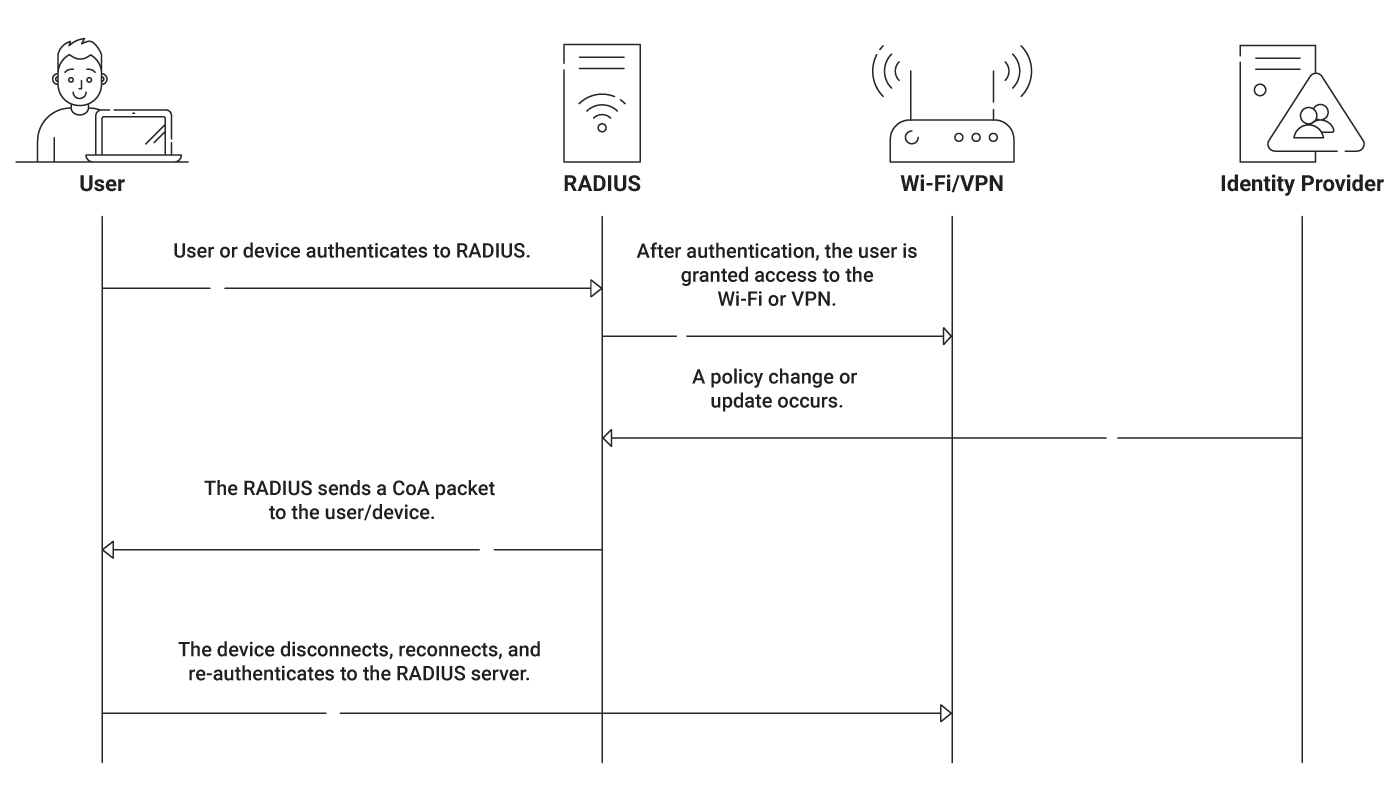
- Some kind of policy change occurs that impacts the connected device.
- The RADIUS server is notified of the policy change (commonly by infrastructure such as your MDM, your IdP, or even your CAs).
- The RADIUS sends out a CoA request packet to the impacted device.
- The device is forced to disconnect, reconnect, and reauthenticate to the RADIUS again.
- Updated authorization is applied at the time of the new authentication.
In short, CoA basically allows the RADIUS to force reauthentication. This means that you don’t have to rely on end-users to manually disconnect and reconnect their devices, nor do you have to manually do the same for IoTs on your network.
Do You Need RADIUS CoA?
Change of Authorization is a relatively recent feature for RADIUS servers, and it hasn’t yet seen widespread adoption. It’s true, however, that CoA would offer a range of benefits to organizations that have deployed RADIUS security. Here are just a few examples of use cases for the feature:
- Dynamically blocking non-compliant devices from your network
- Reassigning users to different VLANs on the fly
- Updating access and authorization levels whenever necessary
RADIUS CoA Use Cases
RADIUS CoA has a wide range of applications: the approach is useful whenever admins need to update or terminate a network session outside of scheduled logins.
RADIUS CoA automatically restricts infected devices to a VLAN, or updates Access Control Lists to limit the reach of non-compliant end-users. RADIUS CoA can also immediately terminate a session if an account is disabled or expires.
RADIUS CoA is dynamic and can quickly block devices or reassign users to different network segments as needed.
What Are the Benefits of RADIUS CoA?
RADIUS CoA enables dynamic modifications to user permissions, which translates to a number of benefits.
RADIUS CoA can update and enforce new security policies in real-time. There’s no need to wait for a session timeout or logoff; new rules come into effect automatically.
Centralized controls mean that updates happen seamlessly, across all of your organization’s networks.
Threats can be easily contained, typically by terminating a user’s session, revoking credentials, or restricting a user or device to a VLAN. RADIUS CoA also enables admins to quickly change VLAN assignments mid-session.
Do I Need a RADIUS Server for CoA?
Technically, almost any network access server should be able to perform a change of authorization. But if you are looking for change of authorization capability without first implementing a RADIUS server, you’re putting the cart ahead of the horse.
Deploying RADIUS server authentication alone is a huge advantage for your network security. It offers a secure authentication method for your Wi-Fi and VPN.
When tied with digital certificates (like Cloud RADIUS was built for), it can help eliminate credential theft. If your RADIUS is cloud-based, all your locations can authenticate to it.
Cloud RADIUS is also an example of a RADIUS service that strives to regularly add new and innovative features.
- Identity Lookup allows Cloud RADIUS to authenticate users in real-time with your IdP, promoting the security of RADIUS even further and keeping your network up-to-date.
- The recent addition of RADIUS over TLS, also known as RadSec, to Cloud RADIUS makes it an excellent solution for roaming environments, too.
This video does a deep dive into how Cloud RADIUS works.
Note: Change of Authorization can be beneficial for RADIUS. But it’s also more useful in scenarios where users and devices wouldn’t regularly be reauthenticating on their own.
Move Beyond On-Premises RADIUS With a Cloud-Native Authentication Stack
On-premises RADIUS servers carry hefty maintenance costs and an increased risk of hardware failure.
Our Cloud RADIUS eliminates operational overhead while strengthening security.
It authenticates users and devices using live security signals from your identity provider, MDM, and EDR/XDR platforms, so access decisions reflect current device posture, not a stale snapshot from last week’s sync.
The result is authentication that scales with the organization, not against it. Teams that have replaced legacy RADIUS with SecureW2 Cloud RADIUS consistently report faster authentication times, fewer outages, and best-in-class uptime, and the option for 99.999% availability.
If your current RADIUS setup is creating friction for IT or leaving security gaps, there is a better path. See SecureW2 Cloud RADIUS in action.
Frequently Asked Questions
How does RADIUS CoA work?
RADIUS CoA is a dynamic, constantly updated system. The RADIUS server responds to changes in user status, or changes in network policy, by sending CoA packets to network switches, directing them to alter attributes. The RADIUS server can also terminate sessions by sending Packets of Disconnect.
What does CoA stand for?
CoA stands for Change of Authorization. In RADIUS CoA, CoA refers to the process of dynamically altering end users’ access and permissions based on changing information.
How can I enable RADIUS authentication?
In order to enable RADIUS authentication, users need to configure both the RADIUS server and the Network Access Device. The RADIUS server manages the organization’s policies and database. The Network Access Device (typically a switch or wireless access point) enforces the policies. Together, they enable RADIUS authentication.