Replace vulnerable PSKs with short-lived certificates and time-bound credentials — issued through sponsored registration or self-service enrollment and integrated with your existing network infrastructure.
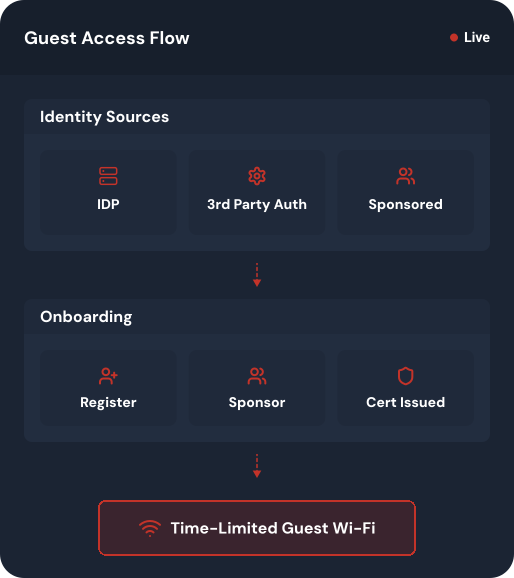
Individual credentials, automatic expiration, and segmented access for every visitor.
Eliminate the constant manual overhead of PSK rotation and help desk tickets with a self-service onboarding system that maintains granular visibility without IT intervention.
| Capability | Traditional Guest Wi-Fi |
Managed Guest Access
|
|---|---|---|
| Authentication |
Shared PSKs or open portals with no identity verification.
|
Certificate or credential-based access tied to identity.
|
| Operational Impact |
Manual account creation and constant help desk tickets.
|
Automated or self-service enrollment with less IT overhead.
|
| Security Lifecycle |
Access persists long after visitors leave.
|
Auto-expiration and revocation based on policy or inactivity.
|
| Network Visibility |
Anonymous connections with no audit trail.
|
Real-time logging of every guest and device event.
|
| Segmentation |
All-or-nothing access with no resource isolation.
|
VLAN assignment based on role, sponsor, or location.
|
SecureW2 provides a scalable framework for temporary network access, ensuring every visitor enjoys instant and secure connectivity while you maintain policy-driven control.
Self-Service Visitor Enrollment
Visitors self-onboard via SMS or email OTP — no front-desk check-ins required.
Multi-Role Access Delegation
Staff sponsor guests directly, removing IT as a connectivity bottleneck.
Dynamic Lifecycle Automation
Credentials auto-expire by role or policy, eliminating stale guest accounts.
Centralized Compliance Monitoring
Every session logs identity, device, and sponsor for streamlined auditing.
Our platform integrates directly with your existing identity and network infrastructure to provide a streamlined path for every visitor, contractor, and partner.
Instant connectivity for trusted users on personal devices using their existing credentials.
STEP 1
Connect
A visitor selects the secure Guest SSID on their device.
STEP 2
Login
A branded captive portal appears — the user signs in via Okta, Entra ID, or Google Workspace.
STEP 3
Verify
Cloud RADIUS performs a real-time lookup to confirm the user is active in your IdP.
STEP 4
Access
The device’s MAC is recorded and network access is granted for a specified duration.
Empower staff to authorize their own guests without involving the IT help desk.
STEP 1
Request
A guest arrives and enters their details on a self-registration page.
STEP 2
Notify
The internal host receives an email or SMS notification with an “Approve” button.
STEP 3
Provision
Once approved, temporary login credentials are automatically sent to the guest.
STEP 4
Connect
The guest enters their unique username and password to join the network securely.
The highest level of security for long-term guests or contractors through automated onboarding.
STEP 1
Enroll
The user accesses a self-registration portal and verifies identity via SMS OTP or Google Auth.
STEP 2
Download
A short-lived, hardware-bound certificate is issued through the JoinNow MultiOS application.
STEP 3
Secure
The device uses the certificate for seamless EAP-TLS authentication — no passwords required.
STEP 4
Expire
When the visit ends, the certificate is automatically revoked — no stale access remains.
Distribute secure, unique credentials to large groups of visitors for events or conferences.
STEP 1
Generate
Admins upload a CSV or use an API to bulk-create unique, time-bound credentials for attendees.
STEP 2
Distribute
Credentials are sent via automated email/SMS or printed on event badges and welcome packets.
STEP 3
Connect
Guests enter their unique, event-specific username and password on the branded portal.
STEP 4
Monitor
Admins track real-time usage and enforce bandwidth policies through the management portal.
Use native integrations and standard protocols to connect cloud identity, device management, and security telemetry to RADIUS authentication.
Cloud RADIUS handles every network authentication scenario. Explore the capabilities that matter most to your organization.
Assign VLANs, ACLs, and network roles dynamically based on user identity, device posture, and compliance status — eliminating static, manually managed network rules.
Serve multiple customers or business units from a single Cloud RADIUS deployment with complete tenant separation, dedicated policies, and centralized management.
Replace shared secrets and password-based EAP methods with hardware-bound certificates for secure, frictionless Wi-Fi and wired authentication across your infrastructure.
Apply identity and device posture checks at VPN connection time using certificate-based authentication — no passwords, no MFA fatigue, no credential theft.
Give personally owned devices the same phishing-resistant EAP-TLS access as managed devices, through a self-service onboarding flow that requires no MDM enrollment or IT intervention.
Deploy Cloud RADIUS across multiple regions with automatic failover, load balancing, and elastic scaling — ensuring network access is never interrupted.
Provide visitors, contractors, and temporary users with isolated, policy-controlled network access — authenticated through your existing identity provider with automatic expiration and full audit trails.
Combine identity, device posture, and security signals in real time to enforce dynamic access policies — granting, restricting, or revoking network access based on who, what, and how compliant the connection is.
Discover how our cloud-managed platform integrates with your existing identity providers and network infrastructure to deliver trusted guest onboarding.