Segment users and devices automatically during RADIUS authentication. Cloud RADIUS uses real-time identity and device assessment to assign VLANs based on role, compliance status, or risk profile so you can quarantine at-risk devices and reduce lateral movement.
Use cloud identity context, device signals, and risk metrics to segment users and devices on your network.
Compare ticket-driven segmentation with policy-based enforcement at authentication time.
| Problem | Manual VLAN Assignment |
After Cloud RADIUS
|
|---|---|---|
| VLAN provisioning |
Ticket-driven changes.
|
Policy-driven assignment at auth.
|
| Segmentation rules |
Static rules and drift.
|
Dynamic by role/compliance/risk.
|
| Access scope |
Over-permissioned access.
|
Quarantine at-risk devices.
|
| Incident containment |
Incidents spread laterally.
|
Consistent enforcement across networks.
|
Cloud RADIUS doesn’t just enhance network security. It provides measurable benefits for your organization.
Less manual work
Reduce VLAN change tickets and one-off exceptions by enforcing segmentation policy during authentication.
Fewer disruptions
Centralize authentication and policy decisions so access remains consistent as environments change.
Reduce credential-driven incidents
Use certificate-based, passwordless authentication to reduce exposure to stolen and reused passwords.
Managed service
Offload RADIUS infrastructure maintenance while integrating directly with cloud identity and device management tools.
Cloud RADIUS evaluates identity, device posture, and risk signals at authentication time to assign the correct VLAN automatically.
An employee on a managed, compliant device authenticates with a certificate. Cloud RADIUS validates identity, device posture, and risk — then assigns the Corporate VLAN with full network access.
STEP 1
Certificate Presented
An employee connects to Wi-Fi using a hardware-backed certificate provisioned through Intune or Jamf.
STEP 2
Identity Verified
Cloud RADIUS performs a real-time lookup in Okta or Entra ID to confirm the user is an active employee with the correct group membership.
STEP 3
Compliance Confirmed
The policy engine cross-references MDM and EDR telemetry to verify the device is encrypted, patched, and reporting a low risk score.
STEP 4
Corporate VLAN Assigned
All signals pass. Cloud RADIUS returns VLAN attributes to the switch or AP, placing the device on the Corporate VLAN with full access.
A personal device connects to the network. Cloud RADIUS detects it is unmanaged and automatically assigns a restricted BYOD VLAN — limiting access to internet-only or approved SaaS apps.
STEP 1
Device Connects
A personal laptop or phone initiates a Wi-Fi connection using a user-scoped certificate or onboarding credential.
STEP 2
Identity Confirmed
Cloud RADIUS validates the user’s identity against the cloud directory and confirms they are an active, authorized user.
STEP 3
No MDM Enrollment
The policy engine checks for an MDM profile and finds none — the device is classified as unmanaged (BYOD).
STEP 4
BYOD VLAN Assigned
Cloud RADIUS assigns the BYOD VLAN with restricted network access — internet and approved SaaS only, no lateral movement to corporate resources.
A managed device fails a compliance or risk check during authentication. Cloud RADIUS automatically quarantines it into an isolated VLAN with no access to sensitive systems until the issue is remediated.
STEP 1
Connection Attempt
A managed laptop presents a valid certificate and attempts to join the corporate Wi-Fi network.
STEP 2
Risk Signal Detected
Cloud RADIUS queries CrowdStrike or SentinelOne and receives a High risk score indicating an active threat or missing security agent.
STEP 3
Compliance Failure
The MDM reports the device is missing a critical OS patch or has disk encryption disabled, violating the segmentation policy.
STEP 4
Quarantine VLAN Assigned
The device is placed on the Quarantine VLAN — fully isolated from production systems with access limited to a remediation portal.
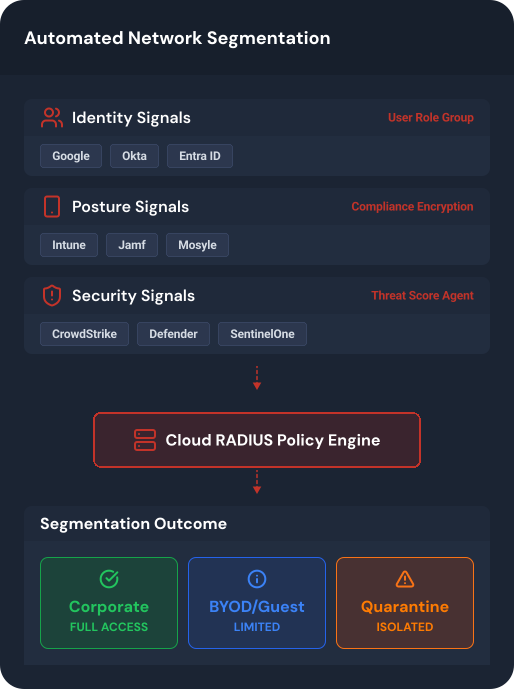
Use native integrations and standard protocols to connect cloud identity, device management, and security telemetry to RADIUS authentication.
Cloud RADIUS handles every network authentication scenario. Explore the capabilities that matter most to your organization.
Assign VLANs, ACLs, and network roles dynamically based on user identity, device posture, and compliance status — eliminating static, manually managed network rules.
Serve multiple customers or business units from a single Cloud RADIUS deployment with complete tenant separation, dedicated policies, and centralized management.
Replace shared secrets and password-based EAP methods with hardware-bound certificates for secure, frictionless Wi-Fi and wired authentication across your infrastructure.
Apply identity and device posture checks at VPN connection time using certificate-based authentication — no passwords, no MFA fatigue, no credential theft.
Give personally owned devices the same phishing-resistant EAP-TLS access as managed devices, through a self-service onboarding flow that requires no MDM enrollment or IT intervention.
Deploy Cloud RADIUS across multiple regions with automatic failover, load balancing, and elastic scaling — ensuring network access is never interrupted.
Provide visitors, contractors, and temporary users with isolated, policy-controlled network access — authenticated through your existing identity provider with automatic expiration and full audit trails.
Combine identity, device posture, and security signals in real time to enforce dynamic access policies — granting, restricting, or revoking network access based on who, what, and how compliant the connection is.
Cloud RADIUS works with common identity providers and network infrastructure so you can automate segmentation policies without rebuilding your network.