WPA2 vs. WPA3: The Better Wi-Fi Authentication for You
Securing a wireless network starts with controlling who and what can connect to it. Wi-Fi authentication determines how users and devices verify their identity before gaining network access, making it a critical part of protecting business networks from unauthorized access.
Different Wi-Fi authentication methods provide different levels of security and access control. Personal networks typically rely on a shared pre-shared key (PSK). Enterprise networks can use 802.1X, Remote Authentication Dial-In User Service (RADIUS), and Extensible Authentication Protocol (EAP) methods such as EAP-TLS to authenticate individual users and devices.
The underlying Wi-Fi security protocol, such as WPA2 or WPA3, also determines how the connection and authentication process are protected.
This article provides comprehensive information on:
- Different types of Wi-Fi authentication
- Their respective specifications
- How they can be used to secure wireless network access
Wi-Fi Authentication Methods
Wi-Fi authentication types determine how users or devices are verified before they gain access to a wireless network. Choosing the appropriate authentication method depends on:
- The network environment
- The network security requirements
- How access needs to be managed
Wi-Fi Authentication Modes
Wi-Fi networks generally use one of three authentication modes: open, personal or enterprise:
- Open Wi-Fi does not require a password or user credentials to connect. It is commonly used for public and guest networks where convenient access is the primary consideration.
- Personal Wi-Fi uses a Pre-Shared Key (PSK), which means users connect with a shared Wi-Fi password. This approach is commonly used for home networks and smaller environments where individual user authentication is not required.
- Enterprise Wi-Fi uses IEEE 802.1X authentication, typically with EAP and a RADIUS server, to authenticate users or devices individually. This provides organizations with centralized authentication and stronger access control.
Depending on the authentication mode and security protocol, Wi-Fi authentication types may use pre-shared keys, passwords, PINs, digital certificates or other credentials to control network access.
While authentication modes determine how users or devices gain access to a Wi-Fi network, security protocols determine how that connection is protected.
Wi-Fi Security Protocols
The security protocol used by a Wi-Fi network determines how authentication and wireless communications are protected.
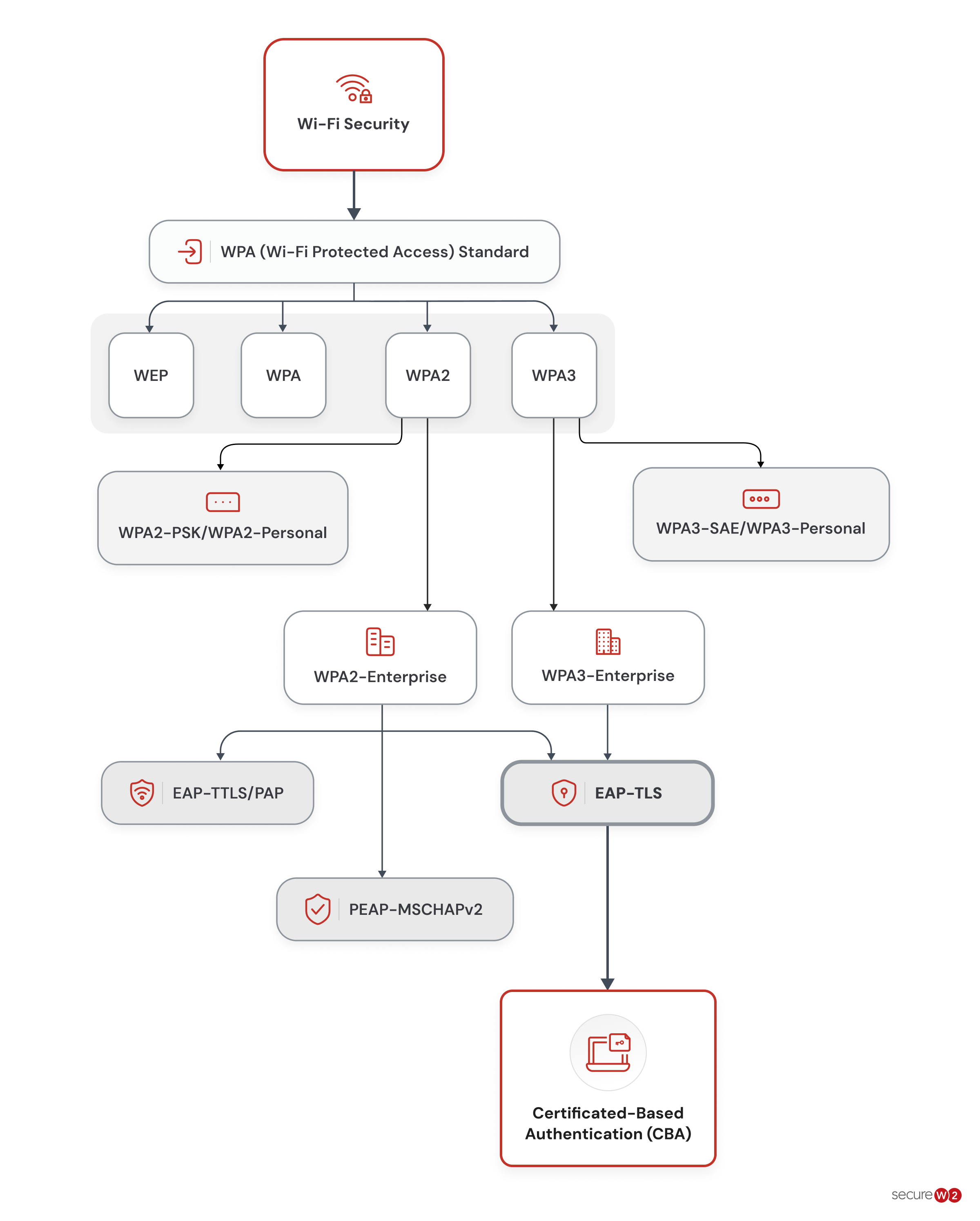
Today, the following four wireless security protocols are in operation, each with a different level of strength and usefulness.
● Wired Equivalent Privacy or WEP
● Wi-Fi Protected Access or WPA
● Wi-Fi Protected Access 2 or WPA2
● Wi-Fi Protected Access 3 or WPA3
Wired Equivalent Privacy (WEP)
WEP was introduced in 1997 as part of the original IEEE 802.11 standard, making it the first security protocol for wireless networking, with the aim of protecting data in transit by encrypting it over the air. To encrypt and decrypt that data, WEP combined a shared secret WEP key with a 24-bit initialization vector to seed the RC4 stream cipher. The SSID plays no role in encryption. It is only the network’s name, and it is broadcast in plaintext.
Despite several security vulnerabilities, WEP paved the way for the development of more advanced wireless security protocols.
Wi-Fi Protected Access (WPA)
WPA was developed to supplant WEP in 2003 due to the latter’s vulnerability. The WPA protocol provides enhanced security measures based on its offering of stronger encryption and authentication mechanisms.
An approach employed to enhance security was the elongation of the encryption key length from 64 bits to 128 bits, thereby rendering the encryption more resilient to malicious attempts at decryption.
Success: The enhanced security features of WPA have rendered it the favored option for safeguarding Wi-Fi networks in comparison to WEP.
Wi-Fi Protected Access 2 (WPA2)
The WPA2 security protocol utilizes the Robust Security Network (RSN) and Advanced Encryption Standard (AES) mechanisms as a means of preventing unauthorized access to data. The security protocol presents two discrete modes:
- WPA2-PSK, which employs shared passwords
- WPA2-Enterprise, which furnishes a more extensive security infrastructure
In 2004, WPA2 replaced WPA as the Wi-Fi Alliance’s certification for the fully ratified IEEE 802.11i standard, and it went on to become the most widely deployed option for securing Wi-Fi communication.
WPA2-PSK
WPA2-PSK, or Wi-Fi Protected Access 2 Pre-Shared Key, is a network security protocol that mandates the use of a shared password among all users.
In the event that an individual without proper authorization acquires a password through illicit methods, it is a relatively straightforward process for them to gain access to the network. The perceived lack of security is a commonly cited reason for the perceived unsuitability of WPA2-PSK.
There are just a few scenarios when WPA2-PSK should be implemented:
- A few trustworthy devices on the network, for instance, devices at home or in a small office
- Devices that are not 802.1X-compliant
WPA2-Enterprise
The deployment of Wi-Fi Protected Access 2-Enterprise (WPA2-Enterprise) needs a RADIUS server, which authenticates network user access. The authentication method is based on the 802.1X policy and is available in several EAP-labeled systems. A private, encrypted tunnel connects each device to the network post-authentication.
Success: Implementing WPA2-Enterprise with RADIUS provides substantially strengthens network security, especially when X.509 digital certificates are used for authentication.
WPA2-Enterprise needs an 802.1X authentication server anyway; therefore, implementing the highest level of authentication security during setup is only natural.
Wi-Fi Protected Access 3 (WPA3)
WPA3 (Wi-Fi Protected Access 3) is the latest Wi-Fi security protocol that was unveiled in January 2018. The novel protocol exhibits several improvements in security in contrast to its forerunner, WPA2:
- An optional WPA3-Enterprise mode that delivers 192-bit cryptographic strength using GCMP-256, intended for high-security environments such as government and defense
- Reinforced defenses against brute-force attacks
WPA3 ships in two configurations: WPA3-Personal, which authenticates with Simultaneous Authentication of Equals (SAE), and WPA3-Enterprise, which uses 802.1X with an EAP method and a RADIUS server.
Warning: WPA3 support has been required in all new Wi-Fi CERTIFIED devices since 2020, but older legacy devices that predate that requirement may still need WPA3 transition mode, WPA3-Personal compatibility mode or a separate WPA2 SSID to connect.
WPA3-Personal
WPA3-Personal (Wi-Fi Protected Access 3-Personal) provides enhanced security by replacing PSK with Simultaneous Authentication of Equals (SAE).
Because SAE forces an attacker into a live exchange with the network for every password guess, a captured handshake cannot be cracked offline, which makes brute-force attempts dramatically slower and far easier to detect.
WPA3-Enterprise
WPA3-Enterprise (Wi-Fi Protected Access 3-Enterprise) requires server certificate validation, which verifies the claimed identity of the server to which a client is connected.
Are you interested in learning more about WPA3? Find out what this article says about the modifications that WPA3 will cause.
WPA2 and WPA3 Enterprise Protocols
The table below gives a quick overview of WPA2 and WPA3 Enterprise protocols:
| WPA2 and WPA3 Enterprise Common Protocols | Level of Encryption | Authentication Speed | Directory Support | Credentials |
|---|---|---|---|---|
| EAP-TLS | Public-Private Key Cryptography | Fast – 12 Steps | Universal | Passwordless |
| PEAP-MSCHAPv2 | Bad Encryption (MD4, Compromised since 1995) | Slow – 22 Steps | Active Directory | Passwords |
| EAP-TTLS/PAP | No Credential Encryption | Slowest – 25 Steps | Non-AD LDAP Servers | Passwords |
With WPA2-Enterprise, a safe EAP form of authentication is needed. PEAP-MSCHAPv2, EAP-TTLS/PAP and EAP-TLS are some of the most widely deployed forms. They are flexible enough to work with a broad range of credentials and supports MFA for added peace of mind.
Typically, when users are added to a network secured by WPA2-Enterprise, they are given a unique identification. While this identification is often a password linked to a specific user, certificates are increasingly being used in place of passwords by many businesses.
Certificates are far superior to passwords. This is because certificates are kept on the device, and the user does not need to manually make any changes to them. This stands in opposition to intricate passwords, which necessitate users to remember and regularly revise them.
Upon joining the network, the certificate undergoes immediate validation. The allocation of certificates is device-specific, and their transfer or revocation necessitates the authorization of a network administrator.
Info: Public key cryptography serves as a safeguard against the utilization of pilfered certificates by malevolent actors.
Public key cryptography also stops attackers from using stolen certificates.
EAP-TLS (Extensible Authentication Protocol-Transport Layer Security)
EAP-TLS authentication is a method of authentication that relies on digital certificates instead of credentials to verify the identities of users.
For further information on EAP-TLS, refer to this article.
EAP-TTLS/PAP (Extensible Authentication Protocol-Tunneled Transport Layer Security/Password Authentication Protocol)
EAP-TTLS/PAP is a credential-based authentication system similar to PEAP and susceptible to the same vulnerabilities as credential-based identification.
To read more about EAP-TTLS/PAP, refer to this article.
PEAP-MSCHAPv2 (Protected Extensible Authentication Protocol paired with Microsoft Challenge Handshake Authentication Protocol Version 2)
A valid set of credentials is necessary to connect to PEAP-MSCHAPv2.
To read more about PEAP–MSCHAPv2, refer to this article.
Managing Wi-Fi With Digital Certificates
Due to the prevalence of passwords, wireless networks often face security difficulties. Passwords inject a human error factor into network security. Not to mention, passwords are susceptible to being compromised through various means such as theft, loss, brute-force attacks or adversary-in-the-middle attacks.
Certificate-based authentication is among several feasible options.
Certificates provide protection to transmitted data through public-private key encryption and authenticate users by implementing the highly secure authentication protocol, EAP-TLS.
Prerequisites for Implementing Certificates
If certificates are so much more secure than passwords, why haven’t more organizations implemented them? The answer, in short, is the complexity of the supporting infrastructure required for their rollout.
A public key infrastructure (PKI) is needed for the generation and upkeep of certificates. Creating a PKI in the past has been time-consuming and difficult, and needless to say, expensive. But PKI-as-a-Service (PKIaaS) solutions drastically simplify these processes.
Success: SecureW2 can provide a straightforward installation that makes running the most secure network easy.
What Is the Best Wi-Fi Authentication Method?
The best Wi-Fi authentication method depends on the type of network, the level of security required, and how access needs to be managed.
For most organizations, WPA3-Enterprise with 802.1X and certificate-based authentication such as EAP-TLS provides the strongest combination of security, identity verification and centralized access control. The most suitable authentication method varies by network environment, as shown in the table below:
| Network Environment | Recommended Wi-Fi Authentication Method | Why |
|---|---|---|
| Enterprise networks | WPA3-Enterprise + 802.1X + RADIUS + EAP-TLS | Strong, identity-based authentication |
| Home networks | WPA3-Personal | Stronger security with a shared password |
| Small businesses | WPA3-Personal or WPA3-Enterprise | Flexible based on access needs |
| Guest networks | Wi-Fi Enhanced Open | Convenient guest access |
| IoT and managed devices | 802.1X + EAP-TLS | Individual device authentication at scale |
How Can I Secure My Organization’s Wireless Network?
In 2004, the first implementation of WPA2-Enterprise took place. Afterward, over-the-air encryption and robust security for wireless networks were made available to corporations and universities. The powerful authentication mechanism known as 802.1X has allowed users to access protected networks for many years.
Warning: Nevertheless, there may be issues with installing and onboarding new users when utilizing WPA2-Enterprise on a large-scale network.
EAP-TLS and EAP-TTLS/PAP techniques keep data safe throughout wireless transmission but differ in privacy, efficiency and user-friendliness. In a nutshell, EAP-TLS with certificate-based authentication is safer, better for users and boosts productivity and security.
Secure Your Wireless Network With WPA2-Enterprise Authentication
WPA2-Enterprise with certificate-based authentication closes the gaps left permanently open by pre-shared keys.
No Wi-Fi passphrase to rotate, no user password to phish and far less room for a rogue device to slip past RADIUS policy.
Our JoinNow platform enforces EAP-TLS across your wired and wireless infrastructure, connects RADIUS policy to live IdP and MDM data, and revokes access in seconds when a user offboards.
If your wireless security still depends on passwords or shared keys, that’s the gap worth closing first.
See how SecureW2 secures wireless networks without passwords.
Frequently Asked Questions
Which is better, WPA2 or WPA3?
WPA3 generally provides stronger security than WPA2 through improved authentication and encryption protections. However, WPA2 may still be appropriate when compatibility with older devices is required. For enterprise networks, WPA3-Enterprise with 802.1X can provide strong identity-based Wi-Fi authentication where supported.
Which Wi-Fi authentication method is most suitable for guest networks?
For guest networks, the appropriate method depends on the access requirements. WPA2-Personal or WPA3-Personal can work for networks where a shared password is acceptable, while captive portals can provide controlled guest access without exposing the primary network credentials.
What is the best Wi-Fi authentication method for retail companies?
Retail companies typically benefit from enterprise Wi-Fi authentication using WPA2-Enterprise or WPA3-Enterprise with 802.1X and RADIUS. This allows organizations to authenticate employees and devices individually rather than relying on a shared Wi-Fi password.
Which is the best Wi-Fi authentication type for corporate IoT devices?
For corporate IoT devices that support it, certificate-based authentication such as EAP-TLS provides strong device identity without relying on shared passwords. For devices that cannot support 802.1X, organizations may need to use alternative authentication and network segmentation controls.