On Prem RADIUS Security Costs More than Cloud
Key Takeaways
- On-premises RADIUS solutions necessitate actual hardware, license, and IT staff maintenance, which raises overall costs and complexity.
- Cloud-based solutions reduce server maintenance and licensing costs, making Cloud RADIUS a more economical alternative.
- Cloud RADIUS has built-in redundancy and 24/7 support, resulting in more reliable performance than on-premises RADIUS servers.
Remote Authentication Dial-In User Service, the protocol used for RADIUS server authentication, has been around for decades. The move to the cloud, however, is a recent development. This is why, up until recently, if your organization wanted to protect its network with RADIUS authentication, you would generally need to invest in on-premises architecture.
With the growing popularity of the cloud, security professionals are given even more options for securing their networks, including the use of cloud-based RADIUS as opposed to the traditional on-prem setup. There are many benefits to a cloud-based RADIUS, one being that Cloud RADIUS security costs less than on-premises RADIUS security.
In this article, we’ll look at:
- The benefits of Cloud RADIUS
- Cloud RADIUS pricing and, specifically, SecureW2 Cloud RADIUS pricing
- The differences between cloud and on-premises RADIUS server prices
On-Premises vs. Cloud RADIUS: What’s the Difference?
On-premises is common terminology that means some component of your infrastructure is situated physically at one of your locations. Alternatively, cloud-based architecture refers to components hosted in the cloud and accessed remotely via the internet.
Traditionally, like any other piece of infrastructure, RADIUS servers were built on-site and hosted in your own server rooms. On-premises RADIUS servers like this are still in wide use today by organizations that previously had one built and continue to maintain it or organizations that need complete control over their data for compliance reasons.
This video goes into greater detail about how Cloud RADIUS compares to an on-premises RADIUS server.
What Are the Benefits of a Cloud RADIUS Server?
Using a cloud RADIUS server reduces the cost and workload associated with managing on-premises hardware. Cloud RADIUS also delivers exceptional security that scales with your business.
Cloud-based RADIUS servers free up employees from the need to patch operating systems or maintain servers. Organizations save on the cost of buying and managing servers, which means the resources can be directed back into the business.
Cloud RADIUS integrates seamlessly with modern software tools. And, because it is based in the cloud, it’s a great fit for organizations operating across multiple locations.
Pros and Cons for On-Premises vs. Cloud-Based RADIUS Servers
On-Premises RADIUS Server
Pros
By far the greatest advantage to an on-premises RADIUS server is having complete control over the depth and construction for it. You choose the exact location and the hardware that goes into it.
Info: For some organizations, this degree of control is extremely important. Some industries may even require this kind of setup for their own privacy and compliance reasons.
Additionally, on-premises RADIUS servers can be very secure if they’re combined with certificate-based authentication and their root CA is air-gapped. Proper physical protection for on-premises PKIs and RADIUS servers is also crucial.
Cons
Complete control over the construction and configuration of your RADIUS server sounds appealing on paper, but in practice, it gets complicated. One of the biggest drawbacks to an on-premises server is exactly that: it takes time and expertise to build.
Warning: Managing and maintaining the infrastructure, physical and virtual, of an authentication server is a full-time job, so anticipate the need to hire an on-prem admin.
Once the RADIUS server is complete, it’s vulnerable to a host of on-site threats. Local outages can bring it down, local weather and natural disasters can damage it, and you need robust on-premises physical security to prevent malicious intruders.
Even if the people around your server don’t necessarily want to compromise it, it’s entirely possible that simple negligence or an accident could harm it, anyway.
When you are responsible for your own network uptime, you’re also responsible for redundancy since being unable to use the network would be catastrophic to business operations.
Any on-prem components need to be duplicated so that there’s a backup in case of a failure or outage, and you have to repeat that for every location to ensure that the same level of authentication is provided to all your offices. This means that the time, effort, expenses, and vulnerabilities are multiplied exponentially.
Cloud-Based RADIUS Server
Many of the disadvantages of on-premises servers are the strengths of a cloud-based RADIUS server.
For instance, one of the greatest strengths is that there’s no need to deal with setting up the physical components or the configuration yourself. Because of this, you save both time and money that you would otherwise spend on acquiring personnel for the configuration and for designating hardware and space for the server.
Instead of hiring and training new staff, using a managed cloud RADIUS like the one SecureW2 provides grants 24/7 access to a team of dedicated RADIUS support engineers with decades of expertise and experience in remote troubleshooting.
As it is cloud-hosted, the RADIUS isn’t vulnerable to on-site threats. Outages, intruders, and inclement weather aren’t issues you need to worry about. You can be certain that the data center where your data is stored is equipped with top-of-the-line physical security and disaster resiliency, better protection than is feasible for the average org.
Since the server is cloud-based, it also has built-in redundancy. You don’t need to replicate for every single office location in your organization.
Cons
There are really only two drawbacks to a cloud-based RADIUS server:
- It requires cloud connectivity to use
- If you go with a third-party RADIUS service provider such as Cloud RADIUS, you will sacrifice ultimate control over your data.
Cloud RADIUS Pricing: How Does It Work?
Cloud RADIUS pricing operates on the software-as-a-service (SaaS) model, where customers pay a predictable monthly or annual rate.
SecureW2 Cloud RADIUS customers are charged according to the number of devices in their networks. This model enables businesses to easily scale up as their business grows.
Cloud RADIUS also eliminates the need to buy and maintain on-premises infrastructure, freeing up more revenue to be invested back into the business.
Cost Estimate to Set Up a Cloud RADIUS Server
A common question many organizations ask, once they realize the numerous benefits offered by a cloud-based RADIUS, is how to build one of their own. It’s entirely possible, and there are two types of cloud RADIUS setups you can build internally:
- Cloud-facing with on-premises components
- Hub and spoke-style architecture
The problem with either method is that they’re complex and often come with enormous costs attached. Let’s take a closer look at either type of architecture to illustrate.
Cloud-Facing With On-Premises Components
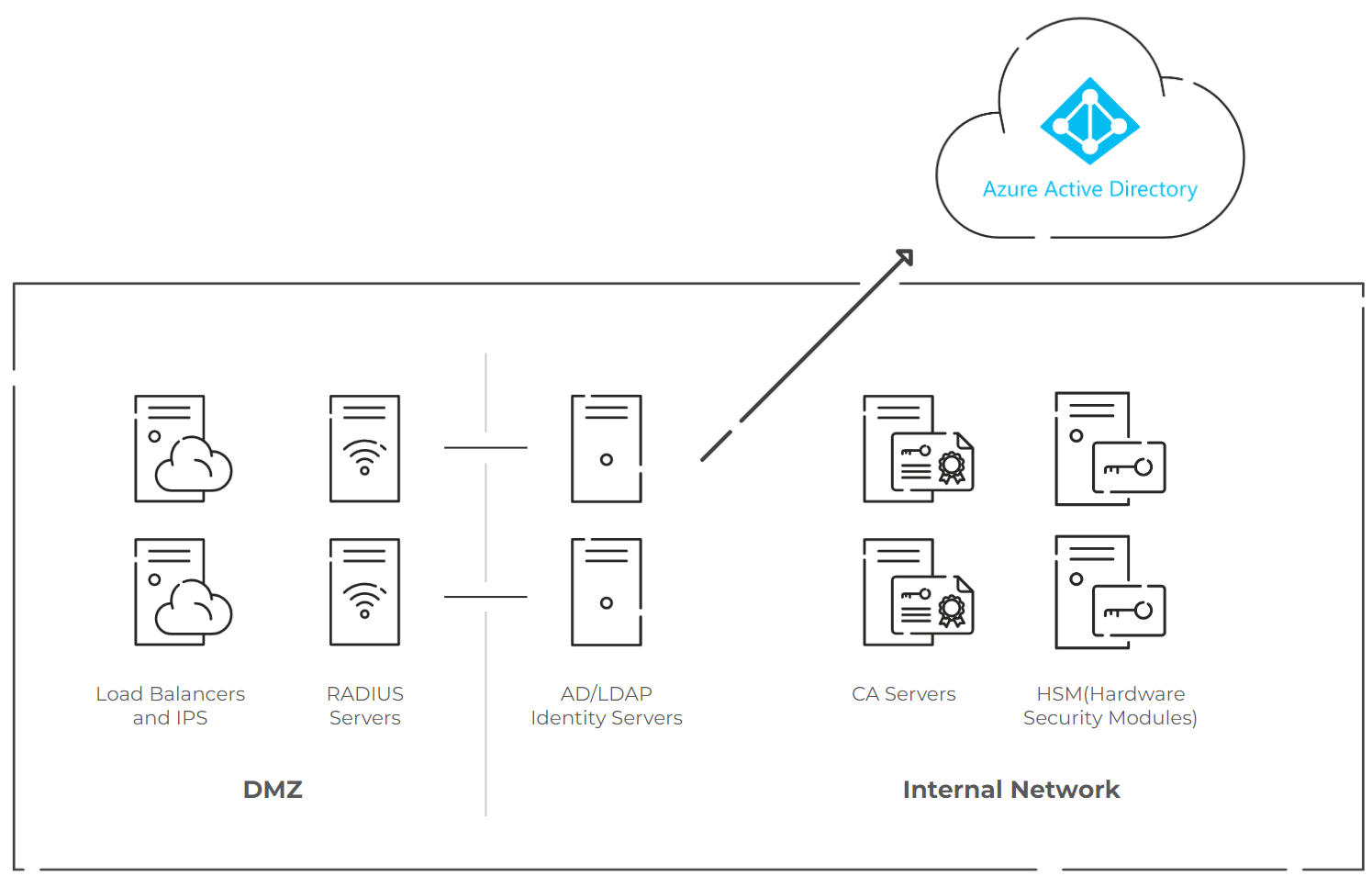
On-premises deployments require extensive hardware, including multiple servers, as the diagram below shows.
Estimated One-Year Cost Summary:
- HSM: $12,000
- Load Balancers: $19,500
- System Licenses: $4,116
- Identity Server License: $2,000
- Backup Licenses: $4,600
- Servers: $8,800
Total: $51,016
Note: This cost estimation is based on estimates for up-front expenses. Many of these infrastructural components will also have recurring annual costs that we have not included in the estimation.
This estimate also does not include the cost of the staff involved in building and maintaining the infrastructure, but keep in mind that the average systems administrator salary is around $73,000 per year, with the costs for consultants and contractors going potentially even higher. These salaries and consulting fees can vary based on your locality.
In this type of setup, your organization would host some of the infrastructure on-site, and said infrastructure would communicate with your cloud-based components like your Identity Provider (Azure AD, Okta, Google, OneLogin, etc).
The components you see in the above graphic would act as a central data center facing the cloud. Each one of your individual office locations would direct its Wi-Fi, VPN, or wired connections to this data center.
Because parts of the data center would be external-facing, you’d need to have a DMZ, or demilitarized zone. This is a gap area between your network and the internet. It’s also one of the first major expenses of this design; you would need to set up some kind of VM to monitor the DMZ and alert you to any threats. Maintaining it could easily cost $2,000 annually.
In the DMZ, you will need to build load balancers and your actual RADIUS servers. That means you’ll need to pay software licensing costs.
Digicert estimates that paying for licensure for a common provider like Microsoft can cost you around $4,000 up-front with recurring expenses of around $800 afterward.
Next, you’ll need to have your identity/database servers. Of course, the cost will depend on which provider you rely on for your identity services, but this also has a high upfront investment of around $2,000 with additional recurring expenses.
If you’re planning on doing certificate-based authentication (CBA) on your own, plan for additional expenses. One of the costlier components you’ll need to worry about is a Hardware Security Module (HSM); if you go through AWS for your HSM, it can easily cost around $12,000 per year.
And all these costs are just for a single data center. If your organization is spread across the globe, you may need to replicate this data center multiple times, increasing these expenses exponentially.
Internal-Facing (Hub and Spoke Architecture)
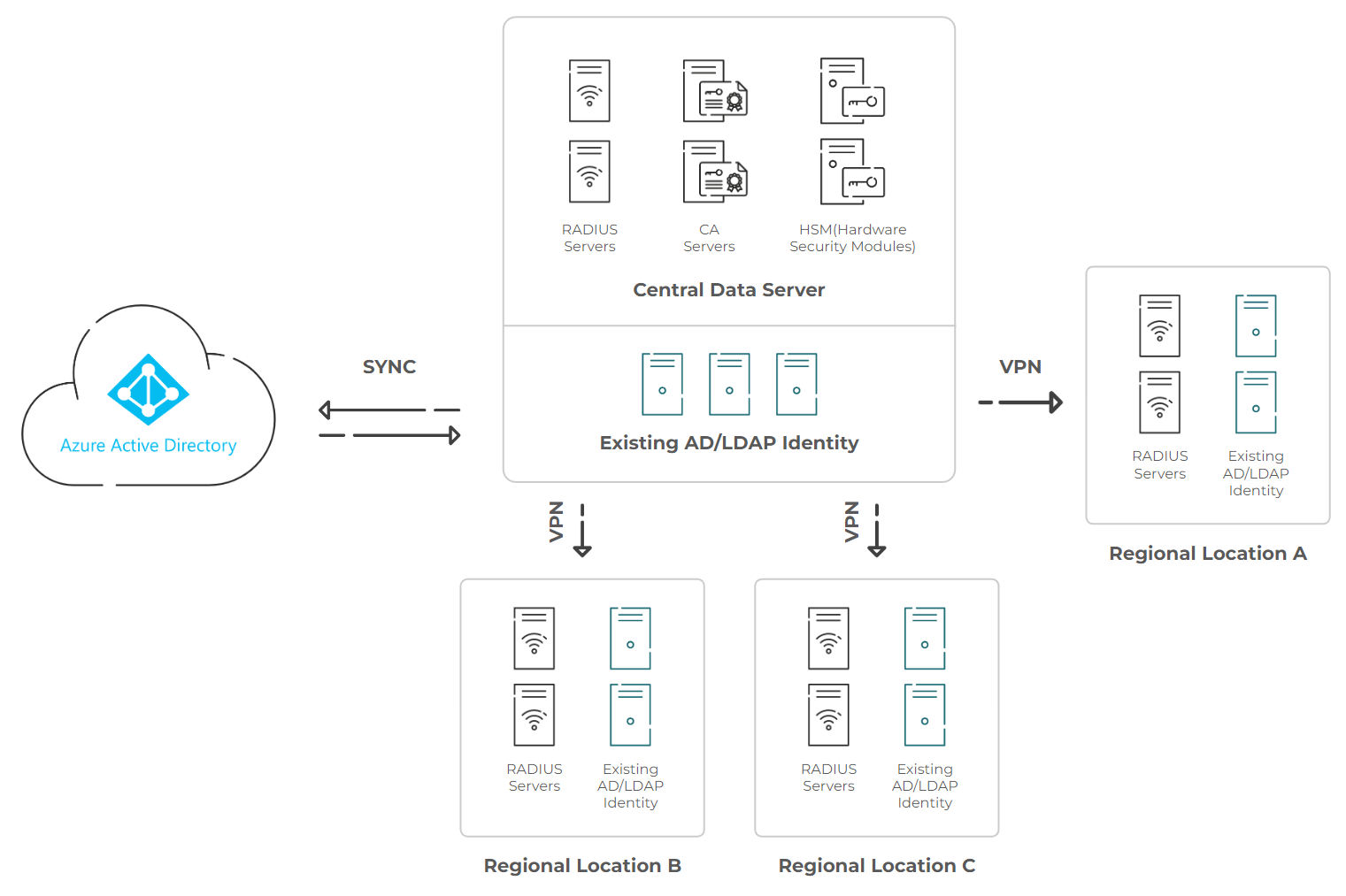
Internal-facing infrastructure includes RADIUS servers, CA servers, HSMs, and AD/LDAP identity servers, as shown in the graphic below:
Estimated One-Year Cost Summary:
- HSM: $12,000
- System Licenses: $4,116
- Identity Server License: $2,000
- Backup Licenses: $4,600
- Servers: $8,800
Total: $31,516
Note: This cost estimation is based on estimates for up-front expenses. Many of these infrastructural components will also have recurring annual costs that we have not included in the estimation.
This estimate also does not include the cost of the salaries or any consulting fees involved in the construction and maintenance of the infrastructure.
Internal-facing architecture is shaped like a hub with spokes. In this setup, you need to build a central data center again with RADIUS servers and identity servers. Ideally, this data center is located somewhere within easy reach of your offices.
Because this setup is internal-facing, you don’t have to invest in a DMZ with load balancers. However, many of the costs from the aforementioned structure still exist; namely, software licensing fees and the steep cost of an HSM.
Furthermore, this design is best suited to offices that are clustered together.
Note: If your organization is spread across the globe, you will find yourself needing to replicate it and create multiple data centers nearby your other locations – hence the name “hub and spoke.”
In addition, you’ll need to create VPN infrastructure connecting all these branches.
What Is RADIUS-as-a-Service?
As you can see, building your own cloud RADIUS takes a tremendous amount of effort, time, expertise, and monetary resources regardless of the architecture you implement.
Fortunately, you don’t have to do all this to deploy RADIUS security.
The alternative to building your own Cloud RADIUS is to utilize a third-party managed RADIUS, or RADIUS-as-a-service. That means all the power of RADIUS is provided by a third party, as is the case with Cloud RADIUS.
One thing to keep in mind, though, is that RADIUS-as-a-service providers can vary in the amount of support they provide; some will simply provide you with the infrastructure and others will provide you with both the infrastructure and support.
An example of the latter is SecureW2 Cloud RADIUS, which is already built and maintained by a team of RADIUS experts. On top of that, we’ve worked with hundreds of organizations of every size, so we have the requisite experience to work with any infrastructure.
Because it was designed to be vendor-neutral, Cloud RADIUS can integrate seamlessly with your current infrastructure, eliminating the need for forklift upgrades. As the cherry on top of the security sundae, Cloud RADIUS is significantly more economical than an on-premises RADIUS or even building your own cloud-based RADIUS. In fact, we estimate that you can save 50-80% by utilizing Cloud RADIUS.
Move Beyond On-Premises RADIUS With a Cloud-Native Authentication Stack
On-premises RADIUS servers carry hefty maintenance costs and an increased risk of hardware failure.
Our Cloud RADIUS eliminates operational overhead while strengthening security.
It authenticates users and devices using live security signals from your identity provider, MDM, and EDR/XDR platforms, so access decisions reflect current device posture, not a stale snapshot from last week’s sync.
The result is authentication that scales with the organization, not against it. Teams that have replaced legacy RADIUS with SecureW2 Cloud RADIUS consistently report faster authentication times, fewer outages, and best-in-class uptime, and the option for 99.999% availability.
If your current RADIUS setup is creating friction for IT or leaving security gaps, there is a better path. See SecureW2 Cloud RADIUS in action.
Frequently Asked Questions
Is Cloud RADIUS more affordable than acquiring an on-premises RADIUS server?
Yes. An on-premises RADIUS server requires a large upfront investment; it also requires ongoing maintenance, which drive costs up further. In contrast, Cloud RADIUS does not require hardware acquisition or upkeep, and frees up budgetary and staff resources to focus on other projects.
Can I use Cloud RADIUS with the hardware I already have?
Yes. You can use Cloud RADIUS with your existing wireless access points, switches, and VPNs. There is no need to invest in new hardware.
Is RADIUS an AAA server?
Yes. RADIUS implements the authentication, authorization, and accounting, or AAA framework. It ensures that client credentials are verified before they join the network, manages access policies, and logs session data.