How To Build The Best RADIUS GUI For FreeRADIUS
FreeRADIUS is a widely used open-source RADIUS server, but it has no native graphical user interface. All configuration happens through command-line text files, which is workable for experienced Linux administrators, but a real operational risk as your network grows.
This guide covers what FreeRADIUS is, your GUI options, the security vulnerabilities to know about, and when a managed cloud RADIUS service makes more sense.
For a primer on how RADIUS works before diving in, see our complete guide to RADIUS servers .
What Is FreeRADIUS?
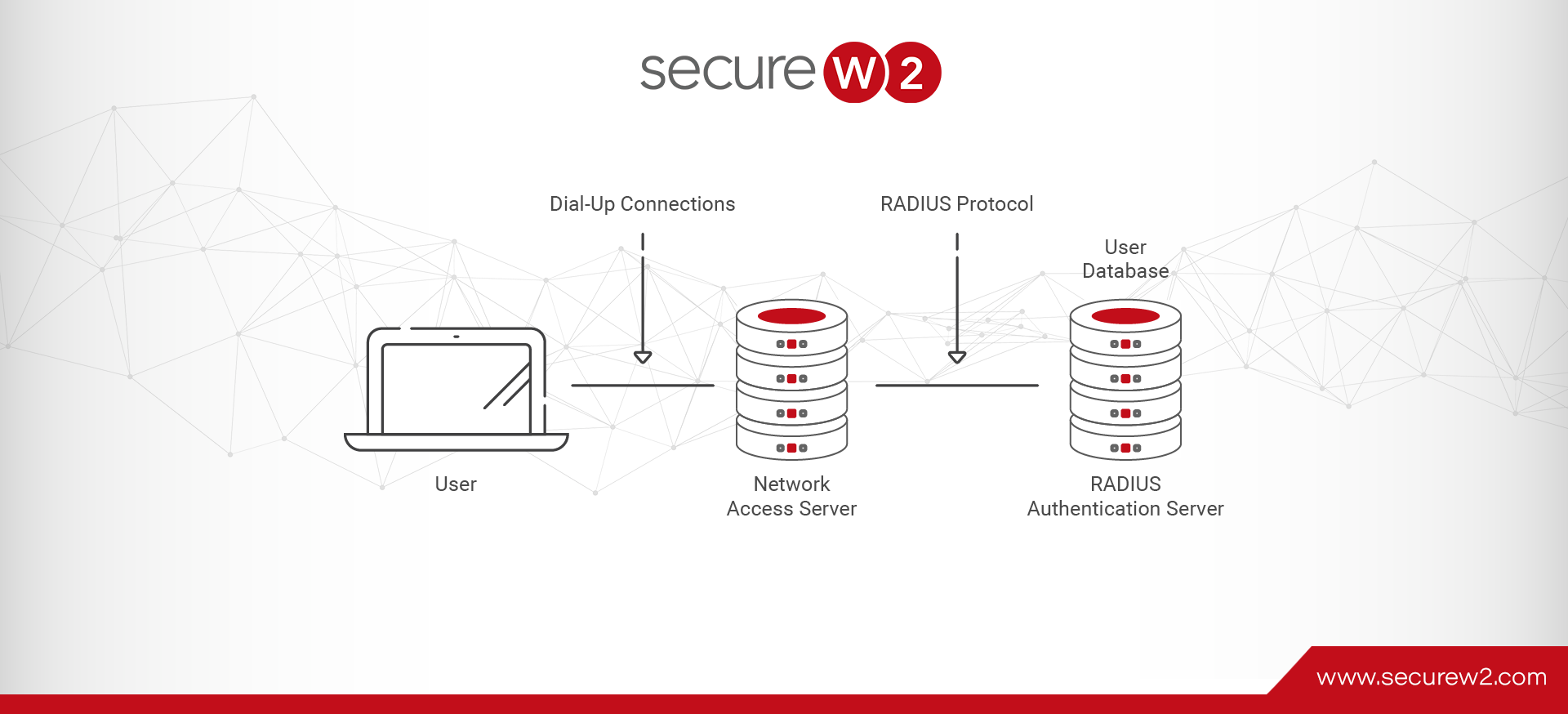
FreeRADIUS is a free, open-source implementation of the RADIUS (Remote Authentication Dial-In User Service) protocol. It is one of the most widely deployed RADIUS servers in the world, used by internet service providers, enterprises, and universities to handle authentication, authorization, and accounting (AAA) for network access.
FreeRADIUS runs on Linux and Unix-based systems and supports a wide range of EAP methods, including EAP-TLS, PEAP-MSCHAPv2, and EAP-TTLS/PAP. It integrates with LDAP directories, SQL databases, and Active Directory. However, it does not integrate natively with modern cloud identity providers like Okta or Microsoft Entra ID without additional custom modules.
Does FreeRADIUS Have a GUI?
No, FreeRADIUS doesn’t have a native graphical user interface. Without additional modules or third-party solutions, you’ll need to manually manage the RADIUS server via command line.
Unfortunately, that’s not a tenable long-term solution. If your RADIUS client is too difficult to manage, it will be neglected and lead to more risk than simply using an inferior form of authentication security.
In order to facilitate easy, painless RADIUS server management, consider using a RADIUS platform with a GUI and native management functionalities. These systems vary in utility and expertise requirements, but all allow for a lower barrier to entry for a RADIUS solution.
What Version of FreeRADIUS Should You Use?
FreeRADIUS 2.x is end-of-life and should not be used in production, since it no longer receives security patches. Version 3.x is the current stable production release and is actively maintained.
Version 4.x is in active development but not yet recommended for production deployments; it introduces significant configuration format changes that require a full config rewrite from 3.x.
If you’re running 2.x, migrating to 3.x is a priority — not just for features, but for security patch coverage.
FreeRADIUS Security Vulnerabilities and CVEs
FreeRADIUS is open-source software. That means security patching is entirely your responsibility, with no vendor SLA or guaranteed response time. The project has had multiple high-severity CVEs over the years, including vulnerabilities in EAP-TLS handling and packet processing that could allow remote denial-of-service or authentication bypass.
Organizations without a dedicated Linux administrator are particularly exposed: attackers actively target unpatched FreeRADIUS installations exposed on perimeter-facing ports. For current CVE listings, see the NIST National Vulnerability Database and search “freeradius.”
FreeRADIUS Setup Complexity and Ongoing Maintenance
FreeRADIUS configuration is entirely file-based. There is no GUI for policy management, client configuration, or log review. A typical deployment takes days to weeks depending on your team’s experience with Linux and 802.1X authentication. Ongoing tasks include:
- Patching FreeRADIUS and its dependencies when CVEs are disclosed
- Managing certificate chain configuration for EAP-TLS
- Diagnosing EAP failures through log file inspection
- Configuring and maintaining integrations with LDAP, Active Directory, or cloud IdPs (which FreeRADIUS supports only through third-party modules with limited cloud IdP support)
If your team does not have a dedicated Linux/networking admin, this maintenance burden is a real operational risk.
FreeRADIUS GUI Options
FreeRADIUS has no built-in GUI, but several third-party tools can add a web-based management layer. The options range from open-source community projects to full managed cloud services. Here are the most commonly used FreeRADIUS GUI solutions.
RADIUSdesk
RADIUSdesk is an open source web-based management system that works with FreeRADIUS. It’s fairly feature-limited compared to typical cloud RADIUS services, but that’s the “cost” of free software. If you’re confident in your ability and just need a GUI to simplify your workflow, RADIUSdesk might be the answer.
However, RADIUS can be daunting to inexperienced admins, and the penalty for failure in such a high-stakes piece of security infrastructure is very high. Part of what you’re paying for in a managed RADIUS service is the 24/7 support and peace of mind that comes from knowing that RADIUS experts are on standby to fix problems as they arise.
daloRADIUS
daloRADIUS is a web application that is used to manage a RADIUS server and can theoretically manage any RADIUS; however, it is mostly configured for FreeRADIUS and its database structure.
Unfortunately, the project is considered dead. The project has seen little to no active development in recent years; it was included in this list to spread awareness that it is outdated and probably vulnerable. Do not use daloRADIUS for new deployments.
TekRADIUS
TekRADIUS is a RADIUS management software by Kaplansoft. It’s a good DIY option for RADIUS management, as it has a GUI and most of the features you’d find in a managed RADIUS service. It’s limited to Windows OS, so many companies will find that it is not a full solution for their network security requirements.
TekRADIUS does require paid licenses, but you get access to support and updates as a result. Despite the inclusion of a simple GUI and ample documentation, TekRADIUS requires complex configuration and a thorough working knowledge of 802.1X, so it’s generally not recommended for novices.
RadMan (Radius Manager)
RadMan is a free, open-source FreeRADIUS management GUI from NetCore. It provides a web interface for managing the FreeRADIUS database — user accounts, accounting records, and session data — without requiring command-line access. RadMan is actively maintained and represents a more modern option than daloRADIUS for teams that need a lightweight web GUI without commercial licensing costs.
OpenWISP RADIUS
OpenWISP RADIUS is a Django-based web application that provides a management interface for FreeRADIUS with a MySQL or MariaDB backend. It supports user registration, password reset, accounting, and multi-tenant configurations. OpenWISP is best suited for organizations already running OpenWISP network management and comfortable with a Python/Django stack.
FreeRADIUS vs. Cloud RADIUS: Side-by-Side Comparison
| Feature | FreeRADIUS | |
|---|---|---|
| GUI | No native GUI | Full web-based management console |
| Setup time | Days to weeks | Hours |
| Ongoing maintenance | Self-managed (patching, config) | Fully managed |
| Security patching | Manual, no SLA | Automated, vendor-managed |
| Support | Community forums | 24/7 vendor support |
| Uptime SLA | None (self-managed) | 99.999% |
| Cloud IdP integration | Limited (requires custom modules) | Native (Okta, Entra ID, Google Workspace) |
| Cost model | Free software; ops labor cost | Subscription |
Cloud RADIUS: A Fully Managed FreeRADIUS Alternative
The SecureW2 JoinNow Cloud RADIUS service offers the most complete managed option for teams that need a FreeRADIUS GUI replacement without the operational overhead.
Configuration files are not required, and customers have access to 24/7 support and 99.999% uptime.
Our managed cloud RADIUS server (with complementary PKI) is much more than just a UI. It’s an intuitive management console, device onboarding platform, certificate lifecycle management platform, in-depth accounting and reporting tool, and access-policy manager. The server delivers everything you might need to secure a WPA2-Enterprise network.
If you decide to keep your existing FreeRADIUS installation, the SecureW2 platform integrates with it. Our vendor-neutral 802.1X security suite is compatible with most major players, including FreeRADIUS.
We can augment your current network infrastructure with the components necessary to finish building a secure RADIUS management platform, or go a step further and deploy a certificate-based EAP-TLS RADIUS that supports certificate authentication using our turnkey PKI.
For more on how 802.1X fits into your RADIUS deployment, see our guide to 802.1X authentication configuration .
When you’re ready to move beyond self-managed infrastructure, SecureW2 JoinNow Cloud RADIUS gives your team a fully managed, certificate-based RADIUS service with a web-based console, zero configuration files, and 99.999% uptime.
Schedule a demo to see how Cloud RADIUS compares to your current FreeRADIUS setup.
Frequently Asked Questions
Does FreeRADIUS have a graphical user interface?
No. FreeRADIUS does not include a native GUI. All configuration is done through text-based configuration files via the command line. Third-party tools like RADIUSdesk and RadMan can add a web-based management layer, but they are not officially maintained by the FreeRADIUS project.
What is the best FreeRADIUS GUI?
The best option depends on your needs. RADIUSdesk is the most commonly used open-source GUI and is actively maintained. RadMan is a lighter-weight alternative. daloRADIUS is outdated and should not be used for new deployments. For organizations that need full support, automated patching, and cloud IdP integration, a managed cloud RADIUS service is a better fit than any open-source GUI.
Is FreeRADIUS still actively maintained?
The FreeRADIUS 3.x branch is actively maintained. Version 2.x is end-of-life and should not be used in production. Version 4.x is in active development but not yet recommended for production deployments.
How do I manage a FreeRADIUS server without command line?
The most practical approach is to install a third-party web interface such as RADIUSdesk or RadMan on top of your FreeRADIUS installation. These tools provide browser-based management for user accounts, accounting data, and basic server configuration without requiring direct command-line access.
What are the main security risks of running FreeRADIUS?
FreeRADIUS has had several high-severity CVEs, including vulnerabilities in EAP-TLS handling and packet processing. Because it is self-hosted, organizations are responsible for applying patches with no vendor SLA. Managed cloud RADIUS services handle patching automatically.
Can FreeRADIUS be managed without command line?
Only partially. Third-party GUIs handle day-to-day user and accounting management, but initial setup, EAP configuration, and certificate management still require direct file editing. Full command-line elimination is not realistic with FreeRADIUS alone.
When should I consider moving from FreeRADIUS to a managed RADIUS service? Consider migrating when you lack dedicated Linux admin resources, when uptime requirements exceed what a self-managed server can deliver, or when you need real-time identity lookups against cloud IdPs like Okta or Microsoft Entra ID — which FreeRADIUS does not natively support.

Neha Singh
Neha Singh is a CISSP, with 13 years of experience, specializing in PKI, RADIUS, and 802.1X frameworks. She is skilled at translating real-world customer challenges into practical scalable solutions. Neha drives adoption of complex security solutions through clear, cross-functional collaboration with Product, Engineering, and Sales. Combines her deep product management experience with a research-driven mindset to build customer trust. She holds multiple industry certifications and serves on the Board of Directors for the ISC2 Chennai Chapter.