Can I Use 2FA/MFA with a RADIUS server?
Key Takeaways
- MFA significantly strengthens RADIUS-based authentication for VPNs and Wi-Fi by protecting against credential theft, replay attacks, and password-based access risks.
- Certificate-based authentication (EAP-TLS) is the most secure and phishing-resistant approach, enabling passwordless access and shifting MFA enforcement to device onboarding rather than login.
- RADIUS MFA can be implemented using OTP apps, push notifications, hardware security keys, or certificates, often integrated with identity providers and modern infrastructure like RadSec for stronger overall security.
Can I Use 2FA/MFA With a RADIUS Server?
RADIUS servers are a cornerstone of network authentication — but a RADIUS server secured only by a username and password is a credential-theft target waiting to be exploited. Adding 2FA or MFA closes that gap.
Multi-factor authentication (MFA), sometimes called two-factor authentication (2FA) and often implemented as RADIUS MFA, requires a user to present more than one form of identification before gaining access.
The three pillars of MFA authentication are:
- Something you know (a password)
- Something you are (a fingerprint)
- Something you have (a physical authorization token/security key)
The advantage of RADIUS MFA is that each layer of authentication adds an extra hurdle for potential threats seeking to infiltrate a network.
This article explains how MFA works with a RADIUS server, compares your options (OTP, push, and certificate-based), and walks through how to deploy it. It is important to understand the underlying architecture to make the right choice for your environment.
For broader context, see our complete guide to RADIUS servers .
What Is a RADIUS Server?
Remote authentication dial-in user service (RADIUS) is a networking protocol that provides centralized authentication, authorization, and accounting (AAA) for users connecting to a network. The term is frequently used to describe three distinct things:
- The RADIUS protocol: The communication standard (defined in RFC 2865) that governs how authentication requests and responses are formatted and exchanged
- The RADIUS server: The software or appliance that receives authentication requests, validates credentials against a directory (Active Directory, LDAP, or a cloud IdP), and issues an accept or reject response
- The RADIUS client: The network device (VPN concentrator, wireless access point, switch, or firewall) that forwards user authentication requests to the RADIUS server
Understanding this distinction matters because MFA does not apply uniformly across all three — the server enforces it, and how it works depends on the authentication method in use.
The traditional RADIUS model relies on a shared secret — a password configured on both the RADIUS client and the RADIUS server — to sign packets between the two. That shared secret is the single point of trust binding your network device to your authentication server. If it is compromised, an attacker can impersonate a legitimate client and submit forged authentication requests.
This video goes into detail about how a RADIUS server works.
Why RADIUS Alone Isn’t Enough: Key Vulnerabilities
Running a RADIUS server without MFA leaves several well-documented weaknesses open:
- Shared secret exposure: The shared secret is typically set once and rarely rotated. Attackers can brute-force or dictionary-attack captured RADIUS packets to recover it and forge authentication responses.
- Credential replay attacks: Attackers can replay intercepted or stolen username and password credentials directly against the RADIUS server, since the protocol does not bind credentials to a device or session.
- No mutual authentication: In standard RADIUS with PAP or CHAP, the client authenticates to the server, but the server does not authenticate to the client, allowing rogue servers to harvest credentials.
- Weak inner tunnels: Protocols such as PEAP-MSCHAPv2 wrap weak inner authentication methods in an encrypted tunnel, which attackers can strip and crack offline.
The Cybersecurity and Infrastructure Security Agency (CISA) has repeatedly flagged password-only VPN and remote access configurations as high-risk targets, and NIST SP 800-207 (Zero Trust Architecture) calls out the insufficiency of single-factor network access controls.
Adding MFA directly addresses these gaps.
One modern response to RADIUS transport vulnerabilities is RadSec (RADIUS over TLS, defined in RFC 6614), which replaces the UDP-based shared secret model with a mutually authenticated transport layer security (TLS) connection between client and server.
Info: RadSec removes the shared secret attack surface at the transport layer but does not replace the need for strong end-user authentication — MFA or certificate-based auth is still required at the credential layer.
What Is RADIUS MFA?
RADIUS MFA integrates the RADIUS protocol with multi-factor authentication (MFA) for an added layer of security. RADIUS MFA is often used to protect Virtual Private Networks (VPNs) and Wi-Fi networks, ensuring that only approved users can access the networks.
RADIUS MFA grants network access based on a client’s credentials and a secondary authentication challenge.
When a client seeks to join the network, they first send a message to the RADIUS server with their credentials. The RADIUS server, or an MFA proxy, then triggers a second authentication challenge which the client must complete before joining the network.
The result is a more secure protocol which makes it difficult for attackers to join the network simply by stealing credentials.
How MFA Works With RADIUS: The Authentication Flow
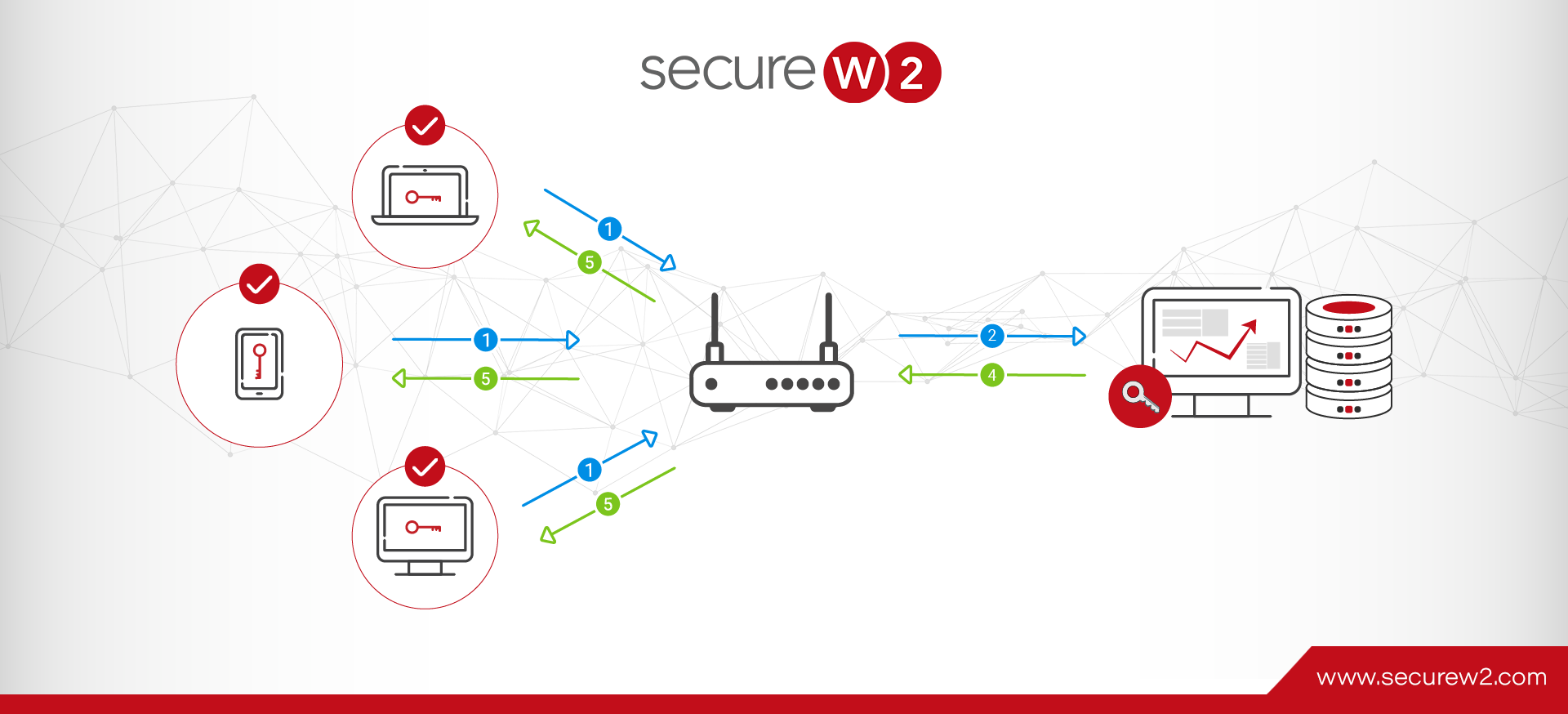
When a user connects to a VPN, the VPN gateway (the RADIUS client) sends an access-request packet to the RADIUS server containing the user’s credentials. In a standard password-only setup, the RADIUS server validates the credentials against a directory and replies with an access-accept or access-reject.
Adding MFA changes this flow. The RADIUS server — or an MFA proxy sitting in front of it — intercepts the access-request and triggers a second authentication challenge before issuing a response. Depending on the MFA method, this plays out differently:
- One-time password (OTP): The user submits their password plus a time-sensitive code from an authenticator app. The RADIUS server validates both the directory credential and the OTP against the MFA provider before replying.
- Push notification: The RADIUS server issues an access-challenge, the user approves a push prompt on their mobile device, and the server then sends the access-accept.
- Certificate-based (like EAP-TLS): The user’s device presents a digital certificate during the TLS handshake. The RADIUS server validates the certificate against its trusted certificate authority (CA) and issues an access-accept. No password is ever transmitted.
You can use MFA/2FA with a RADIUS-hardened VPN authentication in two ways:
During the authentication process by using:
- An authenticator app (such as Google Authenticator) where the user inputs a time-sensitive code when they want to use their VPN
- A security key (like a YubiKey) that contains a private key or certificate paired with the user identity
During the enrollment process by using:
- Onboarding software, so users are required to use some form of 2FA/MFA (key, authenticator app, SMS) in order to obtain an X.509 certificate that will give them VPN access
What Are the Benefits of Implementing RADIUS MFA?
Implementing RADIUS MFA delivers an added layer of security, making it difficult for hackers to access a network by stealing credentials.
RADIUS MFA allows admins to manage user accounts and access rules from one central location. The method works across a wide range of networks, from Wi-Fi networks and router gateways to VPNs.
RADIUS MFA automatically logs user activity like logins and session length, for easy auditing and troubleshooting.
Certificate-Based MFA vs. OTP and Push Notifications
VPNs remain the primary remote access path for most organizations, and the authentication method you choose has a direct impact on your exposure to credential theft.
Note: A great use for MFA is protecting your organization’s VPN, but not all MFA options offer the same protection.
Login credentials can easily be lost or stolen, which is a nightmare for organizations that now have to deal with a thief who can potentially access their data from anywhere in the world.
With an authenticator application such as Google Authenticator, you can verify the person using the VPN is who they claim to be — the user must enter a time-sensitive code accessible only from their enrolled device.
A security key such as a YubiKey takes this further. Because the private key never leaves the hardware device, credential theft becomes operationally useless — an attacker would need the physical key. The SecureW2 platform supports YubiKey certificates authenticated by Cloud RADIUS for a phishing-resistant MFA configuration.
The table below shows how the four common RADIUS MFA methods compare across the dimensions that matter most for network security:
|
MFA Method |
Phishing Resistance |
User Friction |
Credential Theft Risk |
Revocation Capability |
|---|---|---|---|---|
|
EAP-TLS Certificate |
High — no password transmitted |
Low — transparent on managed devices |
Very low — private key never leaves device |
High — certificates can be revoked individually or in bulk |
|
TOTP (Authenticator App) |
Low — codes can be phished in real time |
Medium — user must open app and type code |
Medium — code valid for 30 seconds after interception |
None — no per-session revocation mechanism |
|
Push Notification |
Low — susceptible to push-bombing/fatigue attacks |
Low — one tap approval |
Medium — push can be approved by a fatigued user |
None — no per-session revocation mechanism |
|
Hardware Key (FIDO2/YubiKey) |
High — cryptographic binding to origin |
Low — tap or insert device |
Very low — requires physical possession |
Medium — key can be deprovisioned but not remotely wiped |
Password-only RADIUS is vulnerable to credential stuffing and replay attacks — an attacker with a valid username and password gains access with nothing else required.
Time-based OTP (TOTP) and push notifications improve on passwords but are still susceptible to real-time phishing (adversary-in-the-middle attacks that relay OTP codes before they expire).
Note: Certificate-based EAP-TLS is the only method that eliminates the credential entirely from the authentication exchange.
Certificate-Based RADIUS Authentication for Wi-Fi Networks
MFA cannot be applied at the moment a device connects to a Wi-Fi network.
The 802.1X authentication exchange happens at the protocol level between the device’s supplicant and the RADIUS server — there is no interactive session available to present a second-factor challenge. The protocol completes in milliseconds, before any user-facing prompt could be shown. This is a fundamental constraint of the 802.1X framework, not a configuration limitation.
Info: What you can do is enforce MFA during the device enrollment process, before any certificate is issued.
For example, a user enrolling for certificate-based RADIUS authentication would be enrolled by entering credentials and another factor of authentication, such as a fingerprint scan. This extra step would nearly eliminate the risk of a malicious attacker obtaining identity provider (IdP) credentials and gaining a certificate.
If you’re using Wi-Fi, you should certainly use some type of MFA during your network’s enrollment process.
Organizations using the SecureW2 JoinNow Platform get full visibility into onboarding logs in the management portal, so administrators can:
- See which certificates were issued
- See which devices the certificates were issued to
- Revoke any certificate issued to an unrecognized endpoint
What Devices and Services Should You Protect With RADIUS MFA?
RADIUS authentication is used across a wider range of infrastructure than most teams realize. The following table covers the most common use cases and the recommended MFA approach for each:
|
Device / Service |
Use Case |
Recommended Method |
|---|---|---|
|
VPN Gateway |
Remote employee access to internal resources |
Certificate (EAP-TLS) or TOTP for legacy clients |
|
Wi-Fi (802.1X) |
Campus, enterprise, or guest network access |
Certificate (EAP-TLS) — MFA enforced at enrollment |
|
RDP / Remote Desktop |
Admin and privileged user access to servers |
Push notification or TOTP via RADIUS proxy |
|
SSH |
Server and infrastructure access |
Hardware key (FIDO2/YubiKey) or certificate |
|
Cloud Applications |
SaaS access through a RADIUS-integrated IdP |
Push notification or TOTP |
|
Switches and Firewalls |
Network device administrative access |
TOTP or hardware key via RADIUS proxy |
How to Implement 2FA With Your RADIUS Server: Step-by-Step
The exact steps vary by RADIUS server software and MFA provider, but the conceptual process follows the same pattern:
- Audit RADIUS clients: Identify all devices sending authentication requests to your RADIUS server, including VPN gateways, access points, switches, and firewalls. This defines the MFA enforcement perimeter.
- Choose MFA method: Use certificate-based EAP-TLS for new deployments. For legacy clients, use an MFA proxy such as JoinNow Cloud RADIUS to handle OTP or push authentication.
- Integrate identity provider: Connect your RADIUS server or proxy to your IdP (Entra ID, Okta, Google Workspace, or LDAP) for directory lookup and MFA enforcement.
- Deploy certificate authority: Configure a trusted CA and issue certificates to managed devices using a mobile device management (MDM) platform such as Intune, Jamf, Kandji, or Google Workspace. Enable self-service enrollment for BYOD devices.
- Enforce enrollment MFA: Require a second factor (push, biometric, or hardware key) during certificate issuance for Wi-Fi and VPN access.
- Run phased pilot: Validate authentication flows, certificate issuance, and revocation with a limited set of managed devices before full rollout.
- Cut over and monitor: Transition all RADIUS clients to the new configuration. Monitor authentication failures, certificate expirations, and revocation events.
Best Practices for RADIUS MFA Deployment
Phase your rollout. Start with VPN users, then move to Wi-Fi, then network devices. Each phase gives you a chance to catch integration issues before they affect a larger population.
Automate certificate lifecycle management. Certificates expire. Implement auto-renewal through your MDM or enrollment platform so that expiration does not become an outage. Set alerts at 30 days and seven days before expiry.
Define a re-enrollment policy. When a device is lost, replaced, or compromised, you need a fast path to revoke the existing certificate and issue a new one. Document this process before deployment — incident response is not the time to figure it out.
Enforce certificate pinning at the RADIUS server. Configure your RADIUS server to reject any certificate not issued by your trusted CA. This prevents a rogue certificate from a public CA being used to authenticate to your network.
Log everything. Every access-accept, access-reject, and certificate issuance event should be forwarded to your security information and event management (SIEM) system. RADIUS authentication logs are frequently the first signal of a credential-based attack.
Test revocation. After deploying certificate-based MFA, run a revocation drill. Revoke a test certificate and confirm the device loses network access at the next authentication attempt. Many teams deploy certificate revocation lists (CRLs) or the online certificate status protocol (OCSP) but never verify that the RADIUS server actually checks it.
How JoinNow Cloud RADIUS Simplifies RADIUS MFA
One of the benefits of using JoinNow Cloud RADIUS is that you can integrate MFA directly into the onboarding process without standing up on-premises infrastructure. Many other RADIUS server providers rely on password-based credential verification — a method that is vulnerable to credential stuffing and replay attacks.
We recommend enrolling YubiKey with a certificate as a replacement for MFA codes. The private key generation on the YubiKey makes the key extremely secure and verifies that the intended user is present.
If you want to move your network security from password-based RADIUS to certificate-based MFA, we can help. See JoinNow Cloud RADIUS pricing and packaging or schedule a demo to find the right configuration for your environment.
Frequently Asked Questions
What is the difference between 2FA and MFA for RADIUS?
Two-factor authentication requires exactly two factors; MFA requires two or more. In practice, most RADIUS MFA deployments use two factors: a certificate or password plus a second factor such as a push notification or OTP. The terms are often used interchangeably, but MFA is the broader category.
Can RADIUS work with certificate-based authentication instead of passwords?
Yes. With EAP-TLS, RADIUS can completely replace passwords by relying on digital certificates for identity verification. Instead of checking credentials a user types in, the system trusts the cryptographic proof provided by the device’s certificate and the issuing CA. This approach is typically used in higher-security environments because it removes password risks entirely and ties access directly to managed devices or users with valid certificates.
What is RadSec and how does it relate to RADIUS MFA?
RadSec is a way to secure how RADIUS traffic is carried, rather than how users are authenticated. It replaces traditional UDP-based communication with a TLS-encrypted connection that both the client and server authenticate, which removes the risks tied to shared secrets in transit. However, it doesn’t change how users prove their identity. That’s where MFA still comes in — RadSec secures the communication channel, while MFA strengthens the actual login process. Both are typically used together to cover different layers of security.
Does adding MFA to RADIUS require new hardware?
Not necessarily. Cloud RADIUS services such as JoinNow Cloud RADIUS run entirely in the cloud. Your existing VPN gateways and access points continue to send RADIUS requests as normal; the MFA enforcement happens at the server side. For certificate-based MFA, your MDM handles certificate distribution to managed devices.
Why can’t I use MFA to authenticate to Wi-Fi mid-session?
The 802.1X authentication exchange happens at the protocol level between the device supplicant and the RADIUS server. The exchange completes in milliseconds before any user-facing prompt can be presented. There is no interactive session available at that moment. MFA for Wi-Fi is enforced during the certificate enrollment phase, before the device is permitted to connect.
Which identity providers does JoinNow Cloud RADIUS support for RADIUS MFA?
JoinNow Cloud RADIUS integrates natively with Microsoft Entra ID (formerly Azure AD), Okta, Google Workspace, and LDAP-based directories. MFA policy enforcement is handled at the IdP layer during enrollment, so the MFA methods your IdP supports — push, biometric, TOTP — are all available for use with Cloud RADIUS.

Neha Singh
Neha Singh is a CISSP, with 13 years of experience, specializing in PKI, RADIUS, and 802.1X frameworks. She is skilled at translating real-world customer challenges into practical scalable solutions. Neha drives adoption of complex security solutions through clear, cross-functional collaboration with Product, Engineering, and Sales. Combines her deep product management experience with a research-driven mindset to build customer trust. She holds multiple industry certifications and serves on the Board of Directors for the ISC2 Chennai Chapter.