How To Protect Your Network From Wi-Fi Spoofing Attacks?
Wi-Fi keeps us connected at home, work, and while traveling, but unsecured networks can expose users to serious security threats. Wi-Fi spoofing is one such attack: a cybercriminal creates a fake wireless network that appears legitimate to steal sensitive information.
A 2017 campaign targeted hotel guests in Europe and the Middle East using rogue access points that mimicked legitimate hotel Wi-Fi networks. Once connected, users’ internet activity could be intercepted, exposing information such as login credentials and credit card details, as reported by ZDNET.
This guide explains: what Wi-Fi spoofing is, how it works, and how to protect against it.
What Is Wi-Fi Spoofing?
Wi-Fi spoofing is the creation of a fake network connection that masquerades as an authentic one, as you can see in the image below.
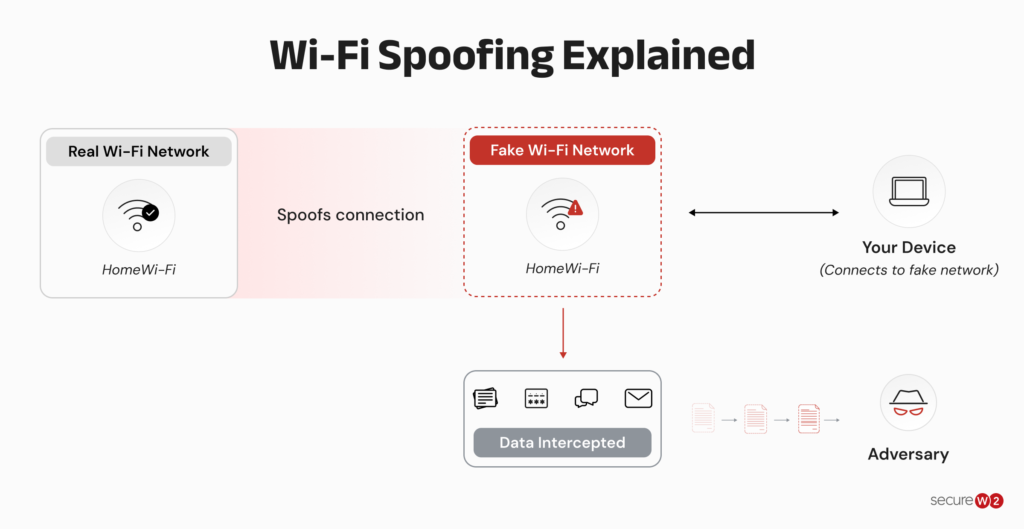
By deceiving individuals into joining this phony network, hackers may:
- obtain sensitive information such as login credentials or financial data
- compromise the target’s safety and privacy by installing malware on their device
Wi-Fi spoofing poses a significant threat to consumers and enterprises alike. The growing number of Wi-Fi-enabled devices — like cell phones, tablets, laptops, and IoT devices — has increased the likelihood of Wi-Fi spoofing attacks. Next, we will examine in depth how Wi-Fi spoofing operates.
Wi-Fi spoofing creates a fake or misleading network identity to trick users or devices into connecting. An Evil Twin attack is one common example of Wi-Fi spoofing.
How Does Spoofing Work?
A Wi-Fi spoofing attack typically follows these steps:
- The attacker identifies a trusted network: The attacker finds a Wi-Fi network that users regularly connect to, such as a hotel, airport, or business network.
- The attacker creates a fake network: The attacker configures a rogue access point with the same or a similar SSID as the legitimate network.
- The attacker positions the rogue network nearby: The fake access point is placed within range of potential victims and may be configured to provide a stronger signal.
- The victim connects to the fake network: The device connects to the rogue network, sometimes automatically if it recognizes the SSID.
- The attacker intercepts or monitors traffic: Depending on the attack, the attacker may capture unencrypted traffic, collect credentials, or redirect the victim to malicious websites.
- The attacker exploits the stolen information: Captured credentials or other sensitive information can then be used for account compromise, phishing, or other attacks.
Note: A strong Wi-Fi signal does not mean a network is legitimate. Attackers can configure rogue access points to imitate trusted networks and appear more attractive to nearby devices.
Types of Wi-Fi Spoofing Attacks
There are numerous forms of Wi-Fi spoofing attacks, each with its own techniques and objectives. These are examples of prevalent Wi-Fi spoofing attacks:
- Evil Twin Attack: An attacker creates a fake Wi-Fi network that looks like a legitimate one to trick users into connecting.
- Man-in-the-Middle Attack: An attacker secretly intercepts and potentially alters communication between two devices.
- Neighbor Spoofing: An attacker imitates a nearby trusted Wi-Fi network or device to deceive users or devices.
- IP Spoofing: An attacker disguises the source IP address of network traffic to appear as if it came from another device.
Evil Twin Attack
The creation of a fake Wi-Fi network that has the same identity along with various configurations as a real Wi-Fi connection is referred to as an Evil Twin attack. The hacker creates a rogue wireless access point (AP) and assigns it the identical SSID as the legitimate connection.
Once the victim’s device joins the fake network, the hacker may spy on the individual’s online activity and obtain confidential information. Wi-Fi Pineapple, an established wireless tracking system, serves as one of the instruments and techniques that may be employed in this type of attack.
Man-in-the-Middle Attack
In an Adversary-in-the-Middle, or Man-in-the-Middle (MITM) attack, the attacker inserts themselves between the device being attacked and the internet so as to spy on and capture private information from the individual’s internet traffic. That’s graphically illustrated in the image below:
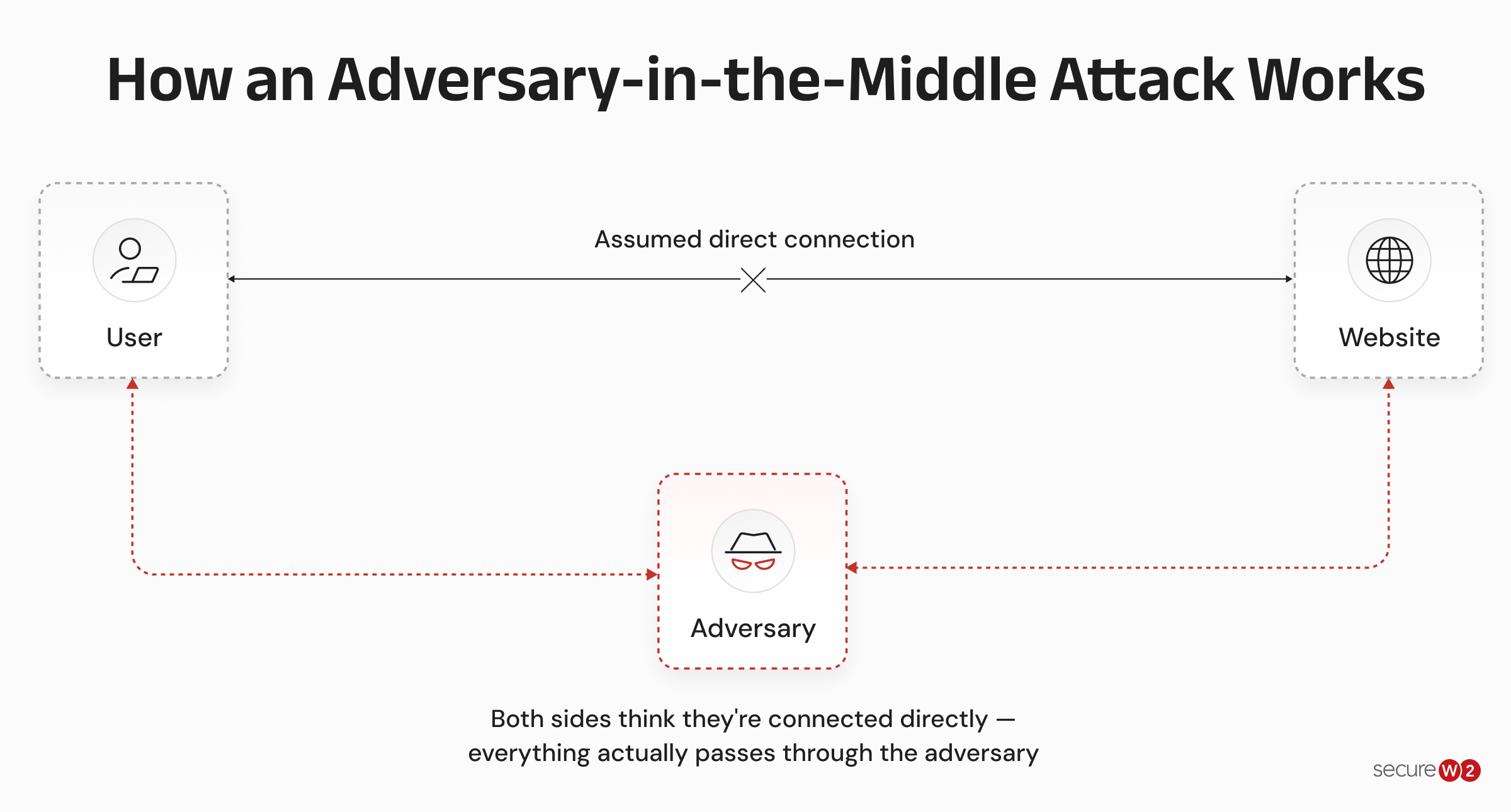
An attack using MITM employing Wi-Fi spoofing might be carried out by creating a bogus Wi-Fi network to which the device being targeted connects.
Once the victim is connected to the phony network, an intruder may monitor their internet traffic and obtain confidential information. A number of methods and tools, like spoofing of ARP, DNS forging, and HTTPS tampering can be used to carry out this sort of attack.
Neighbor Spoofing
This involves a spoofing attack in which a hacker pretends to be someone you recognize or who resides nearby and gains access to your private information.
The assailant disguises their identity and acts like your neighbor, providing them an advantage. Callers may also impersonate bank officials at the branch in which you maintain an account, and then approach you to request private or sensitive data, such as a one-time password (OTP).
IP Spoofing
The technique of establishing an IP address using bogus Source IP information is known as IP spoofing.
An IP spoofing attack is used when an attacker wishes to mask their Internet Protocol (IP) address when making requests or seeking information.
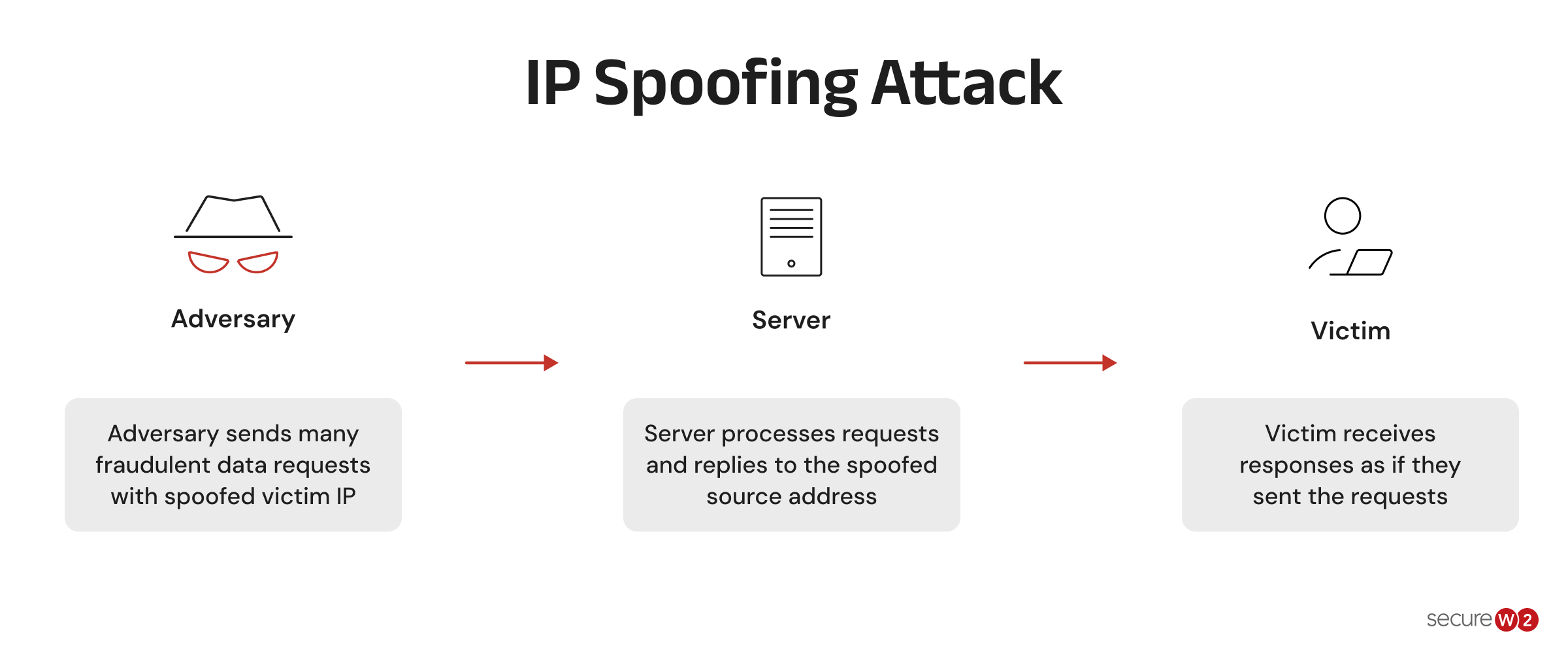
The false internet protocol (IP) appears to be from a trustworthy source, while the genuine source remains operational. In order to mask the true source, hackers use this spoofing method to perform attacks such as DDoS on the intended device or targeted organization.
Due to the fact that this attack happens at the network’s surface, the user remains ignorant that their IP address has been modified. Botnets make IP spoofing attacks straightforward for attackers to execute, as the illustration shows.
What Is Wireless Sniffing?
Wireless sniffing is a passive attack technique in which an attacker captures and analyzes network packets transmitted over a wireless connection. The attacker does not necessarily need to alter the traffic to collect useful information.
On unsecured or poorly protected networks, captured packets may expose sensitive information or reveal details about network activity. Encryption, secure authentication, and HTTPS reduce what an attacker can obtain from intercepted traffic.
Signs of a Spoofed Wi-Fi Network to Look For
Unexpected network names, repeated disconnections, unusual login pages, and requests for sensitive information can indicate that a Wi-Fi network may not be legitimate.
Look for these warning signs:
- The SSID is slightly different from the network you normally use.
- Multiple networksappear with the same or similar names.
- The network suddenly requires credentials when it normally does not.
- The connection behaves unusually or disconnects repeatedly.
- The network asks for personal, financial, or account information before connecting.
- The captive portal URL does not match the organization providing the Wi-Fi.
- The connection is unexpectedly slow or unstable.
- Devices that normally connect successfully are having trouble connecting.
These signs do not prove that a network has been spoofed, but they warrant caution.
Pro tip: Never rely on the network name alone. If you’re connecting to hotel, airport, or business Wi-Fi, confirm the exact SSID and connection instructions with the organization before entering any credentials.
Dos and Don’ts for Protection Against Wi-Fi Spoofing Attacks
Wi-Fi deception attacks pose a significant risk to your privacy and online safety. Do the following to safeguard yourself from these attacks:
Dos:
- Secure your web browsing activity using a reputable VPN to avoid Wi-Fi spoofing assaults.
- Verify the network’s name and details prior to joining a Wi-Fi, particularly a public Wi-Fi network.
- Employ a Wi-Fi connection that employs WPA2 or other suitable security protocols.
- Utilize the most recent security upgrades to maintain the integrity of your software and hardware.
- Use two-step verification whenever possible to increase the security of your online accounts.
- Deactivate automated wireless connections on the devices you use, to prevent your devices from automatically joining unsecured wireless networks.
- Scan your bank records and online platforms frequently for any unusual activity.
- Utilize strong and unique passwords for each of your online accounts.
- Switch off Wi-Fi on your electronic devices when not in use, particularly in public places.
- Inform yourself and your loved ones about how to avoid Wi-Fi deception attacks.
Don’ts:
- Avoid using vulnerable or inadequately protected Wi-Fi connections.
- Refrain from entering sensitive information such as your debit or credit card number or Social Security card number when connecting to a network.
- Do not open files from shady recipients or visit shady URLs.
- Never view sensitive information such as bank or health records while using a free Wi-Fi connection.
- Do not utilize preset or easily guessed credentials for your wireless network or internet accounts.
- Do not keep your electronic gadgets unsupervised in public areas, particularly if they are connected to Wi-Fi.
- Do not assume that all wireless Internet connections are secure and trustworthy.
Steps to Take if You Suspect a Wi-Fi Spoofing Attack
In the event that you suspect that you have fallen prey to Wi-Fi spoofing, it is imperative that you undertake the following measures to safeguard both yourself and your sensitive data:
- Detach from the network: In the event of suspected Wi-Fi compromise, it is imperative to expeditiously sever the connection. It is advisable to modify your location or network configuration in the event that you are connected to an unsecured wireless network.
- Update your credentials: All of your online accounts require fresh passwords, particularly those that you viewed via the questionable Wi-Fi network. Use a unique, robust passcode for each account.
- Review your accounts: Examine your financial statements and online accounts for suspicious activity. In the event of detecting any anomalous behavior, it is recommended to promptly inform your financial institution and the relevant authorities.
- Search for malware: It is recommended to conduct a malware analysis to scrutinize your device for any malicious applications that might have been downloaded and executed during the cyber-attack.
- Communicate with the vendor of the wireless internet network: If you suspect that a free Wi-Fi connection has been compromised, notify the Wi-Fi service provider.
- Try out a credit monitoring service: In the event of suspected compromise of personal data, it is recommended to consider enlisting the services of a credit monitoring service to maintain vigilance against potential fraudulent activity.
- Stay vigilant: Be aware of any suspicious activity on your online profiles or devices, and report it to the appropriate authorities.
Measures for Mitigating the Damage of a Wi-Fi Spoofing Attack
If you suspect a Wi-Fi spoofing attack, take these steps to limit the damage:
- Change compromised passwords: Update the passwords of accounts you accessed while connected to the suspicious network, especially email, banking, and work accounts.
- Enable MFA: Add multi-factor authentication to your accounts to prevent stolen passwords from being used on their own.
- Use passwordless authentication: Where available, use biometrics, passkeys, or hardware security keys instead of passwords to reduce the impact of credential theft.
- Use certificate-based authentication: Organizations can use 802.1X with EAP-TLS to authenticate users and devices with digital certificates instead of shared Wi-Fi passwords. EAP-TLS also enables devices to verify the identity of the authentication server before providing authentication credentials.
- Keep software updated: Install operating system, browser, and security updates to address known vulnerabilities.
- Back up important data: Maintain regular backups so you can recover important information if an attack results in data loss or device compromise.
Note: A VPN can encrypt your traffic, but it does not verify that the Wi-Fi network itself is legitimate. For enterprise Wi-Fi, 802.1X with certificate-based EAP-TLS provides authentication between the device and the network.
Secure Your Wireless Network With WPA2-Enterprise Authentication
WPA2-Enterprise with certificate-based authentication closes the gaps left permanently open by pre-shared keys.
There are no shared secrets to rotate, no credentials exposed to phishing, and no opportunity for rogue devices to bypass a misconfigured RADIUS policy.
Our JoinNow platform enforces EAP-TLS across your wired and wireless infrastructure, connects RADIUS policy to live IdP and MDM data, and revokes access in seconds when a user offboards.
If your wireless security still depends on passwords or shared keys, that’s the gap worth closing first.
See how SecureW2 secures wireless networks without passwords.
Frequently Asked Questions
How can you tell if your Wi-Fi is being attacked?
Check for unusual SSIDs, duplicate network names, unexpected authentication pages, repeated disconnections, unusual connection behavior, or requests for sensitive information. These signs do not confirm an attack, but they can indicate a rogue access point or other Wi-Fi security issue. If something looks suspicious, disconnect and verify the network with the organization responsible for it.
How can I detect an IP spoofing attack?
IP spoofing is difficult to detect from a single device. Network administrators can look for unexpected source IP addresses, conflicting address information, unusual traffic patterns, and packets arriving from addresses that should not appear on a particular network. Network monitoring, intrusion detection systems, and traffic analysis can help identify suspicious activity.
What is wireless sniffing?
Wireless sniffing is the passive capture and analysis of packets transmitted over a wireless network. Attackers can use packet sniffing to monitor network activity and potentially collect information from inadequately protected traffic. Encryption and secure protocols limit the information that can be obtained from captured packets.
How do I unhack my Wi-Fi?
If you suspect your Wi-Fi has been compromised, disconnect affected devices, change Wi-Fi and account credentials, update your router and device software, check connected devices, and review network settings. For an enterprise network, investigate rogue access points and unauthorized devices, and consider using 802.1X with certificate-based authentication to strengthen network access controls.