What is an AAA Server?
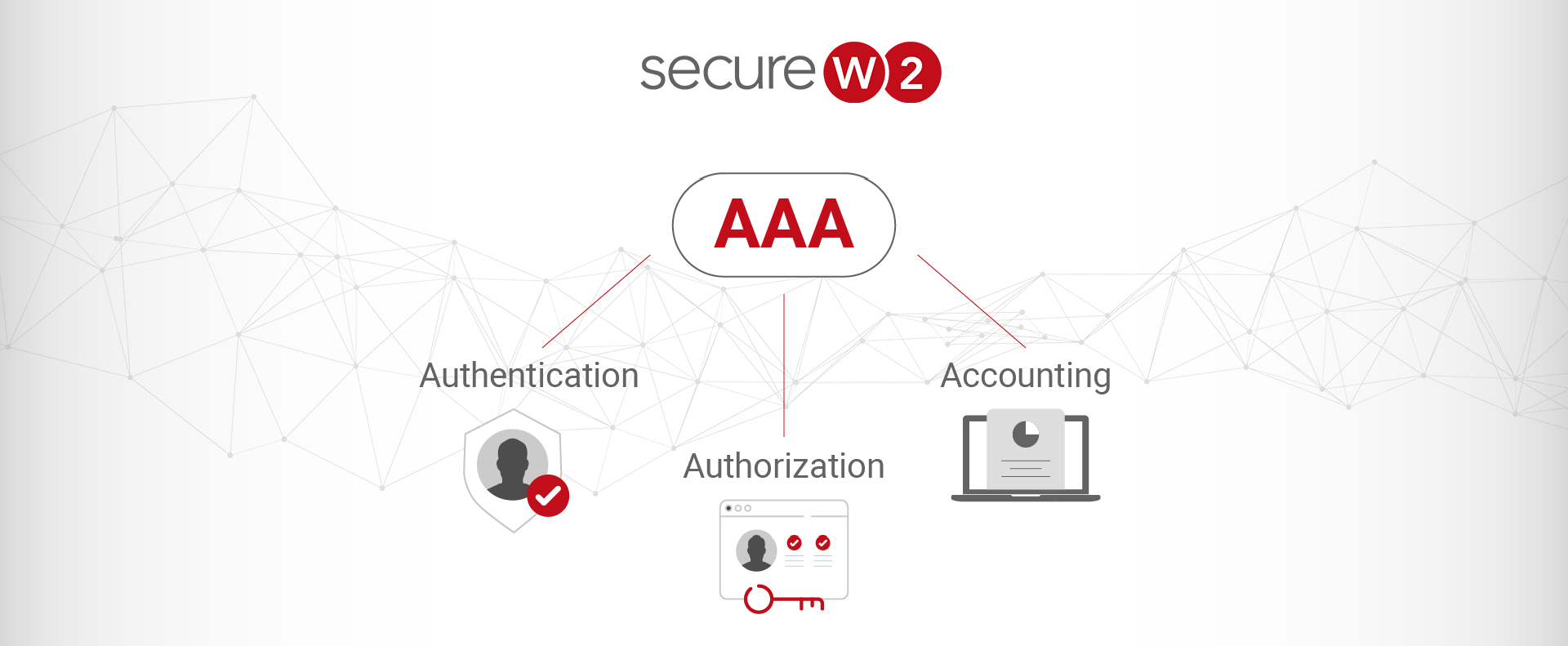
Securing network access and related equipment is very important in the modern era, where everything is connected to the internet. As organizations grow and their network infrastructure becomes more complex, access management and protecting critical assets and information have become more challenging. AAA servers help easily manage all of your infrastructure from a single pane of glass. AAA stands for Authentication, Authorization, and Accounting, representing the three fundamental pillars of network security and management.
Those three A’s stand for authentication, authorization, and accounting.
Micah Spady, SecureW2
An AAA server is crucial for network security and managing user access and authorizations. Authentication, authorization, and accounting servers ensure the protection of network resources by offering a centralized framework for authenticating and authorizing users’ access to specific resources.
Info: AAA servers play a crucial role in maintaining the integrity, confidentiality, and availability of data within a network.
In this article, we’ll provide a comprehensive understanding of what AAA servers are and how they work. We’ll also explore their benefits, how they are implemented, and what security protocols they use. Additionally, we’ll highlight Cloud RADIUS, a cloud-based managed RADIUS service of SecureW2 that offers advanced security features through passwordless certificate-based authentication.
What Does AAA Server Mean?
We’ve already established our understanding that AAA stands for Authentication, Authorization, and Accounting, but how does it all translate into a practical solution for your network?
An AAA server is a dedicated program that acts as the central point for managing these critical access control functions. These three functions form the backbone of network security by controlling user access and monitoring network activity.
This video provides a closer look at how AAA servers work:
Authentication
Authentication identifies a user or device before granting access to a network. It ensures that only authorized users can access sensitive information and resources. This process typically involves validating user credentials such as usernames and passwords, but it can also include more advanced methods like biometric verification or digital certificates. The following diagram illustrates the key differences between certificates and credentials.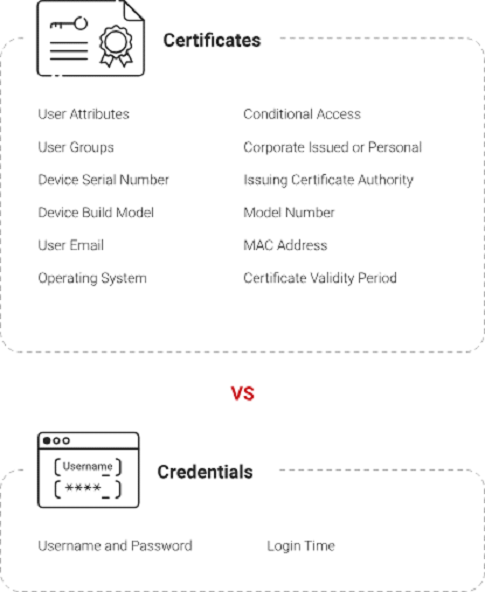
For example, when an employee tries to log into the company network, the authentication process checks their user credentials against a local database. If the credentials match, user access is granted; if not, it’ll be denied.
Note: The authentication step helps prevent unauthorized access and protect the network from potential security breaches.
Authorization
Once a user’s requests are authenticated, the next step is authorization. Authorization determines what resources and services are allowed to be accessed. It involves setting permissions and access controls based on the user’s role and responsibilities and the organization’s security policies.
For instance, a network administrator might have access to the entire network and all its resources. In contrast, a regular employee might only access specific applications and data relevant to their job.
Info: Authorization ensures that users can only access the information they need, reducing the risk of misuse.
Accounting
The final component of the authentication, authorization, and accounting server is accounting, which involves tracking and logging user requests within the network. This function records login times, session duration, the resources accessed, and any changes made. The image below shows what that looks like on your dashboard.
Info: Accounting provides a comprehensive audit trail that can be used for monitoring, reporting, forensic analysis, and internal and external IT audits.
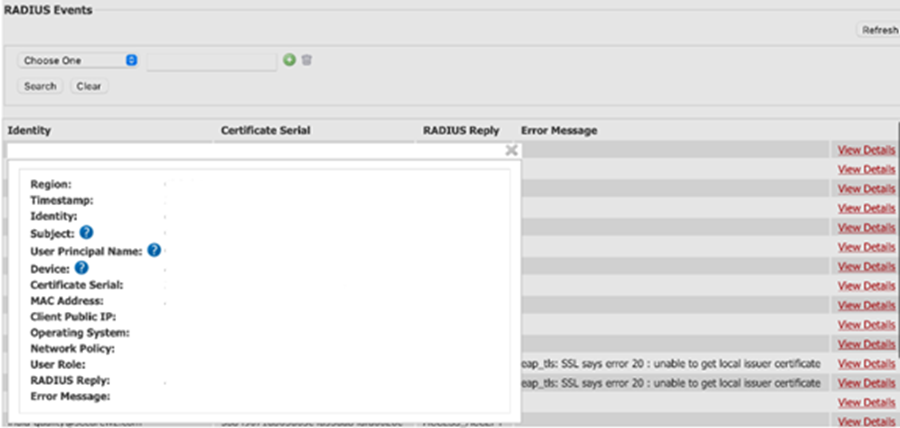
If a security incident occurs, logs can help trace the source of the breach and identify any malicious activities. Additionally, accounting data is valuable for compliance with regulatory requirements as it provides evidence of user access and security measures.
AAA servers provide a robust framework for managing network security by integrating authentication, authorization, and accounting into the system.
How Does an AAA Server Work?
An AAA server manages network security through a series of equally critical stages:
At the connection stage, a user or device tries to connect to a network switch or router. The network enforces the 802.1X protocol, blocking traffic on that port until authentication is completed.
At the authenticator stage, the access point collects the client’s credentials, packages them into a RADIUS Access-Request, and forwards them to the AAA server.
At the authentication stage, the AAA server verifies the credentials and sends an Access-Accept or Access-Reject message back to the access point.
At the authorization stage, the AAA server may also send specialized instructions back to the access point, applying access or bandwidth limits or assigning the device to a specific VLAN.
At the accounting stage, the AAA server logs user identity, MAC addresses, session timing, and data transfer.
What are the benefits of an AAA server?
Authentication, authorization, and accounting servers provide several advantages that improve security, streamline management, and ensure regulatory compliance. Here are some of the key benefits of implementing an authentication, authorization, and accounting server:
Enhanced Security
An authentication, authorization, and accounting server’s primary benefit is enhancing network security. An authentication server ensures that only verified users can access network resources, reducing the risk of unauthorized access. Furthermore, the accounting function provides detailed logs of user requests and enables security teams to detect suspicious behavior promptly.
In an enterprise environment, an AAA server can prevent unauthorized access to sensitive data.
Note: An AAA server provides centralized control, helping you protect the organization’s digital assets against internal and external threats.
Improved Access Control and User Management
Authentication, authorization, and accounting servers simplify user access management by providing centralized access policies. This approach makes it easier to manage user permissions, especially in enterprise organizations. Network security administrators can quickly update access controls from a single pane of glass and ensure that policies are consistently applied across the network.
Security administrators can easily update or revoke access rights through the authentication server when an employee changes roles or leaves the organization.
This streamlines the user management process and reduces the risk of outdated permissions.
Logging for Auditing and Compliance
The accounting function of an AAA server provides logs of user activities, which are important for auditing and compliance purposes. These logs contain login times, session durations, resources accessed, and any changes made to user credentials.
The logging function helps organizations meet regulatory requirements by providing an audit trail of user activities.
Scalability for Growing Networks
It’s challenging to manage users when businesses grow and their networks expand. Authentication, authorization, and accounting servers can easily scale with growing networks and ensure that security controls remain effective even when users and devices increase in the network.
An organization experiencing rapid growth can rely on an authentication server to manage the influx of new users and devices without compromising security.
An AAA server’s scalability ensures access policies are consistently applied and security remains robust.
Use Cases for AAA Servers
AAA servers are widely used to secure networks, manage access to data, and apply role-based permissions.
In enterprise Wi-Fi settings, AAA servers authenticate users and devices as they connect to wireless networks and segment users onto Virtual Local Area Networks (VLANs).
AAA servers also monitor logins to routers, switches, and firewalls, creating a centralized audit trail.
For VPNs and remote work setups, AAA servers verify employee credentials, grant network tunnel access, and log session data.
In educational settings, AAA servers manage BYOD devices, channeling guest users onto restricted networks and ensuring that managed devices have full network access.
What is a AAA Virtual Server?
As organizations adopt more flexible and scalable IT infrastructures, virtual servers become increasingly crucial. An AAA virtual server performs the same tasks as a physical authentication server but within a virtualized environment. This means that software manages the authentication, authorization, and accounting functions, making it easier to scale, configure, and maintain.
An AAA virtual server is sometimes referred to as a cloud-based AAA server. Deploying an authentication server in the cloud provides several advantages, including cost-effectiveness. It’s less expensive than traditional hardware solutions because it allows businesses to pay for only the computer resources they use. It can also be managed globally for large infrastructures.
Cloud Radius by SecureW2
SecureW2 Cloud RADIUS is a cloud-based authentication server. It’s a managed RADIUS server hosted in a public cloud environment such as Microsoft Azure. It provides advanced security and simplifies authentication requests. The key benefits of its implementation include:
- Cost Effectiveness: Cloud RADIUS by SecureW2 eliminates costly hardware requirements and maintenance and provides a cost-effective solution for network security.
- Scalability: It scales seamlessly with organizational needs and allows businesses to adapt network capabilities according to changing demands.
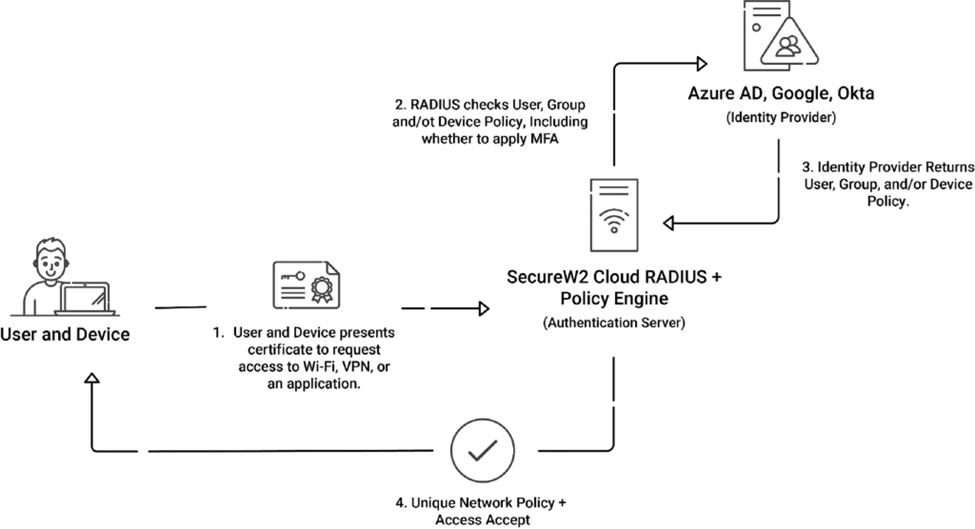
- Global Access: Cloud RADIUS enables organizations to implement secure, passwordless, and certificate-based authentication, as the following image illustrates. That data can be accessed from anywhere in the world.
- Integration with Existing PKI: You can seamlessly integrate it with existing Public Key Infrastructure (PKI) or create a PKI if it doesn’t already exist.
How Do You Implement an AAA Server?
Several steps are involved in implementing an authentication server:
Step 1: Initial Setup and Configuration
Choose the authentication server program that best suits your organization’s needs. Some solutions are FreeRADIUS, Cisco Secure ACS, and Microsoft NPS for on-premises deployments. If you want to manage AAA server authentication and authorization from the cloud, you can choose managed services like SecureW2 Cloud RADIUS for cloud-based implementations.
Step 2: Install the AAA Server
Install the authentication server program on a suitable platform. For on-premises deployments, you can set up a dedicated server or virtual machine (VM). For cloud-based deployments, you can choose Cloud RADIUS, which is handled by the service provider.
Step 3: Configure Network Settings
Configure network settings for your AAA server, such as IP addresses, subnet masks, and gateways.
Step 4: Connect Network Devices
Configure network devices (e.g., routers, switches, wireless access points) to use the AAA server for authentication, authorization, and accounting purposes.
Step 5: Define Authentication Methods
Define which authentication methods, such as passwords, tokens, or digital certificates, you’ll use. Ensure that these methods are supported by both the AAA server and the client devices.
Step 6: Set Up User Database
Configure the user database on the AAA server or an external directory service like LDAP or Active Directory. This local database stores user authentication credentials and other relevant information.
Step 7: Create User Profiles
Define user profiles and permissions for different user roles within the organization. For example, administrators may have full access to network resources, while regular users have access only to required computer resources.
Step 8: Configure Authentication Policies
Set up policies that determine how users are authenticated. This can include multi-factor authentication (MFA), password policies, and certificate-based authentication.
Step 9: Configure Authorization Rules
Define authorization rules that determine what network resources users can access once they are authenticated. This can involve setting up access control lists (ACLs) and role-based access controls (RBAC).
Step 10: Log User Activities
Configure the AAA server to log user authentication, such as login attempts, session durations, and resource usage.
Step 11: Configure Storage to Store Logs
Configure storage to store log activities. This can be on the AAA server itself or an external logging server.
Step 12: Setup Alerts and Reports
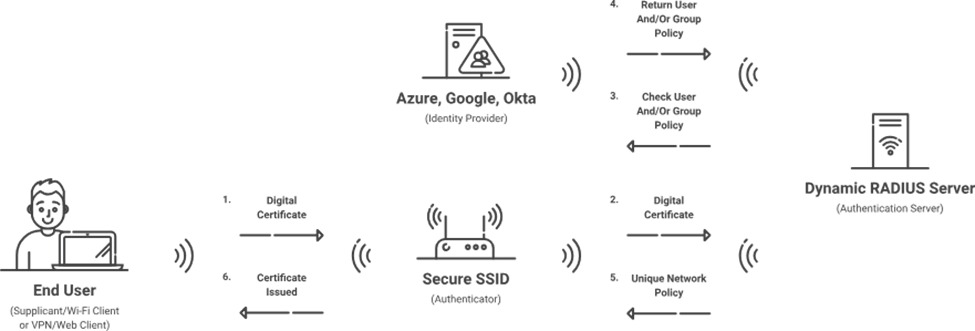
Configure the AAA server to generate alerts for specific events, such as failed login attempts or unauthorized access attempts. The image below illustrates the RADIUS authentication process
What are the security protocols used by AAA servers?
AAA servers rely on robust security protocols to secure your network. These protocols maintain the integrity, confidentiality, and availability of network resources.
The most commonly used security protocols for AAA servers are RADIUS, TACACS+, and Diameter. Each protocol has unique features and use cases, contributing to a comprehensive approach to network security.
RADIUS (Remote Authentication Dial-In User Service)
RADIUS is a frequently utilized authentication protocol, especially for enterprise environments. It was initially developed to authenticate, authorize, and account for users accessing dial-in services. However, it has since evolved for use in various network access scenarios, including VPNs, wireless networks, and Ethernet switches.
RADIUS operates as a client-server protocol where the client is typically a Wi-Fi access point, and the server is the RADIUS server. The client sends user credentials to the authentication server, which verifies the information using a database. If the credentials are valid, the authentication server grants access and applies the appropriate policies for user authentication. The authentication server also tracks user activities such as session duration, data usage, and resource access.
TACACS+ (Terminal Access Controller Access-Control System Plus)
TACACS+, developed by Cisco, provides centralized AAA services for network devices. It is popular in enterprise environments where device management and command-level access control are important.
TACACS+ operates as a client-server protocol similar to the RADIUS server. The client communicates with the TACACS+ server to authenticate users. It provides detailed control over user permissions, allowing administrators to specify which commands a user can execute on a device.
Diameter
Diameter is an advanced AAA protocol designed to address the limitations of RADIUS. It is often used in large-scale and next-generation networks like 4G and 5G mobile networks.
Diameter builds on the foundation of RADIUS but introduces several improvements. Its messages are exchanged between client and server to authenticate users, authorize access, and account for resource usage.
The selection of an AAA protocol depends on the organization’s requirements. RADIUS is commonly used because of its compatibility and scalability. TACACS+ is recommended for enterprise environments that require detailed command-level authorization, while Diameter is best suited for large-scale networks.
Manage Your AAA Server Authentication with SecureW2 Cloud RADIUS
AAA servers protect network resources by ensuring authorized access only. This article explored the basic concept of AAA servers, their benefits, and how they can be implemented on-premises and in the cloud.
If you want to deploy AAA servers in the cloud, SecureW2 Cloud RADIUS offers many advantages including cost-effectiveness, scalability, and ease of management. Cloud-based solutions eliminate the need for substantial upfront investments in physical hardware and allow organizations to pay only for the network resources they use. They also provide the flexibility to scale seamlessly as network demands grow, ensuring consistent performance and security.
SecureW2 Cloud RADIUS is a powerful managed solution for organizations looking to enhance network security. With passwordless, certificate-based authentication features and seamless integration with existing PKI systems, Cloud RADIUS provides a comprehensive approach to managing network access in a secure, scalable, and cost-effective manner.
Visit Cloud RADIUS to learn more and start your journey toward a more secure network today.
Frequently Asked Questions About AAA Servers
What is an AAA server?
An AAA server is a centralized security system that ensures only authorized users and devices can access your network. AAA servers have three core components: authentication, authorization, and accounting. Those functions work together to validate user credentials, determine which network resources each user may access, and track user activity for compliance purposes.
What are the core functions of an AAA server?
AAA servers have three core functions: authentication, authorization, and accounting.
The authentication function verifies the identity of users or devices, and blocks all unverified users from accessing the network. The authorization function determines which network resources a verified user or device can access, and enforces access policies. Finally, the accounting function tracks user and device logins, sessions, data access, and more, building an effective audit trail.
What protocols does an AAA server use?
AAA servers typically rely on the RADIUS, TACACS+, and Diameter protocols to secure networks.
The RADIUS protocol is commonly used to manage Wi-Fi networks, VPNs, and enterprise network access. The TACACS+ (Terminal Access Controller Access-Control System Plus) protocol is usually used for managing switches and routers. Finally, the Diameter protocol is designed for use in heavy-traffic applications, like mobile, 4G/LTE, and other telecommunication use cases.
