
802.1X MAC Auth for Devices Without WPA2-Enterprise Support
Key Takeaways
- Critical equipment like IoT devices may not support WPA2-Enterprise, requiring alternative authentication methods to prevent attacks.
- MAC authentication uses the device’s MAC address for network access, offering a viable solution for devices unable to authenticate via traditional methods like usernames, passwords, or digital certificates.
- Cloud RADIUS supports MAB and filtering, providing centralized control, improved security, and customizable attributes to ensure only authorized devices connect to the network.
Securing network devices is crucial in today’s linked world to prevent cyberattacks. However, not all devices have an operating system that allows them to implement the prevalent 802.1X MAC authentication. Anything from smart home gadgets to hospital-grade medical equipment to specialized factory gear might fall into this category.
These devices may have limited functionality, but they nonetheless need extensive security precautions since they interact with the network and might be used as entry points by hackers.
That’s where Media Access Control (MAC) authentication comes in. Wi-Fi MAC authentication allows devices access to a protected network even if they don’t support WPA2-Enterprise.
Understanding 802.1X Authentication Using a MAC Address
What Is 802.1X Authentication?
The 802.1X authentication protocol is extensively used because it verifies the identity of users before granting them access to a network. As the illustration below shows, 802.1X offers a system for devices to connect safely by checking the validity of their authentication credentials or certificates with the help of an authentication server called a RADIUS server.
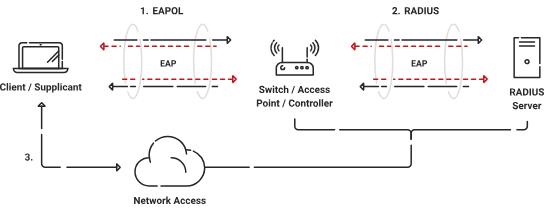
The 802.1X protocol is used widely in wired and wireless networks and operates at the data link layer of the OSI model.
The primary purpose of 802.1X authentication is to restrict access to the network from any sources that shouldn’t have it. With this technology, businesses may limit network access depending on the user’s or device’s credentials.
Using this kind of authentication to enforce stringent access controls and block unauthorized access improves the safety of a network.
What Is MAC Authentication?
Generally, 802.1X authenticates users and devices through a combination of username and password or digital certificates. However, not all devices are capable of authenticating through these means.
This is when a device’s MAC address can come into play.
Each device’s network interface card (NIC) has a media access control address. In most cases, this 48-bit number looks like six sets of two hexadecimal digits, each group separated by a colon or a hyphen.
Info: A MAC address can be used in lieu of or alongside credentials or passwords for authentication.
If you are doing 802.1X with MAC authentication, a device’s MAC address is provided to an authentication server whenever it tries to connect. The server will only allow access after verifying that the client’s MAC address is on the approved list.
What Is MAC Authentication Bypass (MAB)?
MAC Authentication Bypass, or MAB, is a network access method that enables devices to safely connect to a network without using standard credentials or certificates.
MAB is sometimes used as a fallback authentication method for devices that don’t support WPA2-Enterprise authentication.
Warning: While MAB can be a useful strategy, it also carries some inherent risk. The approach doesn’t include any encryption or cryptography.
The device sends its MAC address through the air in plaintext, which leaves it open to interception. Stolen MAC addresses can quickly be spoofed, giving bad actors a potential entry point into your network.
RADIUS Server and MAC Authentication Bypass
A Remote Authentication Dial-In User Service (RADIUS) server is often used to authenticate users using MAC addresses. The Authentication, Authorization, and Accounting (AAA) services provided by a network are centralized on the RADIUS server.
A MAC address and an authentication request from a device trying to join a network to the RADIUS server are sent. The server compares the MAC address to its list of authorized devices and grants or denies the network connection accordingly.
The RADIUS server will provide an ACCESS_ACCEPT message if the MAC address checks out. However, if the MAC address has yet to be verified or authorized, an ACCESS_REJECT message is issued to the device, blocking access to the network.
The diagram below illustrates the MAC Authentication Bypass process.
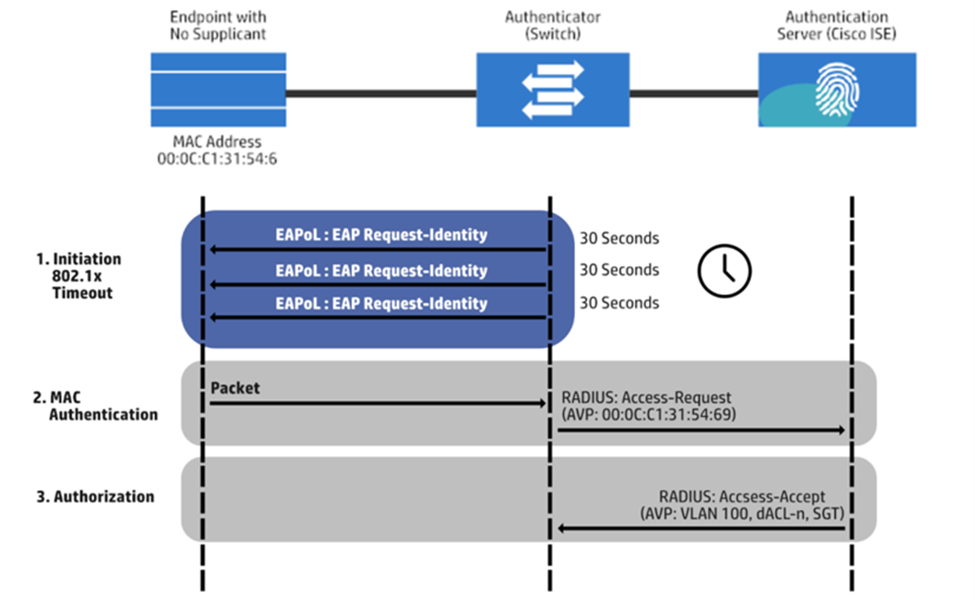
Note: MAC authentication bypass is often used instead of 802.1X MAC authentication for devices that do not support it. Examples of devices that may not support 802.1X include medical devices, many gaming consoles, and some printers.
Here is a list of devices that support 802.1X.
The MAC address alone is sufficient for these devices to establish a network connection. Thanks to this bypass technique, no additional credentials or certificates are required. The RADIUS server checks the MAC address, which, if correctly set up, may grant access.
When Should You Use MAC Authentication?
You should treat MAC authentication as a fallback method; it’s best not to use it unless you have no other choice.
MAC authentication is a good choice for devices that can’t support modern 802.1X authentication methods. Office equipment like printers and scanners; Internet of Things (IoT) devices; and certain security systems are all good candidates for MAC authentication.
Note: You should always take precautions when using MAC authentication. It’s a good practice to segment your network so that devices using MAC authentication are placed on isolated VLANs (Virtual Local Area Networks) and given restricted access.
Using VLANs limits the potential fallout if an attacker spoofs a MAC address to access your network.
Benefits of MAC Authentication for Devices That Don’t Support 802.1X
There are several benefits, both in network security and device management, to using MAC authentication for devices lacking 802.1X functionality.
Segmentation of Devices into Different VLANs
Policies may be set up during MAC-based RADIUS authentication configuration to partition networks depending on subsets of MAC addresses.
Keeping unsecured IoT devices off of the same virtual local area network (VLAN) as servers housing private data or devices requiring a high level of authorization is crucial. The possibility of breaches and unauthorized access is reduced when these devices are kept in separate, secure locations.
Enhancing Security With Unique MAC Addresses
An important benefit of RADIUS MAC authentication is that it requires knowledge of the device’s unique MAC address and the network password. Unauthorized users will have more difficulty breaking into the network because of this extra safeguard.
Restricting Access to Specific MAC Addresses
With RADIUS MAC authentication, you may restrict network access to authorized MAC addresses. Businesses may restrict network access to just the necessary devices by compiling a list of approved MAC addresses.
This further limits the attack surface and decreases the danger of unauthorized devices gaining access.
Implementing 802.1X MAC Authentication
Step-by-Step Process for 802.1X Wireless Authentication
The following is a step-by-step guide for organizations looking to deploy MAC authentication for devices that do not support 802.1X.
Set Up a RADIUS Server
Setting up a RADIUS server to manage requests for authentication from connected devices is the first order of business. The RADIUS server records the approved MAC addresses and functions as a central authentication authority.
Configure Network Infrastructure
The next step is to set up MAC address authentication on the network infrastructure devices like switches and access points. The RADIUS server’s IP address must be entered, and the network equipment’s authentication settings must be adjusted accordingly.
Define VLAN Segmentation
Organizations can set up virtual local area networks (VLANs) and assign unique MAC addresses to each VLAN to guarantee adequate network segmentation and security.
This enables devices to be partitioned into distinct network sections according to their own security needs and the rules in place.
Enable MAC Authentication on Devices
You normally need to adhere to these procedures in order to configure devices for MAC authentication.
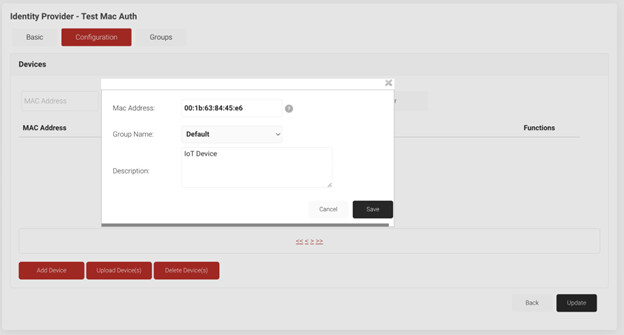
- The device’s distinctive MAC address may often be located in its network settings.
- The MAC address should then be entered into the appropriate network or security settings for MAC authentication by gaining access to the device’s configuration settings.
- The device will now utilize the MAC address for network authentication once you save the adjustments.
Info: The device itself requires minimal setup if you’re utilizing a RADIUS server for MAC authentication. The RADIUS server handles the authentication procedure, so you’ll mostly need to make sure the device is configured to connect to the right SSID.
You may need to set up the device’s PSK and MAC authentication settings individually in certain circumstances when combining PSK and MAC authentication is possible.
For instructions that are particular to your device, contact IT support or the device’s manual.
The following screenshot illustrates how a MAC address is entered into an identity provider.
Testing and Monitoring the MAC Authentication Process
Once everything has been set up, rigorous testing of the MAC authentication procedure is required.
This process includes connecting the devices to the network and checking that they have been authenticated and given the right level of network access based on their allocated VLAN.
Leveraging the RADIUS Server for MAC Authentication
When it comes to 802.1X MAC authentication, the RADIUS server is essential. It processes authentication requests, checks the MAC addresses with a whitelist, and allows or disallows network access, as the screenshot below illustrates.
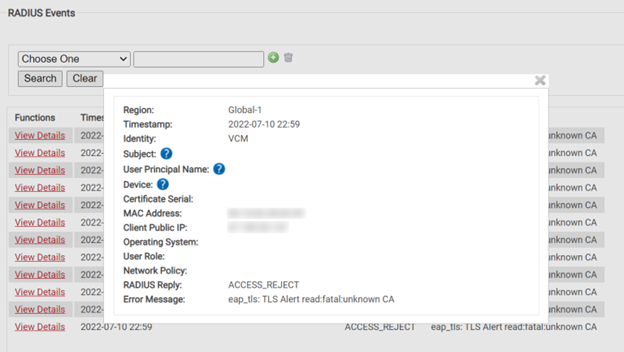
A RADIUS server can be used for MAC authentication to centralize the authentication process and apply uniform security rules throughout the network.
Fine-grained control over which devices are permitted to join is possible thanks to additional capabilities like MAC address filtering that may be specified on the RADIUS server.
In addition, a RADIUS server provides auditing and logging features, helping businesses keep track of who is trying to access the network and whether they should be. This allows for preventative steps to be taken and improves network security in general.
Organizations can offer a safe network environment for devices that do not support 802.1X authentication by using MAC authentication and a RADIUS server. In addition to enhancing security and reducing the danger of unauthorized device connections, this method also enables fine-grained control over network access.
It’s worth noting that Cloud RADIUS may be used to install RADIUS server capabilities. Cloud RADIUS offers the benefits of quick implementation, scalability, and decreased infrastructure overhead.
Info: Cloud-based solutions remove the need for organizations to operate and maintain their own RADIUS servers, making them a more convenient and efficient option.
In conclusion, using a RADIUS server for MAC authentication provides centralized control, enhanced security, and granular access management. By choosing Cloud RADIUS solutions, organizations may further simplify their deployment and maintenance procedures while making use of a RADIUS server’s extensive functionality and logging capabilities.
Improving MAC Authentication With Customizable Attributes
With its customizable features, MAC authentication offers a safe mechanism for connecting non-802.1X-enabled devices to the network. A Cloud RADIUS option comes into play here.
Enhancing Security With MAB and Filtering
Organizations may design fine-grained access controls based on MAC addresses, device types, or other features with the help of a Cloud RADIUS solution that supports MAC Authentication Bypass (MAB) and Filtering.
This improves security since it restricts network access to approved gadgets only.
The diagram below shows a Cloud RADIUS solution operating in a mixed environment, where both MAC authentication and 802.1X are used.
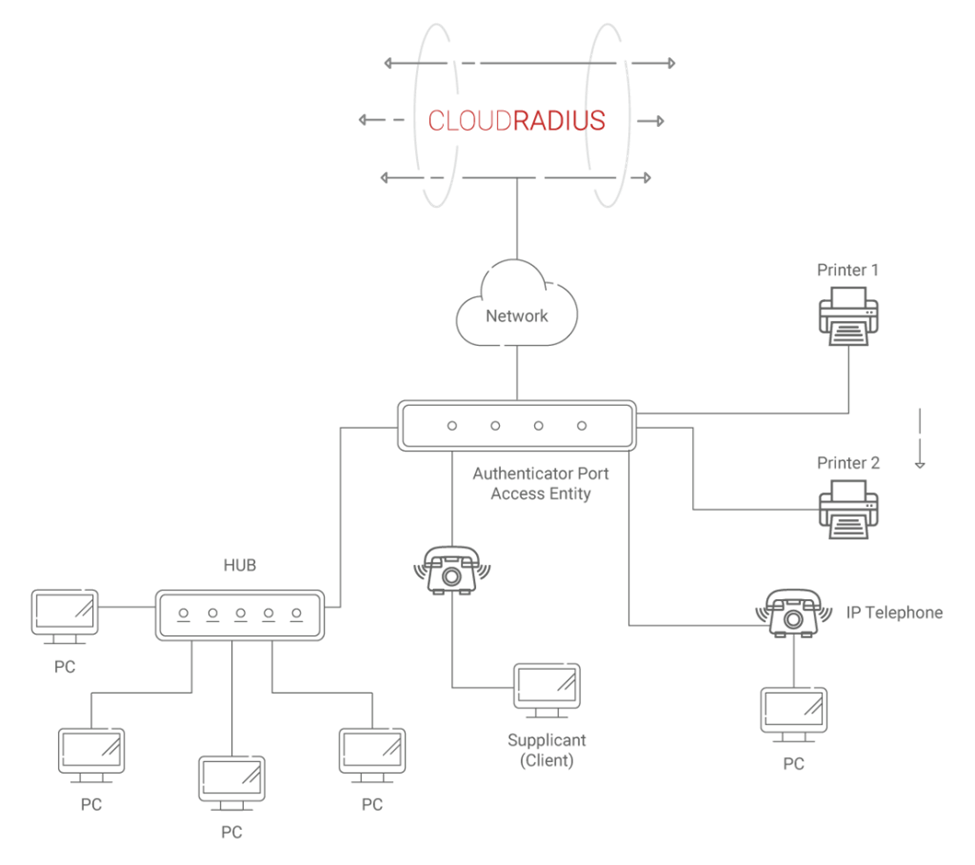
Adding Context to Authentication With Customizable Attributes
Customizable characteristics may be added to the authentication process using Cloud RADIUS systems. Organizations may improve security by making more well-informed judgments regarding access control thanks to the extra information these properties provide about the device, user, or location.
Move Beyond On-Premises RADIUS With a Cloud-Native Authentication Stack
On-premises RADIUS servers carry hefty maintenance costs and an increased risk of hardware failure.
Our Cloud RADIUS eliminates operational overhead while strengthening security.
It authenticates users and devices using live security signals from your identity provider, MDM, and EDR/XDR platforms, so access decisions reflect current device posture, not a stale snapshot from last week’s sync.
The result is authentication that scales with the organization, not against it. Teams that have replaced legacy RADIUS with SecureW2 Cloud RADIUS consistently report faster authentication times, fewer outages, and best-in-class uptime, and the option for 99.999% availability.
If your current RADIUS setup is creating friction for IT or leaving security gaps, there is a better path. See SecureW2 Cloud RADIUS in action.
Frequently Asked Questions
How do you authenticate with a MAC address?
MAC authentication uses a device’s unique hardware address, or Media Access Control address, to identify the device and grant network access. MAC authentication is typically used for printers, IoT devices, and legacy connected devices that don’t support 802.1X authentication methods.
MAC authentication can be a useful authentication approach, but it should be managed carefully to contain the risk of MAC spoofing.
How does MAB work with 802.1X?
MAC Authentication Bypass, or MAB, is often used as a workaround for devices that don’t support 802.1X authentication. Although the term is often used interchangeably with MAC authentication, MAB refers to the automated process of using MAC authentication as a fallback. MAB allows devices like printers or IoT devices to connect to the network, even though they don’t support 802.1X authentication.
How does MAC authentication work?
MAC authentication is used to give so-called “headless” devices, like printers or smart devices, access to a network. These devices can’t handle complex 802.1X security, so MAC authentication allows them to connect using their physical MAC address as an identifier and password.
