Drawbacks of NPS In A Cloud Environment
Key Takeaways
- NPS is a native Windows server that can communicate with Active Directory and Security Accounts Manager to identify users before authentication.
- NPS requires on-premises server maintenance, which is an ongoing expense. It is also vendor-locked and requires complex configuration and maintenance.
- NPS lacks support for cloud applications, as it cannot communicate with Azure AD (Microsoft’s cloud replacement for AD) for identity and access management.
- Cloud RADIUS can synchronize with Azure AD for certificate-based authentication and management, making it more scalable to meet growing business needs.
Network Policy Server (NPS) is Microsoft’s RADIUS server option, controlling network authentication, authorization, and accounting. It offers a centralized mechanism for implementing network security regulations and is commonly used by enterprises to guarantee that only authorized people and devices may access network resources.
Through its integration with Active Directory, network-wide user authentication is made simple. However, as technology develops and the trend towards cloud computing quickens, businesses must overcome several obstacles and constraints with the conventional on-premises NPS.
This article examines the shortcomings of Windows NPS RADIUS, especially in light of modern network conditions and the growing popularity of cloud computing.
We will discuss the inherent disadvantages of using an on-premises solution like NPS, such as:
- The expenses and complexity of setup and maintenance
- Problems with cloud application compatibility
- Challenges with integrating with other operating systems
We will also present Cloud RADIUS as a more practical and effective Microsoft NPS alternative, emphasizing its management, security, and scalability benefits. By looking at these factors, we want to explain why moving to Cloud RADIUS might be a wiser decision for modern businesses.
What Is NPS? What Is an NPS Server?
The RADIUS (Remote Authentication Dial-In User Service) standard, as outlined in RFCs 2865 and 2866 by the Internet Engineering Task Force (IETF), is implemented by Microsoft as NPS.
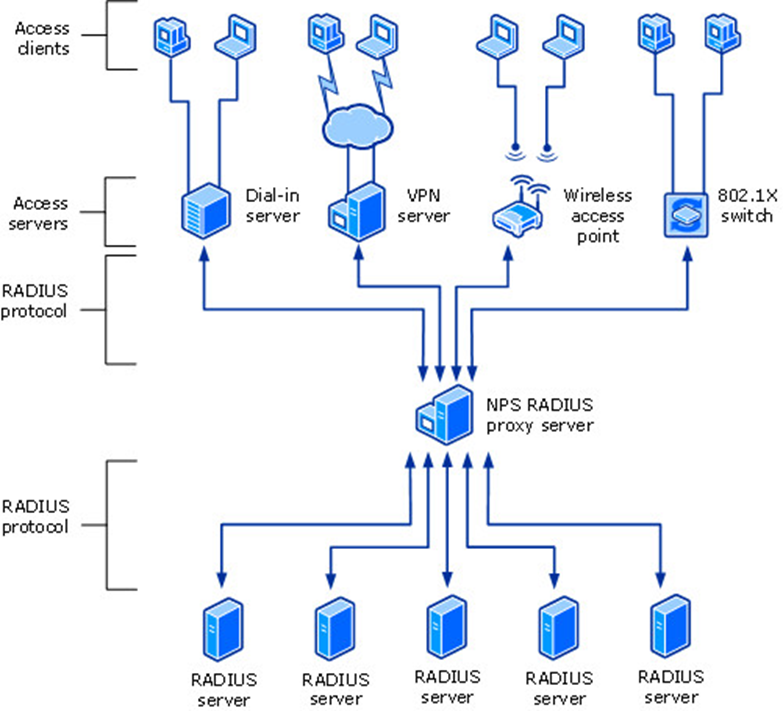
For many forms of network access, such as wireless, wired, dial-up, virtual private network (VPN) remote access, and router-to-router connections, NPS handles centralized connection authentication, authorization, and accounting.
NPS facilitates using a diverse range of wireless, switch, remote access, and VPN devices. Windows Server 2016 offers the Remote Access service, which you may utilize with NPS.
How Does NPS Work?
To authenticate the user credentials for connection requests, NPS uses the local Security Accounts Manager (SAM) user accounts database or the Active Directory Domain Services (AD DS) domain.
When a user seeks to connect to the network by wireless, cable, or VPN, the network access device (such as a wireless access point or VPN server) serves as a RADIUS client, sending an authentication request to the NPS server.
The NPS server then checks the user’s credentials against the local SAM database or AD DS. If the server that configures NPS is part of an AD DS domain, the directory service is utilized to store user accounts. This method validates the user’s identification before giving network access.
Once a user’s credentials have been confirmed, the NPS server compares them against specified network policies to determine whether they can access the network. These policies are critical for maintaining security and ensuring that only authorized users have access to certain network resources. If the credentials are legitimate and the user fits the policy requirements, NPS allows access to the network.
After permission, the NPS server stores connection request information in an accounting log. This log contains information on the user, the network access device, and the session length. NPS makes network administration easier for ISPs and organizations by combining authentication, authorization, and accounting operations. The RADIUS standard enables NPS to handle homogeneous and heterogeneous network environments, resulting in flexible and centralized network access management.
Note: Overall, NPS provides a robust framework for managing network access servers across diverse environments, enhancing security, and streamlining the administration of user credentials and access policies.
This comprehensive approach to network access management is essential for maintaining secure and efficient network operations in modern IT environments.
What Authentication Methods Does NPS Support?
NPS supports both password-based and Extensible Authentication Protocol (EAP) authentication methods for RADIUS clients.
Its supported authentication methods include:
- EAP-TLS (EAP-Transport Layer Security)
- PEAP (Protected Extensible Authentication Protocol)
- MS-CHAPv2 (Microsoft Challenge Handshake Authentication Protocol Version 2)
- PAP (Password Authentication Protocol)
It’s worth noting that NPS supports MS-CHAPv2 and PAP as methods within existing setups, rather than as standalone authentication methods.
NPS can also support multi-factor authentication through the Microsoft Entra extension.
What Are the Benefits of NPS?
Using Microsoft Network Policy Server (NPS) provides admins with a centralized method for managing network access.
NPS enforces security policies across your network, so that changes in policy are reflected at every access point. There’s no need to configure each switch individually.
Direct integration with Active Directory (AD) means that users and groups can be quickly verified. NPS checks user credentials before granting network access. It also tracks session data like logins and connection times, providing a record that teams can consult in case of security issues or audits.
When Do Organizations Most Commonly Use NPS?
Organizations may employ a Network Policy Server (NPS) as a RADIUS solution for various reasons. These circumstances frequently arise from the requirement to:
- Centralize and streamline network access management
- Improve security
- Provide consistent policy enforcement across heterogeneous network environments
Centralized Management of Network Access
Organizations frequently use NPS to centralize network access management with several demand-dial routers, dial-up servers, or VPN servers.
Using NPS, these organizations can efficiently detect and account for wired connections and establish uniform network policies across all devices. This centralization simplifies management and assures all access points use the same security and access standards.
Integration With Service Providers
When an organization uses a service provider to manage its dial-up, VPN, or wireless connections, NPS is an essential tool for authentication and authorization.
The service provider’s access servers can utilize RADIUS to authenticate and authorize connections for its members. This configuration enables seamless integration of the service provider’s infrastructure and the organization’s network policies, ensuring users have safe and dependable access.
Centralized Accounting, Authorization, and Authentication
Another widespread use case for NPS is centralizing accounting, authorization, and authentication across several access servers.
Organizations with a wide range of network access points, including wireless access points, switches, remote access servers, and VPN servers, benefit from having a single control point for user credentials and access records. NPS offers a comprehensive solution that combines these capabilities, making it easier to control and monitor network access throughout the organization.
Support for Diverse Access Clients
NPS is beneficial in situations where numerous access clients are needed.
NPS may manage authentication and authorization for all access points on a network, including wireless, wired, dial-up, and VPN connections. Because of its adaptability, NPS is an excellent choice for organizations with complex and diverse network infrastructures.
An NPS server sits between access servers and RADIUS servers, as shown in the following graphic.
Limitations of NPS as a RADIUS Server
Physical Security Requirements
Several expenses and difficulties are associated with maintaining an on-premises NPS RADIUS server.
Physical servers require high maintenance, which includes:
- Routine upgrades
- Physical security measures
- Defense against theft, weather-related damage, and natural catastrophes
These elements raise the total cost of ownership of on-premises systems, making them more costly than cloud-based substitutes.
Info: Because our Cloud RADIUS service delivers robust security and redundancy without requiring physical infrastructure, it keeps your organization from having to invest in safeguarding its own server from these risks.
Compatibility Issues With Cloud Applications
When integrating cloud services with older systems, many obstacles must be overcome.
Compatibility problems may arise for legacy programs, necessitating intricate modifications or intermediaries to convert data formats to ensure smooth communication. These proxies add levels of complexity and possible sources of failure, but they serve as middlemen to guarantee data flows correctly across various systems.
The disparate security models and RADIUS authentication processes between on-premises and cloud platforms further compound integration issues. For cloud adoption to be seamless, safe, and practical, enterprises must carefully negotiate these technological obstacles.
Info: Modernizing and safeguarding your network infrastructure requires a shift from conventional NPS (Network Policy Server) to a cloud-based solution like SecureW2’s Cloud RADIUS.
In contrast to NPS, which is closely linked with Active Directory and necessitates considerable on-premises maintenance, Cloud RADIUS interacts with Azure AD, improving security and streamlining administration.
Using digital certificates, our Cloud RADIUS server enables passwordless authentication while adhering to Zero Trust principles by communicating only public keys, removing the possibility of credential theft. This system enhances overall security by guaranteeing that only authorized users are granted access using real-time user lookup against Azure AD.
In addition, Cloud RADIUS integrates gateways for Mobile Device Management (MDM) and an innovative access policy engine explicitly designed for Azure AD, enabling simple and safe certificate-based authentication.
Complex Configuration and Management
Configuring Microsoft Network Policy Server (NPS) for EAP-TLS authentication is a complex process that might lead to errors.
The procedure requires a deep comprehension of the EAP-TLS and 802.1X protocols, requiring specialized personnel to oversee the setting. There is a considerable possibility of misconfiguration, which might jeopardize network policies and security.
Installing certificates on servers and RADIUS client devices is necessary to configure NPS with an external LDAP database; Group Policy Objects (GPOs) are frequently used.
Setting up certificate authorities and guaranteeing secure connections are a few processes involved in configuring a WPA2-Enterprise network with 802.1X certificates, connecting Microsoft NPS RADIUS, and integrating Public Key Infrastructure (PKI).
Every stage is intricate and crucial, from setting up network policies and settings to installing certificates. Errors may result in security flaws or authentication issues.
Furthermore, maintaining an on-premises NPS system requires substantial time and knowledge as an organization grows.
Note: There’s no need for much on-premises duplication when using cloud-based solutions like SecureW2’s Cloud RADIUS. The seamless integration of Cloud RADIUS with Azure AD improves security and streamlines administration.
Through this shift, organizations may comply with Zero Trust Network Security guidelines and achieve passwordless authentication, guaranteeing effective, scalable, and reliable network policies and security management.
Integration Issues With Non-Windows Operating Systems
In diversified, modern IT settings, Microsoft Network Policy Server (NPS) frequently has poor compatibility due to integration issues with non-Windows operating systems.
Strong multi-OS compatibility is now essential as more and more devices and operating systems, including Linux, macOS, and several mobile platforms, are used in offices.
Warning: NPS’s tight compatibility with Windows-centric tools and protocols makes it challenging to integrate these diverse contexts.
Establishing NPS to manage and authenticate devices that don’t run Windows OS is one of the main problems. Extra configuration procedures, unique scripts, or outside tools are frequently needed to close compatibility gaps.
For example, setting up 802.1X authentication on macOS or Linux devices might be difficult since these systems require manual certificate installs and tweaks that are very different from Windows methods.
These integration issues may also result in higher administrative costs and possible security flaws. Regardless of the operating system, IT personnel are responsible for ensuring that all devices are reliably and securely authorized. This can be especially difficult in settings where Bring Your Own Device (BYOD) regulations are enforced, which call for the safe and easy integration of a variety of personal gadgets.
Resolving these problems requires a more adaptable and comprehensive approach to network policy administration, frequently using outside programs that provide superior multi-OS compatibility. Organizations operating in a heterogeneous IT landscape may improve their operational efficiency and security posture by streamlining the integration process and increasing compatibility.
Cost Implications of NPS
Because of several considerations, the total cost of ownership (TCO) associated with implementing Microsoft Network Policy Server (NPS) is frequently higher. Cloud-based RADIUS options have many financial ramifications when compared with on-premises NPS systems.
A large hardware investment is needed for on-premises NPS, which involves buying and maintaining servers, networking devices, and associated infrastructure. These initial capital expenses can be high, and if the company grows, more hardware will need to be purchased, driving up prices even further. The cost of putting up redundant systems to guarantee high availability also contributes to the financial burden.
The high TCO of on-premises NPS is partly due to security costs. Organizations must implement strong physical and cybersecurity safeguards to look after their on-premises systems. This entails a consistent financial and human resource commitment for security updates, monitoring, and incident response.
Maintenance is still another essential cost component. Ongoing maintenance is necessary for on-premises NPS systems, including hardware replacements, software upgrades, and troubleshooting. This raises labor expenses since it requires a specialized IT staff with a devoted focus.
Success: Cloud-based RADIUS solutions provide a more affordable option. These solutions transfer maintenance costs to the cloud service provider, negating the need for significant hardware investments.
Furthermore, because Cloud RADIUS services use economies of scale and specialized security knowledge, they frequently offer superior scalability and security at a reduced cost.
This video goes into greater detail about how Cloud RADIUS works.
The Advantages of a Cloud RADIUS Service Over NPS
Conventional network authentication methods like Microsoft Network Policy Server (NPS) face scalability, maintenance, and compatibility issues as businesses embrace cloud computing and remote work arrangements.
Cloud RADIUS stands out as a solid option for solving these issues and has several benefits over on-premises solutions. This section explores the main advantages of Cloud RADIUS, emphasizing its superiority in terms of security, simplicity of maintenance, scalability, redundancy, and integration.
Utilizing the RADIUS protocol, Cloud RADIUS is a cloud-based authentication solution that verifies user identity and grants network access.
In contrast to conventional on-premises RADIUS servers, Cloud RADIUS offers a scalable, adaptable, and secure solution for contemporary IT settings. Because it functions entirely in the cloud, it is smooth in its integration with a range of cloud apps and identity providers (IDPs), and users may access network resources securely from anywhere at any time.
Built-in Redundancy and Scalability
One of the primary advantages of Cloud RADIUS over conventional NPS is its inherent redundancy and scalability.
Cloud RADIUS services are designed to automatically handle large authentication requests, maintaining network availability even during peak usage periods. The cloud infrastructure offers redundancy by distributing several servers across different geographic areas.
This configuration provides continuous availability and fault tolerance, which reduces the chances of downtime.
Seamless Integration With Cloud Applications and IDPs
Cloud RADIUS integrates seamlessly with a broad range of cloud applications and identity providers, including Google Workspace, Microsoft Azure AD, and Okta.
This connection allows centralized control of user identities and access rules, easing the authentication process. Cloud RADIUS uses federated identity management to simplify user access across various services, improving the user experience and productivity.
Enhanced Security and Ease of Maintenance
Network authentication security is a top priority. When it comes to security features, Cloud RADIUS outperforms on-premises NPS systems.
It can use multi-factor authentication (MFA) and sophisticated encryption techniques to guarantee that only authorized users may access the network. Cloud RADIUS providers offer a degree of safety that is hard to attain with on-premises systems since they constantly update their security protocols to handle emerging threats.
Cloud RADIUS greatly simplifies maintenance. The service provider relieves IT personnel of the time-consuming duties of software upgrades, security patches, and system monitoring. Without human involvement from the organization’s IT personnel, this ongoing maintenance guarantees that the authentication system stays safe and up to date.
Ease of Deployment and Management
Setting up an on-premises NPS is more complicated and time-consuming than deploying Cloud RADIUS.
Cloud RADIUS is a managed service, giving you access to our knowledgeable team of engineers at the time of deployment and for support. This makes deploying it significantly quicker than building and deploying your own on-premises RADIUS server.
Because of its quick deployment, establishing a secure authentication system takes less time and money, allowing organizations to concentrate on their primary tasks.
Continuous Updates and New Feature Integrations
Because Cloud RADIUS is a managed service, you don’t need to worry about manually patching or updating it. This saves your IT team the time, money, and effort it would otherwise need to spend on the regular maintenance of a RADIUS server.
Support for Diverse IT Environments
Diverse IT environments and a wide range of operating systems on employee devices are characteristics of modern workplaces.
Cloud RADIUS’s support for many operating systems, including Windows, macOS, Linux, iOS, and Android, ensures compatibility across several platforms.
For businesses that have BYOD policies or for remote employees who could use their own devices to access company networks, this flexibility is essential.
Move Beyond On-Premises RADIUS With a Cloud-Native Authentication Stack
On-premises RADIUS servers carry hefty maintenance costs and an increased risk of hardware failure.
Our Cloud RADIUS eliminates operational overhead while strengthening security.
It authenticates users and devices using live security signals from your identity provider, MDM, and EDR/XDR platforms, so access decisions reflect current device posture, not a stale snapshot from last week’s sync.
The result is authentication that scales with the organization, not against it. Teams that have replaced legacy RADIUS with SecureW2 Cloud RADIUS consistently report faster authentication times, fewer outages, and best-in-class uptime, and the option for 99.999% availability.
If your current RADIUS setup is creating friction for IT or leaving security gaps, there is a better path. See SecureW2 Cloud RADIUS in action.
Frequently Asked Questions
What does NPS stand for in networking?
NPS stands for Network Policy Server.
Network Policy Server, or NPS, manages network security through a centralized authentication, authorization, and accounting (AAA) workflow. NPS is Microsoft’s implementation of RADIUS and integrates natively with Active Directory.
What are the core functions of NPS?
NPS provides centralized network security management. At its core, NPS manages authentication, authorization, and accounting: checking user credentials before they access a network, enforcing access policies, and logging session data. NPS functions as a RADIUS server or proxy.
How does NPS work?
NPS works like a RADIUS server or proxy, managing network security through authentication, authorization, and accounting. NPS validates user credentials before they can access a network; it enforces network policies, restricting user access as appropriate; and it logs session data for accounting purposes.
