Breaking Down the 802.1X Protocol
Key Takeaways
- 1X transforms traditional network access methods by introducing dynamic, user-specific authentication, paving the way for more secure and personalized network environments.
- The authentication process involves three key components: supplicant, authenticator, and authentication server, ensuring only authorized users access the network.
- 1X’s compatibility with multiple EAP methods, including EAP-TLS and EAP-TTLS/PAP, allows organizations to tailor their authentication processes to specific security needs.
- EAP-TLS, the most secure EAP method, requires a Public Key Infrastructure (PKI) for digital certificates, ensuring robust mutual authentication.
The 802.1X protocol is a pivotal authentication protocol in network security that is widely used.
Its foremost aim is to enhance the security of the network by transitioning from WPA2-PSK networks, which are deemed less secure due to their dependence on a solitary shared password, to the more dependable WPA2-Enterprise/802.1X standard.
The implementation of this modification enables individual users to possess unique login credentials, thereby significantly bolstering network security measures.
In this article, we’ll discuss:
- The components of the 802.1X protocol
- The utilization of cloud infrastructure, such as Azure AD (the identity provider)
- SecureW2 Cloud RADIUS, or Remote Authentication Dial-In User Service (the RADIUS server)
What Is the 802.1X Protocol?
802.1X is an IEEE standard for port-based network access control that authenticates users and devices before granting them access to a wired or wireless network.
It uses a framework involving a supplicant, authenticator, and authentication server to control access and verify identities.
802.1X is maintained by the IEEE 802.1 Working Group, with IEEE 802.1X-2020 as the current version of the standard. It can also work alongside companion standards such as 802.1AE (MACsec) for securing network traffic at the MAC layer and 802.1AR (Secure Device Identity) for establishing secure device identities.
This video explores the 802.1X protocol in detail:
Components of 802.1X
The 802.1X protocol comprises three fundamental components: the supplicant, the authenticator, and the authentication server. The diagram below illustrates the relationship between those components. We will also carry out an in-depth analysis of each of these components.
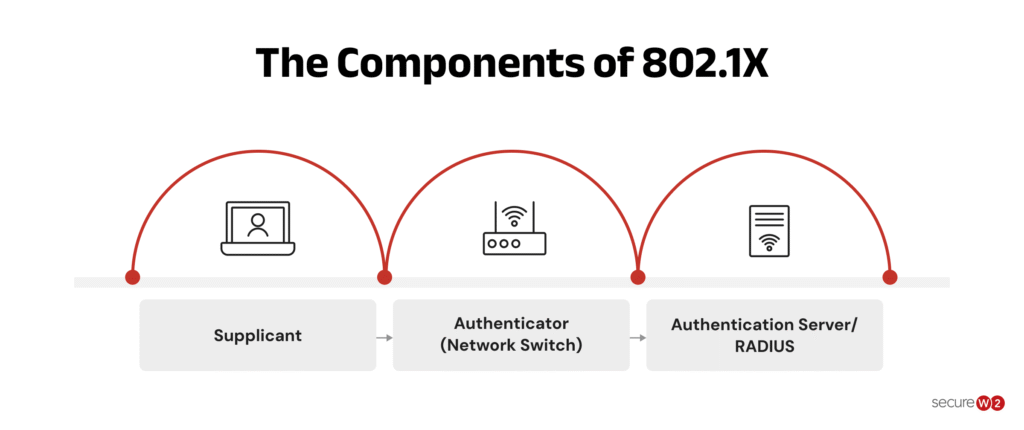
The following table provides an overview of how each component works:
Component | Role | Example |
|---|---|---|
Supplicant | Requests access and provides authentication information | Laptop, phone, IoT device |
Authenticator | Controls access and relays authentication messages | Switch or wireless access point |
Authentication Server | Validates authentication and returns the access decision | RADIUS server |
Supplicant
A supplicant is the endpoint device — such as a laptop or smartphone — that requests network access. Supplicants can request access to both wired and wireless networks.
- The supplicant triggers the authentication process by sending an initial request to the authenticator.
- The supplicant provides credentials or digital certificate to prove its identity and gain access to the network.
Authenticator
Between the supplicant and the authentication server, there is an intermediary device called the authenticator. It controls access to the network resources as a gatekeeper.
- The authenticator acts as the supplicant’s point of entry into the network and is frequently a network switch or wireless access point (WAP).
- It enforces access control restrictions and transmits the supplicant’s authentication requests to the authentication server.
The authenticator utilizes the Extensible Authentication Protocol over LAN (EAPOL) to establish communication with the supplicant.
The process involves the interrogation of the supplicant’s identity and credentials, followed by the transmission of authentication requests to the authentication server, culminating in the return of the authentication outcome to the supplicant.
Authentication Server
The authentication server must verify the credentials provided by the supplicant.
- Authentication of users is enabled through the verification of the supplicant’s identification and credentials.
- The deployment of the authentication server can be either on-premises or as a cloud-based service.
In the cybersecurity domain, it is standard practice for an authentication server to gain entry to a user directory, which could encompass Active Directory, LDAP (Lightweight Directory Access Protocol), or Azure AD.
The network access authorization process involves scrutinizing the provided credentials against the stored user data to determine the eligibility of the supplicant.
The authentication server responds to the authenticator with an authentication result that states whether the supplicant’s credentials are legitimate or not.
The authentication server delivers an access-accept message, allowing the supplicant to access the network if the credentials are legitimate. An access-reject message is delivered in the event that the credentials are invalid, preventing network access.
How Does the 802.1X Protocol Work?
The 802.1X protocol controls network access by requiring a user or device to authenticate before joining a wired or wireless network.
The process involves three components: the supplicant, which requests access; the authenticator, which controls access to the network; and the authentication server, which verifies the identity.
The image below illustrates how the authentication process works:
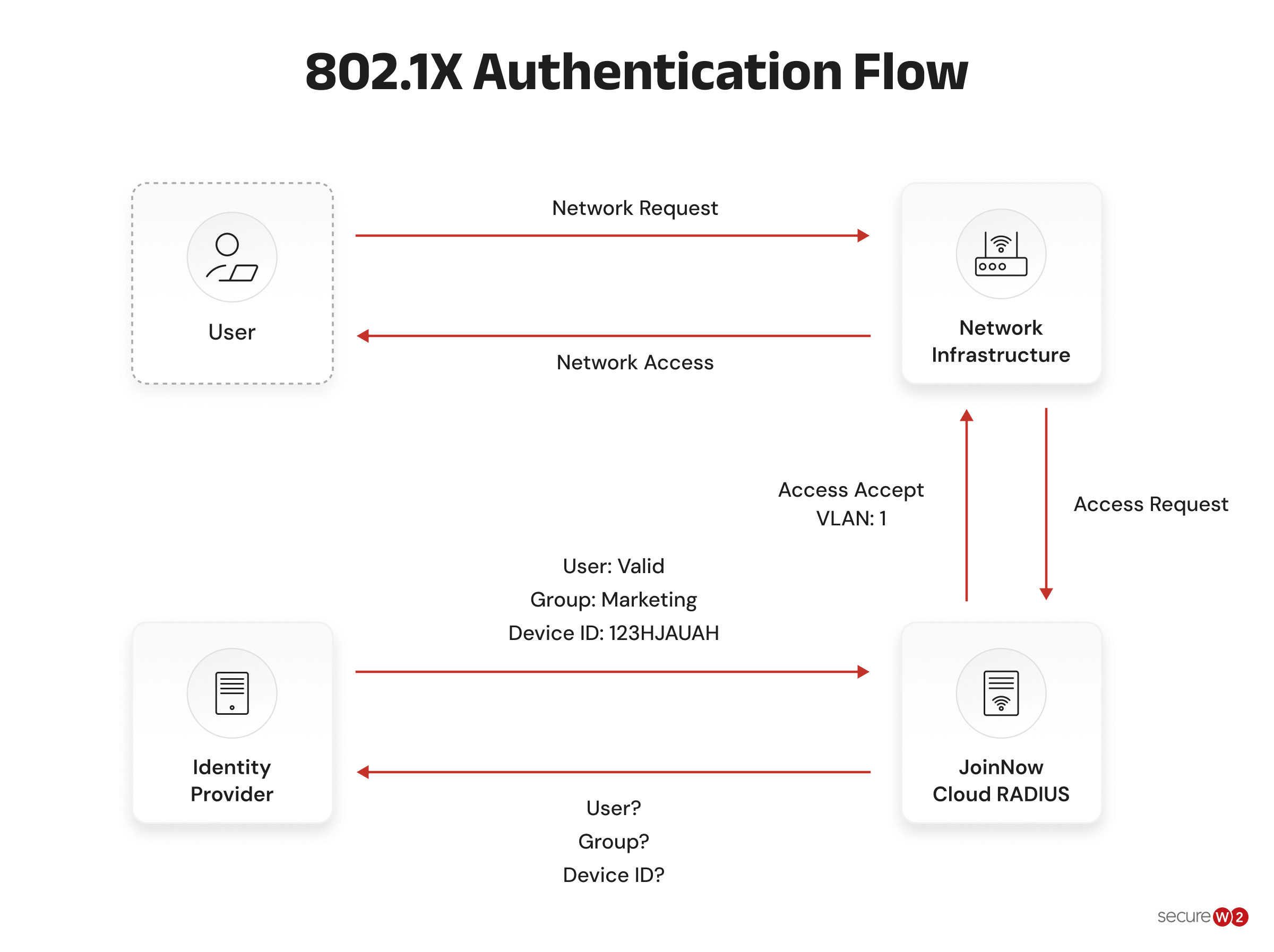
- The supplicant requests access: A device connects to the network and initiates authentication with the authenticator, such as a switch or wireless access point.
- The authenticator requests the device’s identity: The authenticator sends an Extensible Authentication Protocol (EAP) Request/Identity message to identify the user or device requesting access.
- The supplicant responds with its identity: The device returns an EAP Response/Identity message containing the information needed to begin authentication.
- The authenticator forwards the request: The authenticator sends the authentication information to the authentication server, typically a RADIUS server, for verification.
- The authentication server selects the authentication method: Based on the configured policy, the server may request additional information, such as a password or digital certificate.
- The authentication exchange continues: The supplicant and authentication server exchange the required EAP messages through the authenticator until the authentication process is complete.
- The authentication server verifies the identity: The server validates the credentials or certificate and determines whether the supplicant is authorized to access the network.
- Access is granted or denied: The authentication server returns the result to the authenticator. If authentication succeeds, the authenticator allows network access. If it fails, access remains blocked.
EAP provides the authentication framework and supports different authentication methods.
Info: EAPOL carries EAP messages between the supplicant and authenticator, while RADIUS typically carries authentication messages between the authenticator and authentication server.
Common EAP Methods Used With 802.1X
802.1X uses EAP as its authentication framework, allowing organizations to choose different authentication methods based on their security and infrastructure requirements. The following table explains how the most common EAP methods work.
EAP Method | How It Works | Authentication Type |
EAP-TLS | Uses digital certificates to authenticate both the supplicant and authentication server, providing mutual authentication. | Certificate-based |
PEAP with MSCHAPv2 | Creates a TLS-protected tunnel, then authenticates the user within the tunnel using credentials such as a username and password. | Password-based |
EAP-TTLS | Creates a secure TLS tunnel and supports different inner authentication methods, including password-based methods such as PAP. | Tunnel-based, supports multiple methods |
Common Use Cases for 802.1X Authentication
802.1X authentication helps organizations control who and what can access the network. It can be used at different stages, from blocking unknown devices to applying access policies after authentication.
- Block unauthenticated devices:1X requires a device to authenticate before it can access the network. An unknown or unauthorized device can be denied access before it reaches protected resources.
- Identify users and devices: Organizations can use 802.1X to identify who is connecting and which device they are using. This gives IT teams better visibility into network activity.
- Onboard guests and BYOD:1X can authenticate employee-owned and guest devices without relying on a shared Wi-Fi password. Separate policies can then limit their access to corporate resources.
- Apply role-based access: Authentication can trigger different network policies based on the user’s identity, device, or role. For example, a RADIUS server can assign an authenticated device to a specific VLAN (Virtual Local Area Network).
- Control active sessions: Network access can be monitored and changed after authentication. Administrators can update policies or terminate a session when a device or user’s access should no longer be allowed.
Implementing the 802.1X Protocol
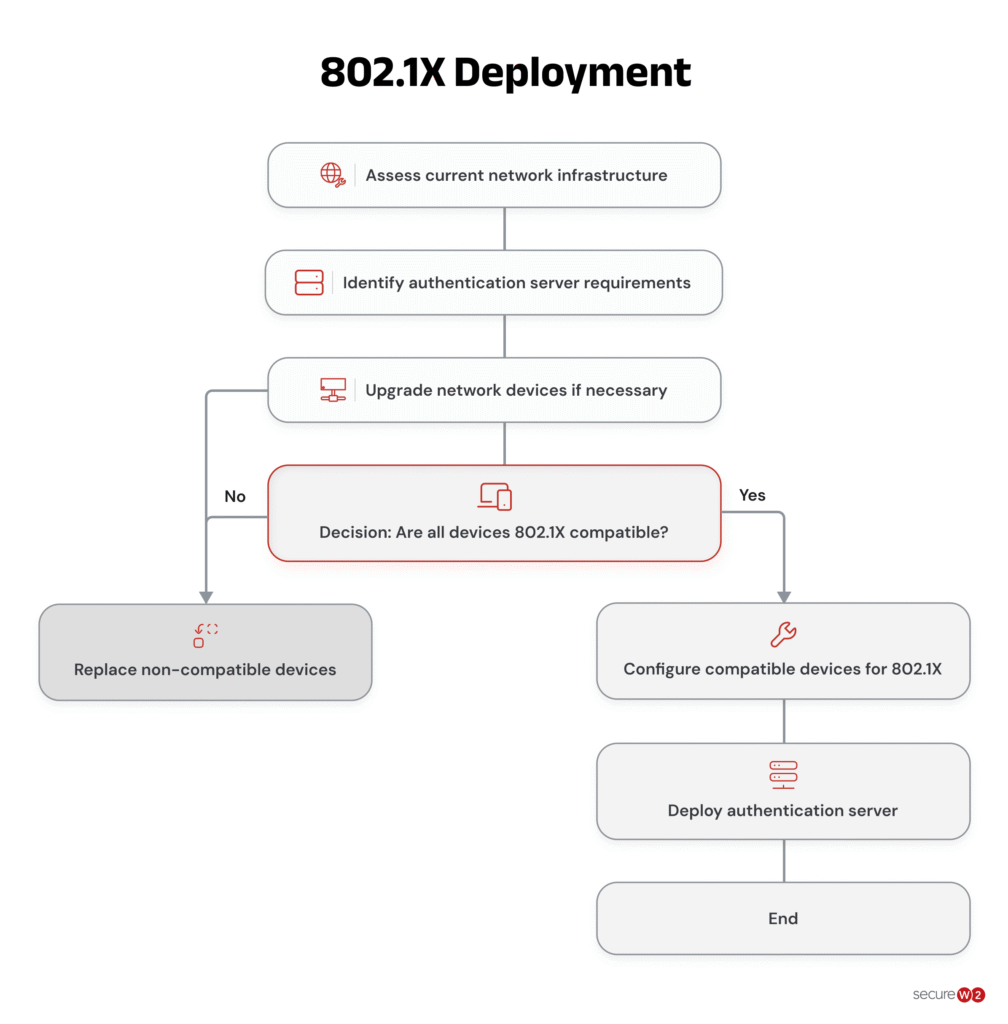
The deployment of the 802.1X protocol necessitates a series of procedures, such as setting up the network architecture, configuring the RADIUS server, and configuring the network devices. Let’s dive deeper into each phase for a comprehensive analysis.
1. Preparing the Network Infrastructure
- Determine which network devices will be supporting 802.1X by identifying them. This typically includes switches, wireless access points, and routers.
- Verify the presence of 802.1X support within the firmware of all network devices. Ensure that the firmware is updated to a version that is compatible, if deemed necessary.
- Examine the network topology to comprehend how network devices are positioned and identify the 802.1X authentication points.
- Establish authentication protocols that dictate the permissible devices and users authorized to access the network, along with the corresponding authentication procedures to be enforced.
The following chart explains how to implement and deploy 802.1X:
2. Configuring the RADIUS Server
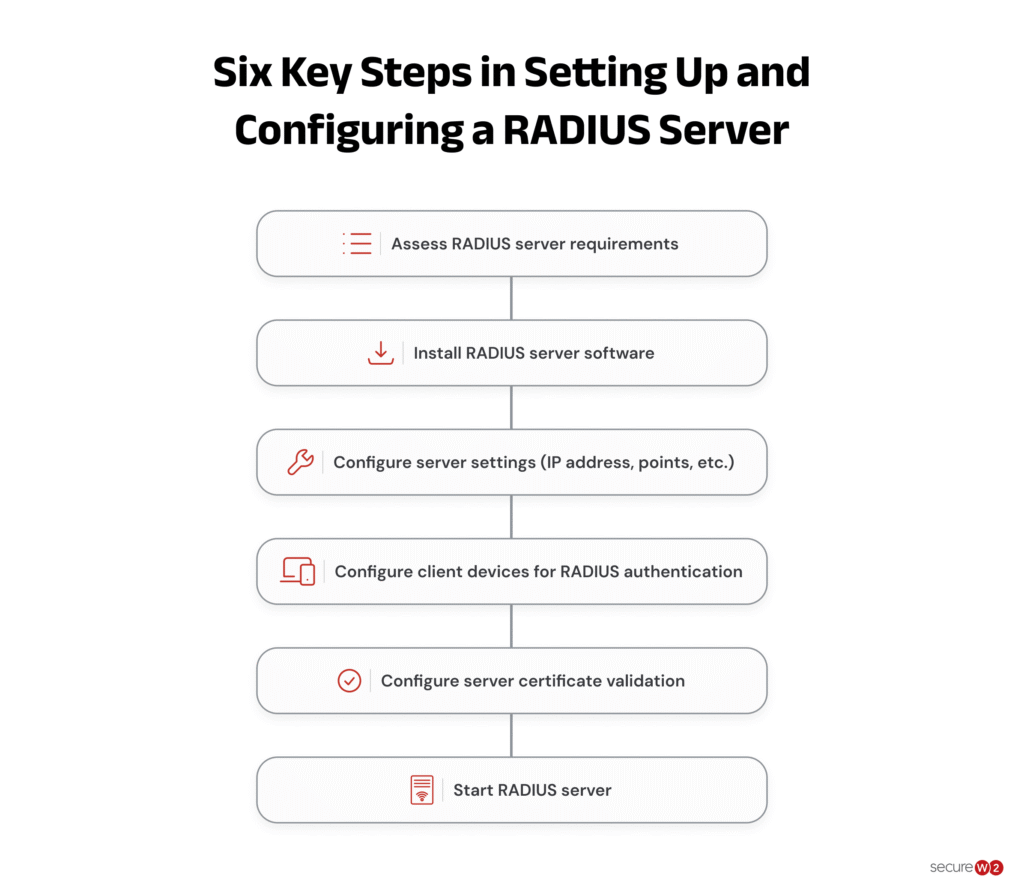
- It is highly advisable to implement the RADIUS server software on a separate and exclusive server for enhanced security measures.
- It is imperative to verify the compatibility of the selected RADIUS server with your system before starting the installation and configuration procedures.
- Ensure the RADIUS server is properly configured with relevant details regarding the network devices, also known as RADIUS clients, that are responsible for performing user authentication.
- It is crucial to ensure the accuracy and specificity of pertinent details, including IP addresses, shared secrets, and other relevant data.
- Integrate the user databases — such as LDAP /SAML or identity providers, which hold user credentials for authentication — with the RADIUS server.
- Create network policies on the RADIUS server to specify the unique access restrictions and authentication guidelines for various user groups or devices.
The chart below illustrates the steps to setting up a RADIUS server.
3. Configuring the Network Devices
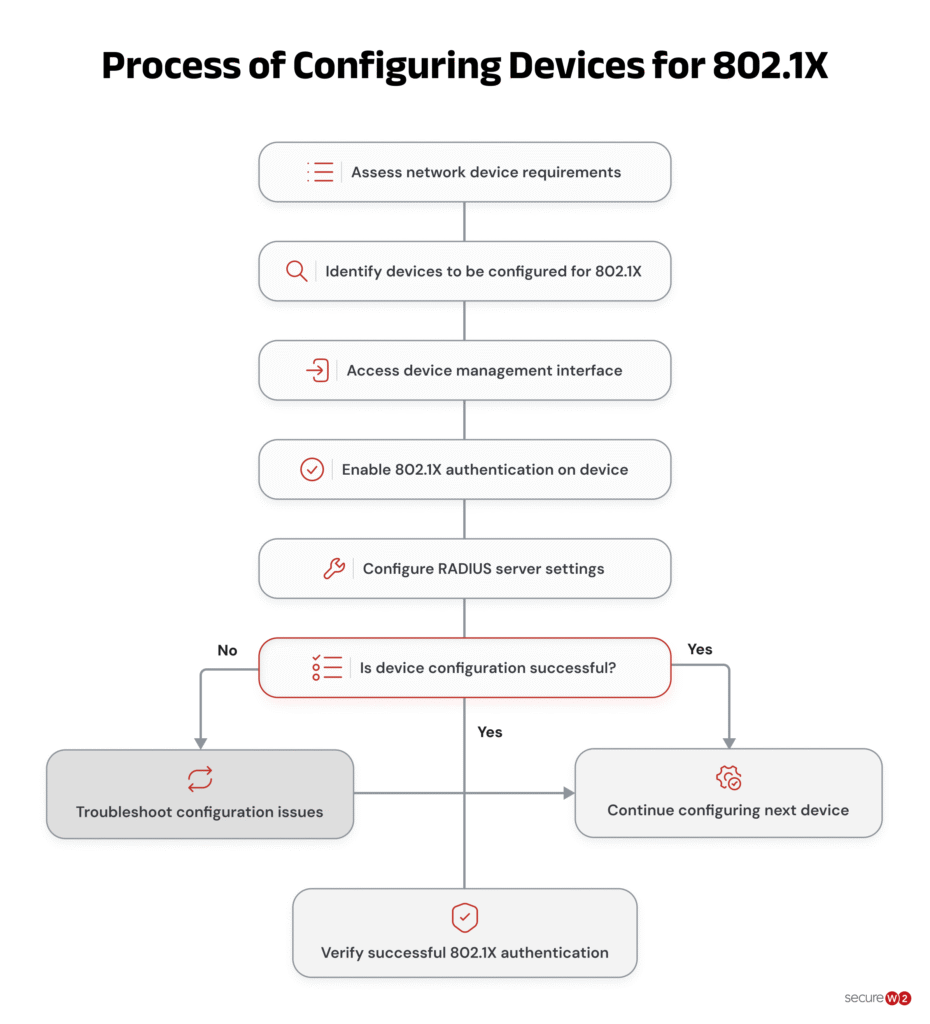
- Enable 802.1X on all network devices by logging into each device that will use the protocol. Usually, the administration interface or command-line interface of the device is used for this.
- Configure the IP address and shared secret of the RADIUS server on all network devices to ensure optimal security measures. This measure guarantees the creation of a protected means of communication between the device and the RADIUS server to facilitate the process of authentication.
- Implement per-port authentication options for the network device configuration.
- Based on the particularities of your network configuration, it is recommended to cautiously activate 802.1X authentication on specific ports instead of deploying it across the entire network. It is recommended to configure the reauthentication intervals and opt for the suitable authentication method, such as EAP-TLS or EAP-PEAP.
- Configure a guest VLAN on the network devices to ensure segregation of unauthenticated or guest devices from the primary network.
- In the event of unsuccessful authentication, the respective devices will be assigned to this VLAN.
The flowchart below provides a detailed breakdown of the process of configuring devices for 802.1X.
4. Testing and Deployment
- Test the configuration by connecting devices to the network ports and watching the authentication procedure to confirm the 802.1X settings. Authenticated devices must have the proper access privileges and unauthenticated devices must be limited to the guest VLAN or not allowed access at all.
- Keep an eye out for any problems or anomalies by continuously monitoring the network devices, RADIUS server logs, and authentication procedures. Investigate and fix any issues that surface.
- Following a successful test, all network devices in your infrastructure should have the 802.1X configuration installed. This can include going through the configuration processes on each device again.
Advantages of the 802.1X Protocol
The 802.1X protocol has various advantages over other authentication methods, including:
- Individual User Authentication: Authenticates users individually instead of relying on a shared password, providing better access control and easier user-level monitoring than WPA2-PSK (Pre-Shared Key).
- Centralized Authentication: Uses a central RADIUS authentication server to manage user credentials, access policies, and authentication across the network.
- Flexible and Extensible: Supports multiple EAP methods, allowing organizations to choose an authentication approach that fits their security and infrastructure requirements.
- Improved Security: Requires authentication before granting network access and, with secure EAP methods, helps protect credentials from interception and unauthorized access.
Disadvantages of the 802.1X Protocol
The 802.1X protocol also has significant drawbacks, such as:
- Implementation Complexity: Requires careful configuration, deployment, and ongoing administration, often requiring specialized IT expertise.
- Network Infrastructure Requirements: Relies on supporting infrastructure such as RADIUS servers, compatible switches, and network access points, which can increase deployment costs.
- Compatibility Issues: Older or unsupported network devices may not work with 802.1X, potentially requiring hardware upgrades or infrastructure changes.
Note: An effective onboarding solution assists organizations in overcoming the limitations of the 802.1X standard.
The right onboarding solution lessens the complexity involved with deploying the protocol by providing a user-friendly interface and streamlined configuration process. As a result, organizations without substantial technical know-how or dedicated IT staff can use it more easily.
Additionally, by handling authentication procedures and easily integrating with existing network devices, onboarding solutions minimize the need for expensive infrastructure investments.
Because it guarantees compatibility with a variety of hardware, including older devices, organizations can use the protocol without having to invest in pricey updates.
Overall, an efficient onboarding solution makes it easier to adopt the 802.1X protocol, decreases the amount of equipment needed, and fixes compatibility problems, enabling organizations to make use of its security advantages more quickly and affordably.
What Is the Difference Between 802.1X and WPA2?
802.1X and WPA2 serve different purposes, but they are often used together in enterprise Wi-Fi networks.
802.1X controls how users and devices authenticate before gaining network access, while WPA2 provides security for the wireless connection itself. The following table explains the key differences between 802.1X and WPA2.
Feature | 802.1X | WPA2 |
|---|---|---|
What it is | An IEEE standard for port-based network access control | A Wi-Fi security standard |
Primary purpose | Authenticates users or devices and controls network access | Protects wireless communications through encryption and authentication |
Network type | Wired and wireless networks | Wireless networks only |
Authentication | Uses EAP and commonly works with a RADIUS server | Supports Personal (PSK) and Enterprise authentication |
Enterprise use | Commonly used to authenticate individual users or devices | WPA2-Enterprise uses 802.1X for authentication |
Encryption | Does not provide wireless encryption by itself | Uses encryption to protect Wi-Fi traffic |
Example | A laptop authenticates with an EAP-TLS certificate before receiving network access | WPA2 encrypts the laptop’s wireless traffic after it connects |
How 802.1X and WPA2 Work Together
In an enterprise Wi-Fi environment, WPA2-Enterprise uses 802.1X as its authentication framework.
The device authenticates through the access point and RADIUS server, and once authentication succeeds, WPA2 provides encryption for the wireless connection.
802.1X is responsible for access control and authentication, while WPA2 secures the Wi-Fi connection. They are complementary technologies rather than direct alternatives.
Replace Legacy 802.1X Infrastructure With Certificate-Based Network Access
802.1X is only as strong as the infrastructure behind it. Password-based methods such as PEAP-MSCHAPv2 introduce credential risk that no firewall can fully neutralize whereas certificates remove that risk entirely.
Our JoinNow platform delivers cloud-native 802.1X enforcement built around EAP-TLS, with streamlined certificate enrollment for both managed and unmanaged devices, eliminating the need for on-premises RADIUS hardware while simplifying secure network access at scale.
Organizations that move to SecureW2 solutions minimize credential-based support tickets, and close attack surfaces left wide open by legacy network access control systems.
See how SecureW2 simplifies certificate-based 802.1X for your environment: Schedule a demo.
Frequently Asked Questions
What is a controlled port vs. an uncontrolled port?
A controlled port restricts normal network access until the device successfully authenticates. An uncontrolled port allows authentication-related traffic to pass between the supplicant and authenticator before authentication is complete.
Does 802.1X work for both wired and wireless networks?
Yes. 802.1X works with both wired and wireless networks. On wired networks, an Ethernet switch can act as the authenticator. On Wi-Fi networks, the wireless access point typically performs this role.
What’s the difference between 802.1X and WPA2/WPA3-Enterprise?
802.1X is an authentication and network access control framework, while WPA2-Enterprise and WPA3-Enterprise are wireless security standards that use 802.1X for authentication. In an enterprise Wi-Fi deployment, 802.1X handles the authentication process while WPA2 or WPA3 provides wireless security and encryption.
What is the most secure EAP method for 802.1X?
EAP-TLS is generally considered one of the strongest EAP methods for 802.1X deployments. It uses digital certificates to provide mutual authentication between the device and authentication server, eliminating the need for users to authenticate with a password.
Does 802.1X encrypt network traffic?
No, 802.1X itself does not encrypt network traffic. Authentication and encryption are separate functions. For Layer 2 traffic encryption, organizations can use MACsec (IEEE 802.1AE), while 802.1X can support the authentication and key-management process through MACsec Key Agreement (MKA).
What happens if a device fails 802.1X authentication?
If authentication fails, the controlled port remains unauthorized, preventing normal network access. Depending on the network configuration, the device may instead be placed in a guest or quarantine VLAN with limited access.
Do I need a RADIUS server to use 802.1X?
Most 802.1X deployments use a RADIUS server as the authentication server. Organizations can deploy RADIUS on-premises or use a cloud-based RADIUS service to authenticate users and devices and return network access policies.