
Best Secure Wi-Fi Authentication Protocols
Wireless networks have become an integral part of our daily routine as they interconnect our devices and provide us with the convenience of mobile internet access. The convenience of wireless connectivity necessitates robust security measures to protect our sensitive information and privacy.
This is why implementing wireless authentication protocols is of the utmost importance. Wi-Fi authentication protocols guarantee that legitimate users are granted access to wireless networks. This introductory guide will delve into the primary wireless authentication methods, particularly emphasizing WPA2-Enterprise and its comparative advantages over other methodologies.
Understanding Wireless Authentication Protocols
Establishing and enforcing rigorous wireless network access restrictions is made possible using wireless authentication protocols, which are vital to network security.
Developing secure connections, preventing unauthorized access, and protecting data and privacy depend on the right wireless authentication methods being put into practice.
We will examine the following main wireless authentication techniques in more detail:
- Wired Equivalent Privacy (WEP)
- Wi-Fi Protected Access (WPA)
- Wi-Fi Protected Access 2 (WPA2)
- Wi-Fi Protected Access 3 (WPA3)
Wired Equivalent Privacy (WEP)
WEP, the inaugural security protocol for wireless networks, holds historical significance in cybersecurity. However, its current security status is deemed inadequate due to notable vulnerabilities.
The WEP protocol employs a uniform encryption key that remains static across all network devices. Regrettably, the data’s security has been compromised due to the vulnerability of the static key, which can be effortlessly intercepted and utilized to its detriment.
Warning: Due to its vulnerability, we don’t recommend utilizing WEP today.
Wi-Fi Protected Access (WPA)
WPA was developed to address its vulnerabilities as a security enhancement to its predecessor, WEP. The WPA protocol implemented the Temporal Key Integrity Protocol (TKIP) to ensure that encryption keys are generated dynamically for every data packet transmitted.
The implementation of this particular feature significantly enhances the level of complexity that malicious actors must overcome to successfully decipher the encrypted traffic. The utilization of Message Integrity Check (MIC) has been incorporated by WPA to detect any potential tampering efforts.
Warning: Although WPA represents a step forward in comparison to WEP, it remains susceptible to various vulnerabilities that can be exploited by malicious actors, ultimately compromising its security.
Wi-Fi Protected Access 2 (WPA2)
Currently, WPA2 stands as the predominant industry standard for upholding wireless security. Implementing an Advanced Encryption Standard (AES) instead of TKIP enhances the security of WPA.
Info: Advanced Encryption Standard (AES) is a robust encryption methodology that presents formidable obstacles to malevolent entities endeavoring to decipher sensitive information.
The WPA2 protocol offers discrete modes of operation, specifically Personal (WPA2-PSK) and Enterprise (WPA2-Enterprise).
WPA2-PSK (Pre-Shared Key)
In this particular mode of operation, the devices undergo authentication by means of a pre-established password, commonly referred to as a Pre-Shared Key (PSK).
Warning: Using a uniform password across multiple network devices can pose a potential security threat, particularly in extensive deployment scenarios.
Consider a coffee shop that provides its customers with the same password. An intruder who acquires the password may enter the network and steal data from any linked device — and passwords aren’t necessarily difficult to acquire.
DailyQuiz (previously ThisCrush) had a breach in 2021, allowing hackers access to a database of around 13 million users. The attackers obtained 8.3 million users’ unencrypted passwords, email addresses, and IP addresses and sold them on the Dark Web, finally finding their way into the public domain in May after being swapped via several data brokers.
Too many organizations make the mistake of storing critical user information unencrypted. No database is completely safe. If a hacker manages to access it, encrypting the data within would make it indecipherable — hence, unusable — to them.
WPA2-PSK is a popular home network choice due to its ease of use. However, it should not be utilized in professional settings.
Success: WPA2-Enterprise offers more robust security and should be considered by businesses.
WPA2-Enterprise
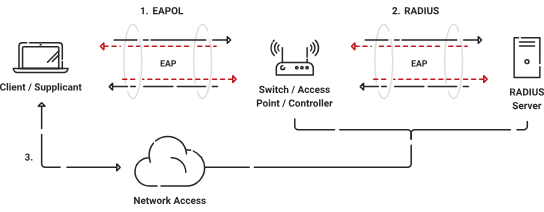
WPA2-Enterprise is highly suitable for enterprise environments because it utilizes the robust 802.1X authentication infrastructure. The diagram above illustrates the authentication process.
WPA2-Enterprise requires a few components to implement successfully:
- Supplicant
- Access point
- Authentication server
A supplicant — a mobile device or a laptop — is the device that begins connecting to the network in an 802.1X architecture. The access point or switch performs the authenticator role, and the authentication server (usually a RADIUS server) checks the supplicant’s credentials.
The supplicant sends their login details to the authenticator, which then sends them to the authentication server. Then the authentication server checks the passwords and tells the authenticator what to do next. If the passwords are accepted, the authenticator gives entry to the network. If not, the door is closed.
Success: 802.1X hardware makes networks safer by letting each user authenticate themselves rather than having one password for the whole network.
It is often used in business settings to ensure that only authorized devices and users can connect to the network and access private resources.
This video delves into how 802.1X authentication works.
Wi-Fi Protected Access 3 (WPA3)
WPA3 represents the most recent advancement in wireless security protocols, designed to address vulnerabilities identified in preceding iterations. The system provides enhanced security functionalities such as heightened encryption and fortified protection against offline password-cracking endeavors.
While WPA3 is a promising development in cybersecurity, it is important to note that its compatibility with current devices may be limited due to its nascent stage of development.
Wi-Fi Protected Access 3 (WPA3)
WPA3 represents the most recent advancement in wireless security protocols, designed to address vulnerabilities identified in preceding iterations. The system provides enhanced security functionalities such as heightened encryption and fortified protection against offline password-cracking endeavors.
While WPA3 is a promising development in cybersecurity, it is important to note that its compatibility with current devices may be limited due to its nascent stage of development.
What Is the Best Wi-Fi Authentication Protocol?
There is no one absolute best Wi-Fi authentication method. Each organization has slightly different security requirements; teams should select their wireless authentication protocols accordingly.
That said, enterprise Wi-Fi authentication methods are a smart choice for many businesses and larger organizations.
WPA3-Enterprise secures networks by requiring users and devices to validate their credentials through a RADIUS server, eliminating the risks associated with shared passwords.
WPA2-Enterprise also uses a RADIUS server to authenticate users and devices. It’s also a strong choice for most businesses.
Small businesses and remote teams may prefer to use WPA3-Personal, which is easier to deploy than an enterprise authentication method. WPA3-Personal doesn’t require a RADIUS server or Active Directory database, making it less costly to implement and maintain; at a small scale, it still delivers impressive security benefits.
What Is Enterprise Wi-Fi Authentication?
Enterprise Wi-Fi authentication is a Wi-Fi authentication method that requires users or devices to verify their identity before they can read or transmit data over a wireless network.
Enterprise authentication methods don’t rely on shared passwords; instead, they assign each user a unique credential or digital certificate. As a result, admins can decide exactly how much access to grant each user or device. They can also easily track user activity and revoke access as needed.
Info: Enterprise authentication tools provide an extra layer of security, making it much more difficult for malicious actors to access private networks.
How Does Enterprise Wi-Fi Work?
Enterprise Wi-Fi leverages the IEEE 802.1X standard to authenticate users and devices. Here’s how that works:
- The 802.1X authenticator recognizes that a new device is seeking to join the network. In response, the authenticator blocks traffic at the port until the new device shows its credentials.
- The supplicant, or new device, shares its certificate with the authenticator, which passes it to the authentication server.
- The authentication server verifies the credentials against a secure directory and then passes a message to the authenticator containing detailed instructions about access to be granted to the supplicant.
WPA2-Enterprise: Enhancing Wireless Security With Digital Certificates
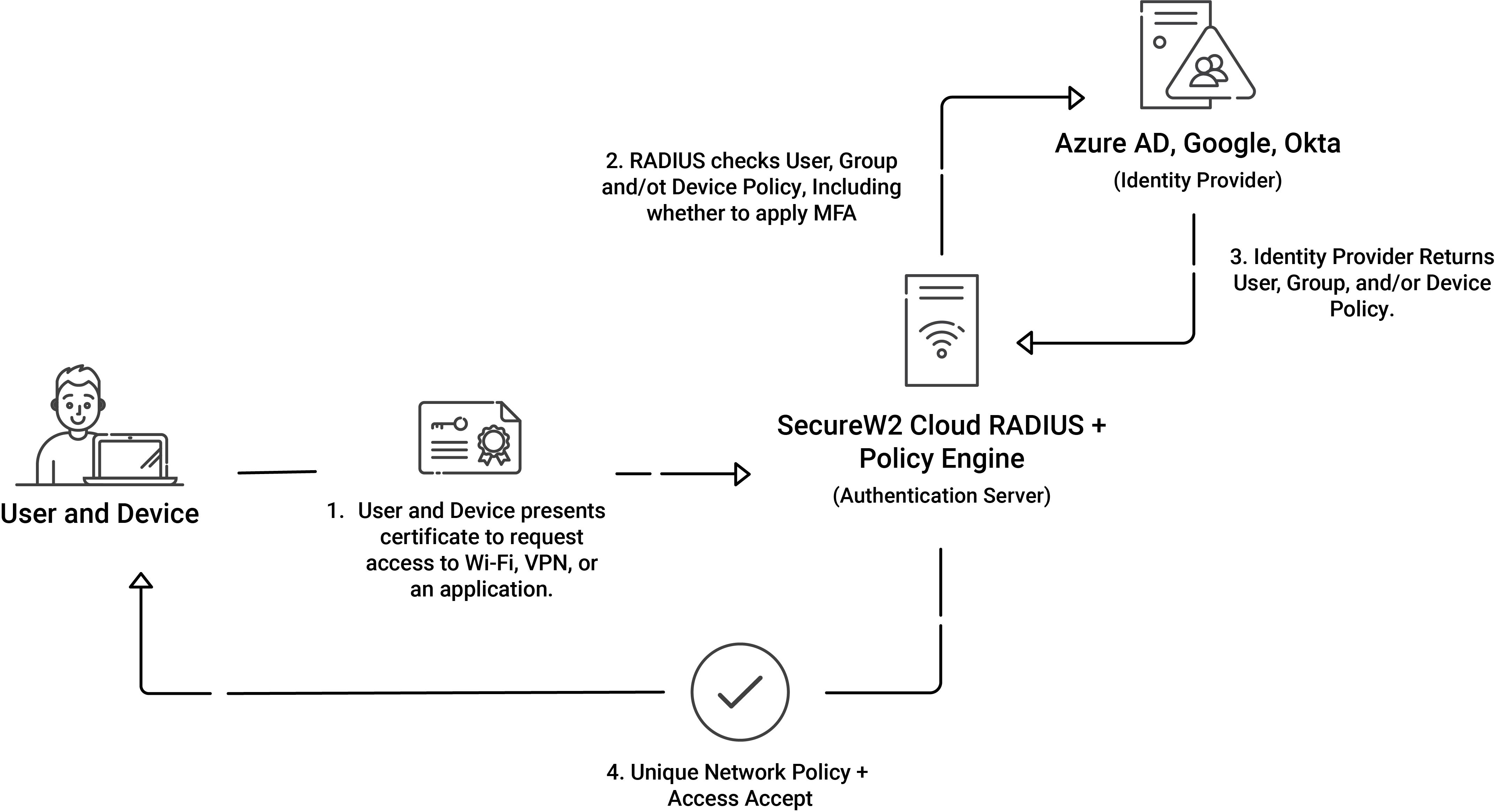
The combination of WPA2-Enterprise and 802.1X yields robust security measures for wireless networks. However, if you still use passwords, your organization’s network will remain vulnerable even with 802.1X authentication infrastructure. The diagram above illustrates what authentication looks like when you use digital certificates instead of passwords.
By utilizing digital certificates for authentication, this solution addresses the limitations of traditional protocols and provides enhanced security, scalability, and precise management of user access permissions. In the next section, we’ll delve into the intricacies of WPA2-Enterprise and scrutinize its efficacy in safeguarding Wi-Fi connections.
WPA2 Enterprise and 802.1X
WPA2-Enterprise is a security mechanism that operates within the Wi-Fi Protected Access 2 (WPA2) protocol. The utilization of the 802.1X authentication framework is leveraged to enhance the security of enterprise environments.
Info: Utilizing digital certificates is an important and more secure aspect of WPA2-Enterprise, which serves to authenticate users and devices.
This contrasts with WPA2 Personal (WPA2-PSK), which relies on a shared passphrase for authentication.
Digital Certificates for Authentication
Digital certificates serve as electronic authentication mechanisms that validate the authenticity of both users and connected devices.
The aforementioned certificates are issued by a trustworthy Certification Authority (CA) and contain crucial information such as:
- the public key of the entity
- identity particulars
- the digital signature of the CA
Upon initiating a connection to a WPA2-Enterprise network, the client device proffers its digital certificate to the authentication server to verify its identity.
Advantages of WPA2 Enterprise and Digital Certificates
Info: WPA2-Enterprise, when used with digital certificates, provides greater security and scalability by eliminating the vulnerabilities associated with shared passwords.
WPA2-Enterprise offers strong network protection and efficient authentication procedures by having the ability to enforce granular user access control. Below is a detailed discussion of the advantages:
- Enhanced Security
Using digital certificates, WPA2-Enterprise reduces the security vulnerabilities from shared passwords. Using strategies like social engineering or brute-force assaults, passwords may be readily compromised.
On the other hand, a digital certificate’s private key is securely kept on the client device and offers a greater type of authentication.
Success: Using digital certificates greatly reduces the risk of unauthorized network access.
- Scalability
WPA2-Enterprise with 802.1X authentication is suitable for bigger organizations with a large user base since it provides centralized administration and authentication functions.
Digital certificates, which allow dynamic, per-user authentication, simplify adding or deleting users from the network.
Success: This scalability ensures efficient network access, management, and maintenance.
- Granular User Access Control
The ability of WPA2-Enterprise to impose granular user access controls is one of its key benefits. Administrators can provide customized access privileges for various user groups or people using the 802.1X standard.
This degree of control improves network security by ensuring that each user is given the appropriate privileges based on their position or requirements.
Success: Granular access control reduces the possibility of unauthorized access and data breaches.
Authentication Protocols for WPA2 Enterprise
WPA2-Enterprise supports a variety of authentication protocols. These protocols are essential to the authentication process because they provide secure connections and enable the identification of persons and devices.
Let’s analyze some of the popular WPA2-Enterprise authentication protocols:
- EAP-TLS (Extensible Authentication Protocol-Transport Layer Security)
- PEAP-MSCHAPv2 (Protected Extensible Authentication Protocol – Microsoft Challenge Handshake Authentication Protocol version 2)
- PAP (Password Authentication Protocol)
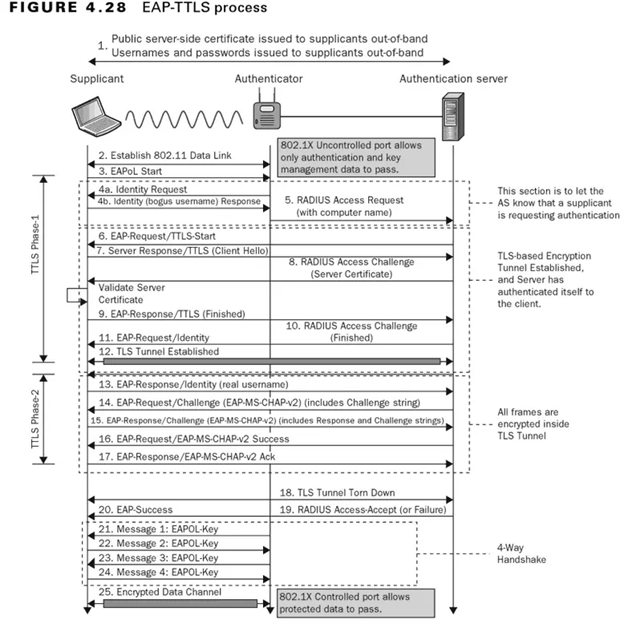
- EAP-TTLS (Extensible Authentication Protocol-Tunneled Transport Layer Security)
The following table illustrates the key differences between these protocols:
WPA2 & WPA3 Enterprise Common Protocols
| WPA2 & WPA3 Enterprise Common Protocols | Level of Encryption | Authentication Speed | Directory Support | Credentials |
|---|---|---|---|---|
| EAP-TLS | Public-Private Key Cryptography | Fast – 12 Steps | Universal | Passwordless |
| PEAP-MSCHAPv2 | Bad Encryption (MD4, Compromised since 1995) | Slow – 22 Steps | Active Directory | Passwords |
| EAP-TTLS/PAP | No Credential Encryption | Slowest – 25 Steps | Non-AD LDAP Servers | Passwords |
EAP-TLS
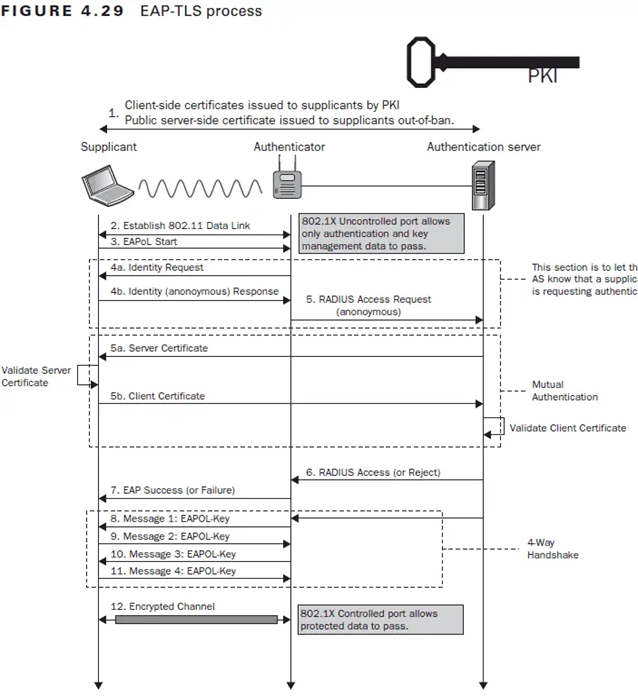
EAP-TLS is a trusted and highly secure authentication method often used in WPA2-Enterprise networks. The client device and the authentication server’s identities are verified using digital certificates.
During the authentication process, the client presents the server with their digital certificate, and the server verifies their validity. EAP-TLS facilitates secure communication by creating an encrypted connection between the client and the server, as the image below illustrates.
PEAP-MSCHAPv2
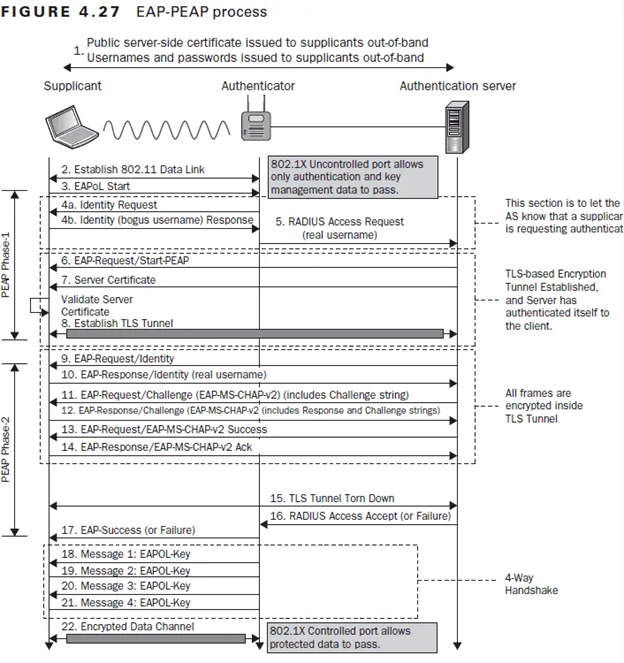
PEAP-MSCHAPv2 is another widely used authentication method in WPA2-Enterprise networks, particularly in Microsoft settings. It combines EAP-TLS security with the simplicity of username/password authentication.
Initial authentication in this protocol happens across a secure tunnel between the client and the server. The server subsequently verifies the client’s credentials using the MS-CHAPv2 protocol, which protects the authentication process from hacking or eavesdropping. The following image illustrates how the process works.
PAP
Even though PAP is thought to be less secure than PEAP-MSCHAPv2 and EAP-TLS, some WPA2-Enterprise implementations offer it nevertheless. PAP includes sending the user’s password to the authentication server in clear text for validation.
Warning: Because of the lack of encryption, PAP is vulnerable to interception and is not generally suggested for usage in secure contexts.
It can be applied when stronger authentication mechanisms are not supported or in legacy systems.
EAP-TTLS
EAP-TTLS is an authentication protocol that offers other authentication methods a secure tunnel. It combines Transport Layer Security’s (TLS) security with EAP’s adaptability. EAP-TTLS permits using several authentication techniques inside the secure tunnel, including PAP, CHAP, and MS-CHAPv2.
Success: EAP-TTLS supports a larger range of credential types while ensuring secure authentication.
The following diagram illustrates the EAP-TTLS process:
Unleash the Power of WPA2 Enterprise and Passwordless Authentication
SecureW2 provides an end-to-end solution for deploying WPA2-Enterprise and improving network security. We offer solutions that simplify implementing digital certificates, do away with the need for passwords, and provide a streamlined authentication process for your users.
With SecureW2’s managed PKI, administrators can create as many certificate authorities as they need and manage all steps of the certificate lifecycle. We also provide simple onboarding technology for managed and unmanaged devices to ensure each certificate is issued to all devices.
SecureW2 also provides Cloud RADIUS, a cloud-based RADIUS server solution that verifies the validity of PKI-issued digital certificates. Implementing WPA2-Enterprise securely and flexibly is possible with Cloud RADIUS’s centralized and managed user authentication, accounting, and authorization procedures.
SecureW2’s solutions let you deploy WPA2-Enterprise, raise the bar on network security, and simplify and streamline user authentication. Contact us today, and let our team of experts direct you toward streamlined, reliable solutions.
Frequently Asked Questions
What are the four types of Wi-Fi security protocols?
When people talk about the “types” of Wi-Fi security protocols, they are usually referring to the four generations of protocols. The technology has been in evolution since the late 1990s, and each new generation improves on the previous one.
Those four generations are WEP, WPA, WPA2, and WPA3. Today, WPA3, or Wi-Fi Protected Access 3, is the state-of-the-art protocol, delivering individualized data encryption and simultaneous authentication.
Within these generations, Wi-Fi authentication methods also come in both home and enterprise versions. Home authentication methods use a shared password for all users, while enterprise versions rely on credentials or digital certificates to authenticate users and devices.
What are the major wireless security standards?
The four major wireless security standards are WEP, WPA, WPA2, and WPA3. WPA3, or Wi-Fi Protected Access 3, is the most up-to-date iteration of wireless security technology. WPA3-Enterprise is the gold standard for Wi-Fi security used by businesses around the world.
What are the main wireless authentication modes?
The main wireless authentication modes are Open, Personal, and Enterprise. Each mode takes a very different approach to authentication.
Open authentication is often used in public locations, like cafes or airports. Users may need to enter a password to access the browser, but the network itself does not ask for passwords or credentials. Data exchanged on an open network is unencrypted and can easily be intercepted by malicious users on the same network.
Personal mode uses pre-shared keys (PSKs) to authenticate users. In the latest setups, this is replaced by simultaneous authentication to protect the PSKs from being intercepted.
Personal mode is often used in home offices and small networks. It is relatively secure but leaves open the risk that cyberattackers could access personal data through a stolen device or a leaked password.
Enterprise mode replaces shared passwords with the 802.1X authentication framework, which requires each device to authenticate using unique credentials. This mode is used by larger businesses and organizations. It provides the highest level of security and allows admins to track users at a granular level.
