How RADIUS Improves Wi-Fi Security | Wi-Fi RADIUS Authentication
As Wi-Fi networks continue to expand, they have become a popular target for hackers. Cybercriminals have designed countless types of attacks, including man-in-the-middle (MITM) attacks, to target users on wireless networks. But with the right defensive measures and technology, organizations can protect their networks from attack.
A Remote Authentication Dial-In User Service (RADIUS) server for Wi-Fi protects your networks by ensuring only authorized users can access them. RADIUS servers are seeing increased use across all types of businesses due to the wide array of security benefits they offer.
In this article, we’ll examine what a RADIUS server can do for a Wi-Fi network, how Wi-Fi RADIUS authentication works, and why organizations should consider deploying a RADIUS server for their Wi-Fi.
What Is a RADIUS Server?
A Remote Authentication Dial-In User Service server (RADIUS server) is an authentication server that prevents unauthorized access to wired and wireless networks, as well as virtual private networks (VPNs), by serving as a central verification point for user identification. This means network devices don’t need to store user credentials locally, as the RADIUS server queries a user directory instead.
RADIUS servers are sometimes called AAA servers because they have centralized authentication, authorization, and accounting capabilities:
- Authentication: When users or devices initially request access to the network, RADIUS servers authenticate them, confirming their identity with credentials or a digital certificate.
- Authorization: RADIUS servers can also reference a directory of user information to determine the level of authorization individuals should be granted once they’ve been verified: which resources they can access based on role or other specific permissions.
- Accounting: RADIUS servers create RADIUS event logs that provide a detailed snapshot of the devices accessing a networking resource — such as login and logout times and time-stamped activities — as well as audit trails for regulatory compliance.
This AAA framework forms the basis for most modern network protocols, including RADIUS and TACACS+.
RADIUS isn’t the only AAA protocol — many organizations compare TACACS+ vs. RADIUS. However, many ultimately choose RADIUS for its network and device administration capabilities.
There are many authentication protocols organizations can use alongside RADIUS.
There are many authentication protocols organizations can use alongside RADIUS. These protocols typically determine how an end user or device authenticates itself. The most popular options include credential-based authentication (username and password) and certificate-based authentication.
Why Use RADIUS Servers for Wi-Fi Authentication?
RADIUS Wi-Fi authentication offers a stronger network security posture through its AAA core functions, which prevent unauthorized network access and keep detailed access records for ongoing security and audit readiness. The entire process is designed to protect your organization, data, devices, and users.
Benefits of Wi-Fi RADIUS authentication include:
- Enhanced Wi-Fi security: RADIUS supports WPA2-Enterprise and WPA3-Enterprise networks with advanced encryption and AAA functions, offering better security for sensitive data.
- Real-time policy enforcement: If an employee loses their device or an administrator needs to revoke access, RADIUS enables instant revocation for specific users without impacting other authorized users.
- Simple guest Wi-Fi access: Authenticate users for limited guest access with RADIUS features such as captive portals with branded login pages and self-service enrollment.
- Network segmentation: Use virtual local area networks (VLANs) to assign users or devices to unique network segments, which helps keep sensitive data safe on restricted servers and databases.
- BYOD security: Enforce flexible bring-your-own-device (BYOD) policies with device-agnostic RADIUS user authentication.
Using a RADIUS server for Wi-Fi comes with additional benefits depending on implementation — specifically, which credential- or certificate-based authentication method you use.
The Key Components of RADIUS Wi-Fi Authentication
The three key components of RADIUS authentication are:
- The supplicant or client device: The user device sending a network access request
- The network access server (NAS): The network hardware that guards the network by sending the access request along
- The RADIUS server: The centralized authentication point that verifies a user’s identity and denies or grants access
To work successfully, RADIUS Wi-Fi authentication requires a few components beyond the standard password-based Wi-Fi authentication you see in home networks. The NAS must be an enterprise-grade wireless access point (AP), and all parties use a shared secret that keeps interactions between the client and server safe.
You will also need to determine which authentication protocol you want to use alongside your RADIUS solution. The authentication protocol dictates which method users and devices will use to prove their identities when they request access.
RADIUS Wi-Fi Authentication Protocols
Organizations typically use one of three protocols for RADIUS Wi-Fi authentication:
- EAP-TLS:Certificate-based authentication
- PEAP-MSCHAPv2:Credential-based authentication
- EAP-TTLS/PAP: Credential-based authentication
What Is EAP-TLS?
Extensible Authentication Protocol-Transport Layer Security (EAP-TLS) is a passwordless authentication protocol. Instead of logging into a wireless network with a username and password, users and devices receive digital certificates to access the network.
A digital certificate is like a virtual photo ID; it’s made of a template that contains a lot of information about the individual using it.
One major advantage of digital certificates is that they can’t be stolen or transferred; this gives administrators a much higher degree of certainty about who’s actually on their network.
Certificate-based authentication requires a public key infrastructure (PKI) to manage and maintain certificates, which can be a significant barrier to entry. But with the right tools, such as onboarding technology, modern PKIs are now much easier to implement than they were in the past.
What Is PEAP-MSCHAPv2?
Protected Extensible Authentication Protocol-Microsoft Challenge Handshake Authentication Protocol version 2 (PEAP-MSCHAPv2) is a common credential-based authentication protocol. It offers some improvements over previous iterations, such as using an encrypted EAP tunnel when passwords are transmitted over the air.
The biggest flaw of PEAP-MSCHAPv2 is its dependence on passwords.
Even with some improvements over its predecessors, this authentication protocol remains vulnerable due to a hashing algorithm that has been compromised for decades. Even Microsoft has recommended that organizations consider certificate-based alternatives to PEAP-MSCHAPv2, such as EAP-TLS.
What Is EAP-TTLS/PAP?
EAP-Tunneled Transport Layer Security/Password Authentication Protocol (EAP-TTLS/PAP) is a credential-based protocol that requires devices to verify a server certificate before connecting to a network to make sure they don’t connect to the wrong one. After verification, the device sends the user’s credentials through an encrypted EAP tunnel, much like with PEAP-MSCHAPv2.
Unfortunately, it’s easy to misconfigure devices for EAP-TTLS/PAP, and a single mistake can lead to end users sending their usernames and passwords over the air in a cleartext format, which is easy for a hacker to intercept.
Wi-Fi RADIUS Authentication Protocol Comparison Chart
These three protocols are the most common protocols used for RADIUS authentication. This comparison table provides a high-level overview of the differences between these protocols.
Protocol | Authentication Type | Uses Passwords? | Security Level | Common Use Case |
EAP-TLS | Certificate-based | No | Very High | Enterprise passwordless Wi-Fi |
PEAP-MSCHAPv2 | Credential-based | Yes | Moderate | Legacy enterprise environments |
EAP-TTLS/PAP | Credential-based | Yes | Moderate | Mixed-device environments |
While WPA2-PSK is another common authentication protocol, it is usually reserved for home networks and very small businesses due to its limited security.
As the comparison table shows, EAP-TLS is the top choice for modern implementations because its certificate-based approach is more secure than other authentication methods.
How Does RADIUS Wi-Fi Authentication Work?
How RADIUS works with Wi-Fi security varies depending on the authentication protocol your network uses: credential-based or certificate-based.
Credential-Based Authentication
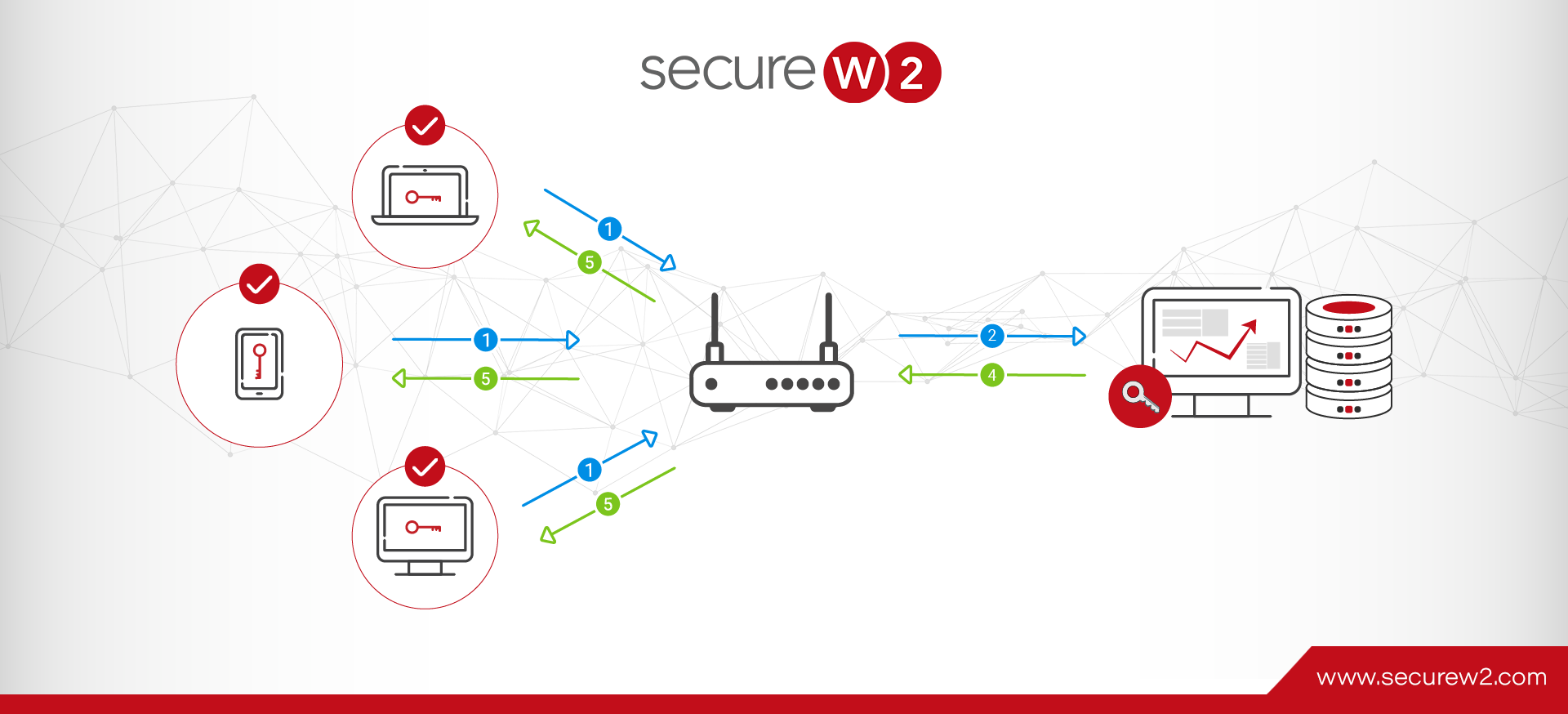
In credential-based authentication protocols, the Wi-Fi access point (also known as a network access server) transmits user credentials to the RADIUS server (generally encrypted via a protected tunnel). The RADIUS server verifies the credentials against the directory before granting access. The directory is usually an identity provider (IdP), such as Entra ID, Active Directory, Google, or Okta.
Here are the steps for credential-based RADIUS authentication:
- Supplicant sends access request to NAS: The end user or device submits an access request message to the NAS containing their username and encrypted password.
- NAS forwards access request to RADIUS server: The NAS transmits that authentication request to the RADIUS server.
- RADIUS server assesses and responds: The server reads the shared secret, checks the database, and returns one of three possible authentication messages — an ACCESS ACCEPT message to authenticate, an ACCESS CHALLENGE packet to ask for more details, or an ACCESS REJECT packet if it can’t verify the credentials.
- (If ACCESS ACCEPT) RADIUS server grants user access: Client receives an ACCESS ACCEPT response with the shared secret and Filter ID attribute, which grants specific permissions based on role, department, or authority level.
Certificate-Based Authentication
With certificate-based authentication using EAP-TLS, the process is a little different. The device starts by verifying the authenticity of the RADIUS server’s certificate. This prevents the user from authenticating and connecting to the wrong network, which is common in evil twin AP attacks. Next, the device sends its certificate to the RADIUS server, which checks whether the certificate has expired.
Here are the steps for certificate-based RADIUS authentication:
- Device sends access request with certificate to NAS: Client sends its certificate to the NAS to request network access.
- NAS sends access request to RADIUS server: The NAS pushes the request to the RADIUS server.
- RADIUS server reviews certificate: The RADIUS server checks expiration conditions and a certificate revocation list (CRL) to determine if the certificate is expired or revoked — if so, the access request will be denied.
(If valid) RADIUS server grants user access: If authorized, the RADIUS server confirms and grants access with customized permissions based on live policies.
With the SecureW2 JoinNow Cloud RADIUS platform, there’s an extra step:
Cloud RADIUS integrates with all major cloud identity providers. During authentication, it can communicate directly with IdPs such as Azure AD (Entra ID), Okta, Google, or OneLogin to verify a user’s existence once their certificate’s validity is confirmed.
This ensures that the system applies the most up-to-date access policies. Even if you haven’t revoked the certificate yet, the user will be denied access if they’re deactivated in your IdP.
Credentials aren’t sent over the air at any point during this process, protecting them from exposure.
See passwordless RADIUS authentication in action. |
Explore how the SecureW2 JoinNow Platform combines Cloud RADIUS and Dynamic PKI to authenticate users and devices without passwords — with a self-guided product tour, no sales call required. |
What Are Some Common Use Cases for RADIUS Wi-Fi Authentication?
Organizations in virtually every industry need to authenticate users and devices, determine authorization levels for each logged-in user, and track devices from a central location. RADIUS Wi-Fi authentication delivers all these capabilities. That’s why organizations across a wide range of environments use this technology.
Enterprise and Corporate Networks
Organizations often use RADIUS Wi-Fi security to support their BYOD programs. Rather than issuing pre-shared keys (PSKs) that leave networks vulnerable to attacks and mismanagement, companies deploy a RADIUS server for Wi-Fi to let employees connect their personal devices by using their directory credentials. Once users are on the network, VLAN segmentation capabilities within RADIUS can keep employees and contractors on separate network segments.
Healthcare Organizations
The Health Insurance Portability and Accountability Act (HIPAA) has serious implications for Wi-Fi security at healthcare organizations. Many organizations rely on WPA2-Enterprise with 802.1X authentication to help them protect patient data from unauthorized access. RADIUS accounting logs provide a detailed audit trail of the specific network resources each device accesses, which is essential supporting information for passing a HIPAA audit.
Higher Education
Many higher education organizations use RADIUS to help them authenticate thousands of users at once. The Eduroam service, which lets traveling students, faculty, researchers, and staff access the internet securely at participating campuses in 100 countries, uses 802.1X authentication and a linked hierarchy of RADIUS servers to verify users through credentials provided by their home institutions.
Multi-Site Enterprises
Companies with multiple facilities can use RADIUS to manage authentication policies centrally. Working from a single RADIUS infrastructure, rather than on separate configurations in each office, IT teams can perform tasks such as revoking a departing employee’s network access or authenticating guest users on the network.
The Security Risks of Credential-Based Wi-Fi Authentication
While using credentials for Wi-Fi authentication is typically one of the simplest routes, it’s far from the most secure. Organizations tying their Wi-Fi to passwords expose their networks to many risks, including:
- Vulnerability to over-the-air attacks:Man-in-the-middle attacks, evil twin AP attacks, and other over-the-air attacks trick end users into sending their credentials to the wrong place. Malicious actors can then use these credentials to gain unauthorized access to your network.
- Password mismanagement:Remembering passwords is a hassle, so users often reuse them or use simple, insecure passwords that are easy to guess. Shared network passwords, such as pre-shared keys, can easily be shared outside your organization.
- Poor end-user experience: Juggling dozens of passwords is frustrating, and it becomes exponentially harder when organizations implement policies such as frequent password updates and specific password complexity requirements.
- Increased IT workload:When end users forget their passwords, they need to contact your support team to regain network access. Besides being annoying for end users, who experience a drop in productivity while they wait, this is time-consuming for your IT department.
Benefits of Certificate-Based Authentication & RADIUS Servers for Wi-Fi
The alternative to password-based authentication is certificates. Using certificates for user authentication provides a range of benefits, especially when combined with the security of a RADIUS server:
Improved Security Based on Cryptography
Certificates use robust asymmetric encryption to prevent the open transmission of sensitive data over the air. Each certificate consists of a private key and a public key, which are mathematically linked to one another.

Because the system is no longer sending credentials to your wireless access points, many attacks are prevented. Even if the attackers intercept a certificate, they cannot use or transfer it, since the private key is never sent over the air.
Enhanced Ability to Enforce Granular Network Access Control (NAC) Policies
You can use a PKI along with a RADIUS server to leverage information from your infrastructure, including your directory services or mobile device management (MDM) platforms. Certificate templates contain information from sources such as your identity provider and MDM, and you can apply that to your network access policies.
For example, you can segment your HR employees from your DevOps employees who may need more bandwidth.
Easier End-User Login Experience
Passwordless authentication offers a better experience for your end users while enhancing security. It saves users time since they won’t have to spend time re-entering or remembering complex passwords. Certificates allow end users to connect automatically, with a quicker authentication process.
Ability to Integrate With Your Existing Network Infrastructure
Both RADIUS and PKI can integrate with your network infrastructure, including IdPs such as Microsoft Active Directory, Azure AD (Entra ID), Google, and Okta. SecureW2 Cloud RADIUS integrates seamlessly with your identity provider through the Identity Lookup process, which verifies a user’s status in real time during each authentication.
How to Set Up a RADIUS Server for Wi-Fi
Although details may vary from platform to platform, the general steps for setting up a RADIUS server for your Wi-Fi network include the following:
- Select and install RADIUS server software. You can implement a traditional RADIUS server on-premises, such as with a Windows server, or use a cloud-based RADIUS service.
- Register each wireless access point as a RADIUS client. Your access points will then act as intermediaries between end-user devices and your RADIUS server.
- Select an EAP method. Choose between EAP-TLS, PEAP-MSCHAPv2, and EAP-TTLS/PAP.
- Define your network access policies. Configure policies that give authenticated user groups appropriate levels of network access.
- Configure each access point for WPA2/WPA3-Enterprise. You’ll also need to direct each access point to your RADIUS server’s IP address.
- Enable RADIUS accounting and test your connections. RADIUS accounting will log all your session data, giving you valuable insights for troubleshooting and compliance reporting.
Learn more about setup for Windows RADIUS Servers and Cloud-Based RADIUS Servers.
How to Avoid RADIUS Wi-Fi Implementation Challenges
Although RADIUS technology has proven its reliability over the years, some IT teams do run into problems during implementation. Use these strategies to maximize your chances of a successful go-live:
Configure All Certificates Carefully
Wi-Fi RADIUS authentication often fails because a client device doesn’t trust the certificate authority (CA) that issued the RADIUS server’s certificate.
Be sure to distribute this root CA certificate to all client devices before you attempt certificate-based authentication. Also, make sure you renew all your RADIUS server certificates before they expire — otherwise, you’ll experience sudden authentication failures across your network.
A single expired RADIUS server certificate will trigger sudden authentication failures across your entire network. Track certificate expiration dates and renew well ahead of time.
Set Up More Than One RADIUS Server for Wi-Fi
If your single RADIUS server goes down, all wireless users will lose network access. Consider establishing RADIUS redundancy, in which another RADIUS server takes over when the primary server fails or is overloaded. Having more than one RADIUS server helps you avoid the security risks that come with downtime.
Make Sure Firewalls Aren’t Blocking RADIUS Traffic
RADIUS authentication and RADIUS accounting use UDP ports 1812 and 1813, respectively. These ports must be open on any firewall between your access points and your RADIUS server. Otherwise, a firewall that separates your subnets will simply drop RADIUS packets.
Verify That NTP Is Working
Verify that Network Time Protocol (NTP) is working correctly on your RADIUS servers and on all client devices. NTP helps synchronize the clocks on all devices on your network. If a device’s clock is off by more than a few minutes, it may determine that the current time doesn’t fall within the validity period of the RADIUS server’s certificate. This discrepancy will prevent authentication.
Check for Shared Secret Consistency
If the shared secret isn’t identical on the RADIUS server and on the access point, all authentication attempts through that access point will fail. One way to ensure consistency while reducing security risk is to generate shared secrets at random and store them in a secrets manager.
Why Choose Cloud-Based RADIUS Over On-Premises Deployment?
Cloud-based RADIUS lets organizations get the benefits of RADIUS authentication without the infrastructure overhead. With a cloud RADIUS solution:
- A provider handles infrastructure provisioning, OS patching, high availability, and failover as a service.
- The organization keeps control over authentication policies and connects its own access points.
- Multi-site organizations enforce policies consistently across locations.
- Policy changes deploy to all locations immediately.
That overhead is real. For decades, on-premises RADIUS — Windows NPS, Cisco ISE — has required organizations to:
- Provide and patch a dedicated operating system
- Deploy a RADIUS server and identity infrastructure in every office needing low-latency authentication
- Maintain the RADIUS software
- Build and operate a high-availability architecture
- Staff an in-house team to troubleshoot authentication failures on short notice
- Purchase and configure additional hardware to scale
Cloud-based RADIUS depends on internet connectivity to work, and it may not be an option for organizations legally required to handle all data on premises. But for many organizations, especially those that already use cloud-based identity providers, it’s an appealing option.
SecureW2 Makes RADIUS Server & PKI Security for Wi-Fi Accessible & Simple
While RADIUS server configuration and setup isn’t usually intimidating for organizations, implementing a PKI can be. We often hear administrators say the more they’re involved with a PKI, the less they want to manage it.
Fortunately, with the right platform, deploying a PKI and RADIUS doesn’t need to be challenging. The SecureW2 JoinNow Platform is a passwordless authentication suite that provides organizations with everything they need to deploy passwordless security for their wireless networks.
Our suite includes Cloud RADIUS and Dynamic PKI. We designed both solutions with vendor neutrality in mind, integrating with a wide range of vendors. With the JoinNow Platform, you can manage and automate the entire certificate lifecycle and create granular network policies — all from one location.
See for yourself how RADIUS and Wi-Fi security looks in action. Contact our expert solutions engineers today to schedule a demo.
RADIUS Wi-Fi Authentication FAQs
What is RADIUS used for in Wi-Fi security?
RADIUS is used to centrally authenticate and authorize users and devices connecting to a Wi-Fi network. Instead of relying on a shared password, a RADIUS server verifies identities using credentials or digital certificates before granting access. This helps organizations improve security, enforce access policies, and monitor network activity.
Are RADIUS servers still used?
Yes, RADIUS servers are still used today. When paired with an advanced certificate-based authentication method, such as EAP-TLS, RADIUS adds an additional layer of security to today’s enterprise networks. From wired and Wi-Fi connections to VPNs, RADIUS remains a modern standard due to its central and simplified management, AAA framework, and scalable options for cloud platforms and managed service providers.
Is RADIUS safe over the internet?
Yes, RADIUS is very safe for internet connections. More than a site-specific security measure such as HyperText Transfer Protocol Secure (HTTPS), RADIUS is a secure network protocol designed to keep users, devices, networks, and organizations safe. When you pair RADIUS with a secure, encrypted authentication protocol, such as EAP-TLS, you make it easier for authorized users to gain access to select resources based on specific policies. Similarly, comprehensive authentication, authorization, and accounting functions make it easier to prevent, detect, and terminate unauthorized network access with RADIUS.
Is RADIUS more secure than WPA2-PSK?
Yes, RADIUS authentication is generally more secure than WPA2-PSK because it uses unique credentials for each user or device instead of a shared password. Shared passwords can be leaked or reused, while RADIUS supports stronger authentication methods like EAP-TLS certificate-based authentication that help prevent credential theft and unauthorized access.
Can RADIUS prevent unauthorized Wi-Fi access?
RADIUS helps prevent unauthorized access by verifying the identity of users and devices before allowing them onto the network. Organizations can also apply policies based on user roles, device types, or compliance status to restrict access further.
Why do enterprises use EAP-TLS with RADIUS?
Enterprises often use EAP-TLS with RADIUS because it provides certificate-based authentication without relying on passwords. This significantly reduces the risk of credential theft, phishing attacks, and password reuse while improving the overall security of enterprise Wi-Fi networks.
Can RADIUS authenticate devices without users?
Yes. RADIUS can authenticate non-user devices such as printers, IoT devices, and shared workstations using certificates, MAC authentication bypass (MAB), or other machine-based authentication methods.