Best RADIUS Server for Enterprise Networks
RADIUS servers, also known as AAA (Authentication, Authorization, and Accounting) servers, are a staple in Wi-Fi, wired, and VPN security. They offer much-needed security to networks by authenticating each connection, providing varying levels of authorization for users, and keeping logs that detail every connection attempt.
These are extremely beneficial functions for enterprise-sized organizations, which have large networks to defend. But without prior experience, setting up a RADIUS server on your own is challenging, and finding a suitable RADIUS service can be overwhelming. To streamline your decision, we’ve done the work for you and gathered this list of the best kinds of RADIUS servers for enterprise organizations.
What Is a RADIUS Server?
A Remote Authentication Dial-In User Service (RADIUS) server is a secure authentication and accounting server that works with Network Access Servers (NAS) such as switches, APs, or VPN gateways. When a RADIUS server receives an access request message, it compares the credentials or digital certificate provided with a directory of authorized usernames, passwords, and/or certificates. If the credentials or certificate match an entry in the directory, the server authorizes access and automatically logs user/device activity for the duration of the session.
Some folks refer to a RADIUS server as an AAA server, which stands for Authentication, Authorization, and Accounting. These are the processes the server uses to verify users (authenticate), grant access to networks (authorize), and monitor and record network use by each user and device (account for/log).
What Does a RADIUS Server Do?
A RADIUS server delivers centralized authentication, authorization, and accounting (AAA) for network administration and security. To understand what that means, let’s use a relatable simile.
A RADIUS server is like a bouncer at a club.
The bouncer:
- Checks ID at the door (authentication)
- Lets you into the club according to your entry status — VIP, general admission, or not allowed due to an invalid ticket (authorization)
- Keeps track of patron activities inside the club (accounting)
- Removes anyone who’s causing trouble (monitoring, revocation)
Much like a bouncer, a RADIUS server:
- Checks user credentials or digital certificates against a directory or user database (authentication)
- Grants your approved level of network access via role-based access controls (authorization)
- Logs your credentials, IP address, session duration, data usage, and activities on the network (accounting)
- Revokes access with suspicious or unauthorized activity (monitoring, revocation)
Learn more about RADIUS servers.
Are RADIUS Servers Still Used?
Many enterprises and smaller organizations use RADIUS servers today. While the RADIUS protocol dates back to the 1990s, it’s still highly relevant and secure thanks to significant advances in cybersecurity.
Used for credential-based authentication and certificate-based authentication alike, RADIUS solutions provide robust verification, password encryption, continuous trust validation, and customizable configurations at scale. RADIUS protects password attributes using shared-secret-based MD5 obfuscation, but does not encrypt the entire packet unless combined with TLS (RadSec). Businesses with a complex network of local and remote access devices trust RADIUS for reliable network security.
4 Key Features of RADIUS Authentication Software
RADIUS servers and software come with many benefits, making them a great choice for network security at any level.
- Centralized Authentication, Authorization, and Accounting (AAA): Other network access protocols separate AAA functions, but RADIUS solutions bundle them together. This simplifies network management by allowing administrators to adjust user- and device-specific access controls from one centralized, user-friendly interface.
- Certificate-Based Authentication Options: Even with RADIUS password encryption, bad actors can intercept, hack, or guess passwords. Digital certificates offer enhanced security for your network.
- Simple Integration: Firewalls, wireless access points, switches, VPNs — whatever network tools and devices your organization manages, RADIUS servers can integrate with them.
- Zero Trust (ZT): The key principle of zero trust is “never trust, always verify” — and RADIUS solutions abide by this principle. When admins revoke user or device access, the affected user or device loses access almost immediately, preventing serious data breaches or misuse of network resources.
Why Should Enterprises Use RADIUS Security for Networking?
The cybersecurity landscape is constantly shifting as new threats emerge. As the size of your network increases, so does the number of vulnerabilities and potential entry points.
There are tons of cyberattacks that enterprise networks reliant on PSKs (pre-shared keys) are vulnerable to, such as:
- OTA & MITM attacks
- Brute force and dictionary attacks
- Phishing attacks
One of the greatest threats, however, is the human element. With over 60% of Americans reporting that they reuse their passwords, even the most stringent password requirements are no guarantee that your Wi-Fi and VPN are safe.
Enterprise RADIUS servers can help you tighten your Wi-Fi and VPN security by ensuring that everyone has their own set of credentials for access rather than sharing one set. Of course, when you use digital certificates, the benefit of a RADIUS server is only heightened because the vulnerability inherent to passwords is removed entirely.
Are RADIUS Servers Secure?
Yes, RADIUS is one of the most secure network access protocols for modern businesses. With a shared secret between RADIUS clients and servers, password encryption and passwordless certificate authentication options, and real-time user and device verification through a centralized database, RADIUS employs an array of defenses against cyber threats.
As with any cybersecurity measure, administrators should remain aware of potential vulnerabilities, including:
- Complex Infrastructure: RADIUS servers offer robust customization and configuration options, but that adds complexity for implementation and maintenance.
- Security Vulnerabilities: Without regular administrative measures, including network monitoring, regular updates, and revocation of expired certificates, RADIUS servers can still expose your network.
- Connectionless Protocol Concerns: RADIUS uses a connectionless Transport Layer Protocol (TLP) called User Datagram Protocol (UDP). UDP is fast but may be less reliable and consistent than connection-based protocols such as Transmission Control Protocol (TCP). You can improve reliability and security by pairing RADIUS servers with passwordless Extensible Authentication Protocol-Transport Layer Security (EAP-TLS).
On-Premise vs. Cloud RADIUS Security
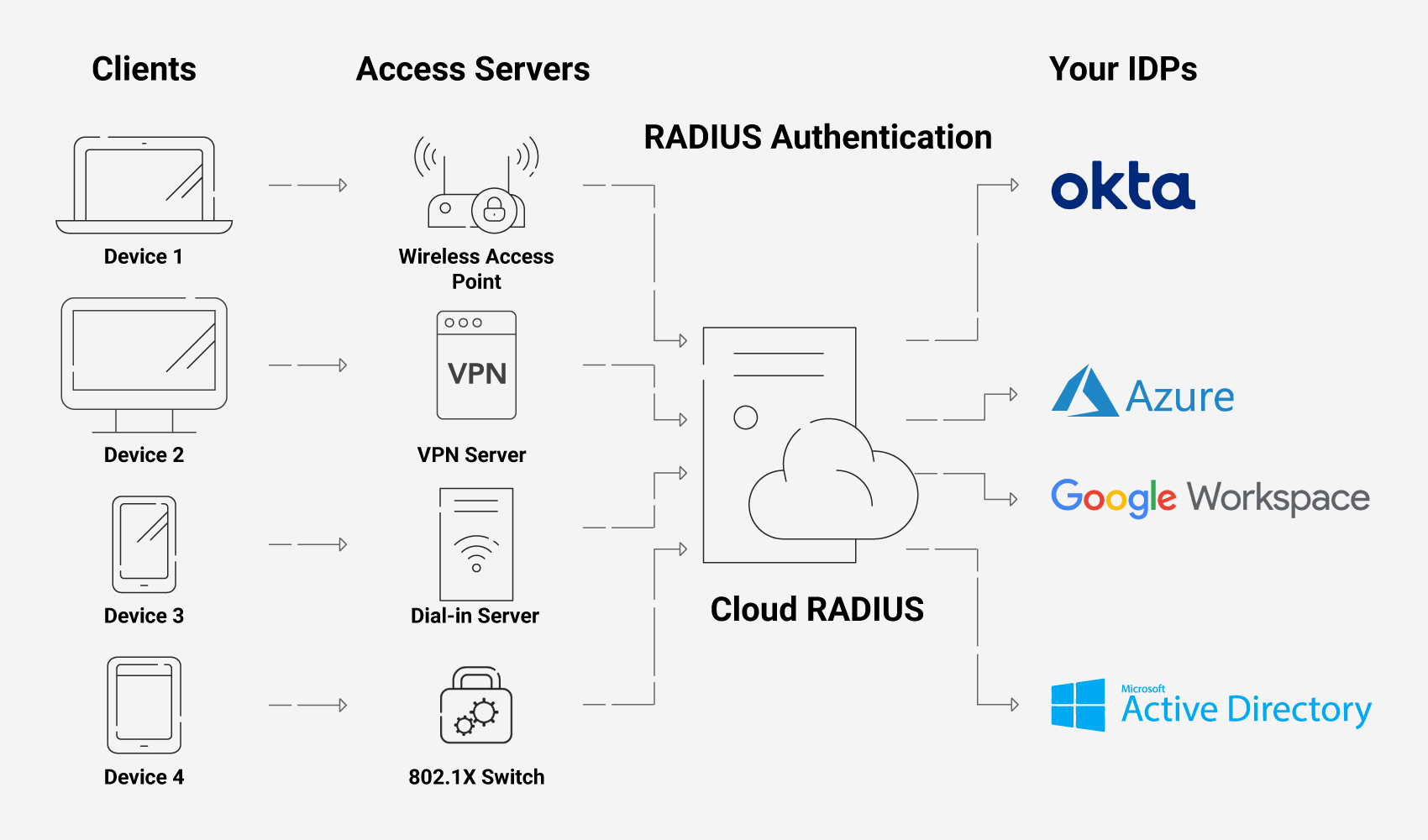
In the past, RADIUS servers have been built physically in-office in on-premise setups. Today, some RADIUS servers are still occasionally established on-premise, but typically only when there are stringent compliance or audit requirements for data security. Some find it more secure when they have complete control over the construction of their RADIUS.
There are many drawbacks, however, including a high cost when you have to replicate these physical servers at every location and a lengthy deployment time. Alternatively, cloud-based RADIUS servers are much more scalable, since you don’t need to duplicate their infrastructure across every single office location your enterprise has. Managed services like Cloud RADIUS can also be deployed extremely quickly due to the support of experienced engineers.
How Do I Choose the Best RADIUS Solution for My Business?
There are numerous cloud RADIUS services available to enterprises today. This makes choosing one confusing and overwhelming for an already-busy network administrator. As you consider your options, keep these RADIUS server requirements in mind:
- Scope
- Environment
- Internal Time Commitment and Expertise
- Regulatory Compliance Requirements
- Integration and Ease of Deployment
- Compatible Authentication Methods and Security Features
- Support and Documentation
- Regular Updates
- Budget
- Scalability
Scope
How many users and devices do you manage? What access controls do you require? Do you need network authentication for wired, wireless, or VPN connections — or all of the above? How important is accounting support?
Get a clear picture of the scope of your RADIUS needs before comparing solutions.
Environment
Do you have the resources necessary to manage on-prem infrastructure, or do you prefer a cloud-based RADIUS solution? There’s no single right answer — it depends on your business, facilities, staff, and budget.
Internal Time Commitment and Expertise
Do you want a managed service provider to set up, implement, onboard, and maintain your server? If not, you’ll need to handle implementation and management in-house, which requires niche expertise and internal resources.
Regulatory Compliance Requirements
For managed solutions, not all RADIUS providers offer the same built-in compliance. Identify your needs and compare solutions.
Integration and Ease of Deployment
Ideally, any enterprise RADIUS server you use should be able to integrate with your existing infrastructural components. Having to make any huge changes or forklift upgrades to your infrastructure will just draw out the length of deployment — leaving your network vulnerable for an even longer amount of time.
Look for information about which Identity Providers and Wi-Fi vendors the RADIUS is known to integrate with. Make sure that the list includes your infrastructure vendors.
Compatible Authentication Methods and Security Features
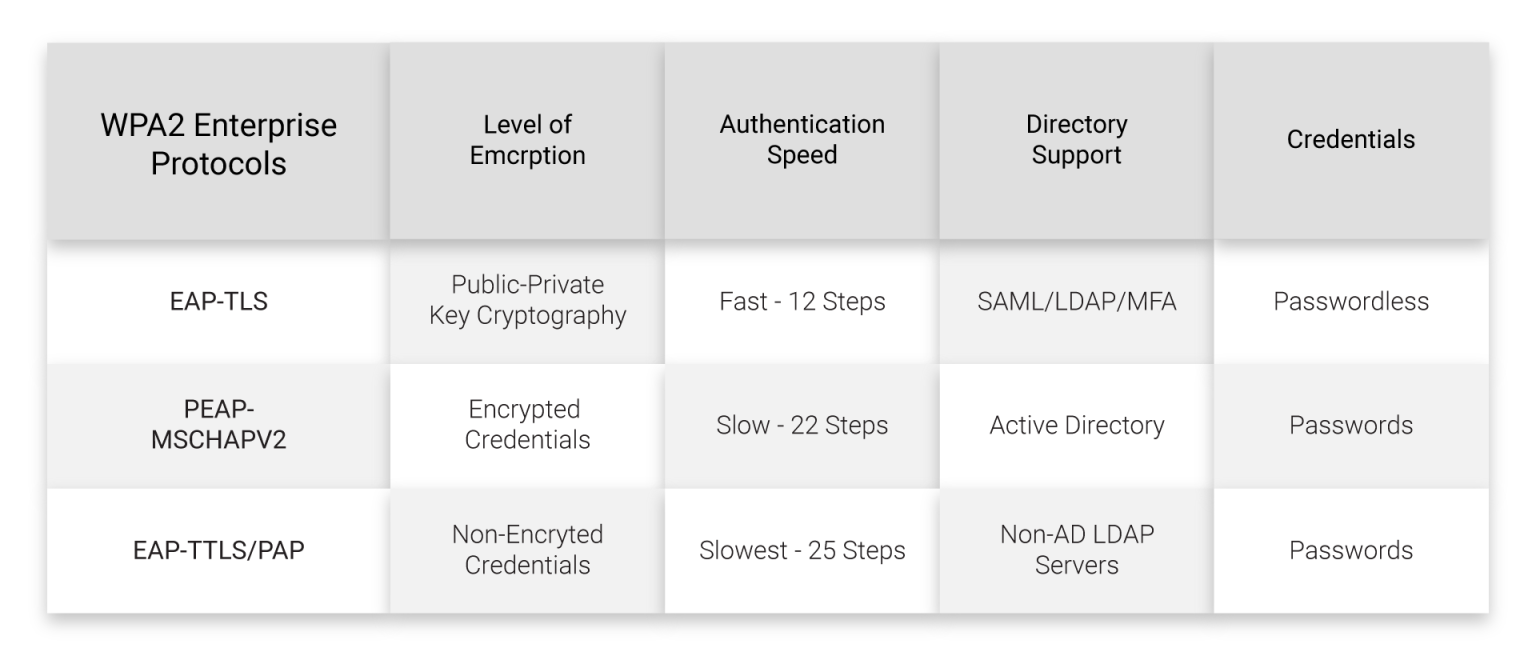
Another thing to consider is what type of authentication you want to use along with your RADIUS. It’s common to use credentials still, which most RADIUS servers will support.
However, digital certificates are a significantly more secure option, and they don’t need to be difficult to deploy with a good managed PKI service. If you’re interested in going this route, you will need to ensure your RADIUS server is compatible with digital certificates.
You’ll also want to think about the authentication protocols supported by each RADIUS service’s infrastructure. This is often related to whether you’ll be using certificates or passwords, but it is still a nuance worth contemplating. We recommend EAP-TLS given its speed and its common use with digital certificates. However, not all RADIUS services are guaranteed to support it in their standard service, and may support protocols like PEAP-MSCHAPv2, which encrypt credentials.
Don’t forget to evaluate directory support. For example, if you use Active Directory, EAP-TTLS/PAP doesn’t support it.
Finally, if you want other security features such as multi-factor authentication (MFA), make sure they’re compatible with your RADIUS solution.
Support and Documentation
RADIUS servers require expertise to set up and maintain on a day-to-day basis. Having detailed supporting documentation will give you the resources you need to reference in the future if any issues arise.
The addition of a support team is even better. Who better to help you quickly resolve issues than the people who built the RADIUS and work with it every day? Not all RADIUS services offer the same amount of support, though, so this is something to keep in mind while you look at your options.
Regular Updates
Any security-conscious professional knows that your security measures need to change in time to keep up with emerging threats. Similarly, any RADIUS service you utilize should also evolve to keep up with the times.
Vigilant RADIUS services often develop and release new features. Examples of a couple of recent additions to some services include features like RadSec or Change of Authorization.
Budget
What are you willing to invest in the right RADIUS authentication software? In addition to basic implementation and recurring costs, consider the return on investment (ROI) of each solution: the potential time and cost savings relative to the features offered.
Scalability
Most RADIUS solutions are inherently flexible and scalable, but it’s a critical detail to verify.
What’s your business growth plan over the next three, five, or 10 years? While the best RADIUS solution for you should accommodate your current business needs, it must also grow along with you.
Best RADIUS Servers for Enterprise
Cloud Infrastructure
Passwordless
Cloud RADIUS is a managed RADIUS service that was specifically designed from the ground up for secure, passwordless authentication with digital certificates. It pairs with the SecureW2 managed PKI and easy onboarding and deployment tools, such as our dissolvable onboarding client and managed device gateways.
On its own, it’s known for its vendor-neutrality and ability to fit into any infrastructure seamlessly. With its supporting team of engineers, it can be deployed in under an hour.
What’s more, Cloud RADIUS empowers organizations to move past legacy protocols like LDAP. Since it can communicate directly with your Identity Provider at the time of authentication, you don’t need a duplicate LDAP directory server. Without ties to legacy protocols, Cloud RADIUS makes it simple for enterprises to move to the cloud for all their authentication needs.
Password & LDAP-Based
There are many cloud RADIUS servers available that utilize LDAP today. Many of them have attractive features, such as free trials of varying lengths that allow your administrators to get a feel for how they work prior to deploying them on a larger scale.
Some have additional perks, too, such as multi-tenant portals for MSPS or the ability to integrate with major IDPs. Common drawbacks for these types of RADIUS servers, however, are their reliance on cloud LDAP servers, rather than communicating directly with your IDP. Unfortunately, there are plenty of reasons for organizations to steer away from LDAP these days.
Additionally, many of these services aren’t designed for passwordless authentication by default. The main authentication protocol they tend to support is EAP-TTLS/PAP. This doesn’t mean that you can’t go passwordless with such services at all, but some require you to purchase an add-on to do so with EAP-TLS.
Which Is Better: RADIUS or LDAP?
RADIUS helps regulate network access across wired, Wi-Fi, and VPN connections. On-premise or cloud-based, it can authenticate, authorize, and provide accounting support (AAA) via passwordless certificate-based authentication or user credentials. RADIUS runs on User Datagram Protocol (UDP), which is efficient, but doesn’t require a confirmed connection to transmit data packets.
Lightweight Directory Access Protocol (LDAP) is an authentication protocol like RADIUS. It’s typically on-premise only without cloud options, and while it can authenticate and authorize users, it doesn’t have accounting support. LDAP runs on Transport Layer Security (TLS). It doesn’t secure credentials to the same degree as RADIUS, and it doesn’t support passwordless (certificate-based) authentication.
If you’re deciding between LDAP vs. RADIUS, RADIUS is a more flexible, robust, and secure option.
Open Source
In terms of monetary expenditure, open-source RADIUS servers are a noteworthy option. Since they are open-source, they are generally readily available, and you don’t have to pay licensing fees.
But like many other “free” things, open-source RADIUS servers are an entirely unmanaged service. You will need to configure it and deploy it yourself within your organization. Furthermore, it may not automatically include any access to a support team, although some open-source RADIUS servers may offer additional support for a variable price.
Legacy and On-Premise
For some organizations, on-premise RADIUS servers are the RADIUS servers of choice. This could be the case, for example, if you’ve already set up the necessary infrastructure for one in the past or you only have one office location to worry about.
In many other situations, however, cloud-based RADIUS services are a far superior choice. They don’t require replication across multiple locations, they’re generally simple to deploy, and you don’t have to invest in physical security measures to protect them from local weather conditions or threats.
Deploy Enterprise-Grade RADIUS Security Easily With Cloud RADIUS
A cloud-based RADIUS solution is the answer to many of your network security’s greatest challenges. It allows all of your locations to authenticate to the same RADIUS at once, it’s scalable, and you don’t have to worry about duplicating costly on-premise infrastructure and staff.
Cloud RADIUS offers you all the aforementioned benefits plus so much more. Since it’s vendor-neutral, it can integrate with your current infrastructure. It was designed for passwordless authentication with digital certificates, removing the vulnerability that passwords create in your network. Cloud RADIUS includes robust features such as Identity Lookup, which communicates directly with your IDP in real time to apply the most up-to-date policies during authentication.
Plus, we pride ourselves on our highly knowledgeable team. On top of updating our RADIUS with cutting-edge features like RadSec and Change of Authorization, we offer rapid support from our expert engineers. Sign up for a free demo today to see Cloud RADIUS in action.